Erado San can explain virtual cache far better than I can.
EradSan's Tech Dojo
(http://members.tripod.lycos.nl/Erado/Home/)
Basically setting a reasonable minimum and maximum virtual cache
can minimise unneccessary disk activity,
and prevent the cache from eating all your memory.
Erado reasons the maximum should be no more than 1/4 of your total memory,
With 16Mb the upper limit no matter how much memory you have.
The minimum should be half or equal to the maximum.
Click the Start Button
Select Run,
Type "sysedit", and hit OK
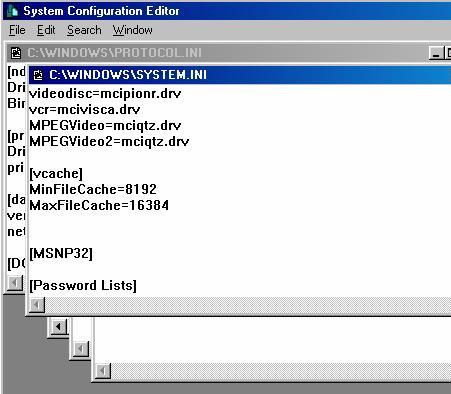
Select the System.ini window
Scroll down to
[VCACHE]
MinFileCache=8192
MaxFileCache=16384
Enter the text shown above,
The *.ini files are case sensitive,
Choose how much ram to reserve for Virtual Cache,
4 Mb = 4096
8 Mb = 8192
16 Mb = 16384
Reboot your PC and check all is well.
5 - Display Properties Loader
Performance Index