System
Specification (Use Case View II)
(back)
 (Home)
 (next)
|
Carpark Security System (Sensor Integrated system and Member) |
||||||||
|
|
||||||||
| The sequence diagram for each use cases are also available. |
||||||||
| Pre-condition
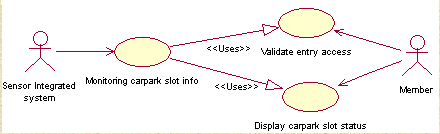
The member to park their car into the carpark has to be registered using his authorized card number that is issued upon registration. The entry of member will be validated initially prior to entry. In addition, The carpark should has at least one empty slots for the next vehicle to park upon entry. |
||||||||
| Main Flow
Upon successful entry, there will be a display of the carpark status (S-1). The sensor integrated system will have to monitor the carpark slots (S-2) the car has parked in. This will be a continuous process for every entry of a vehicle as well as its departure. |
||||||||
| Sub Flow
S-1: Display carpark slot status - The system will display the current status of the carpark . The information shows are the total available slots at each level of the carpark. S-2: Monitor carpark slot info - Upon entry into the carpark, the sensor at each slots will signal back to the sensor system. It will in turn then transfer the data to the carpark system. The system will then check for the raw data received and update it into the parking_lots and carpark tables.
|
||||||||
|
||||||||
|
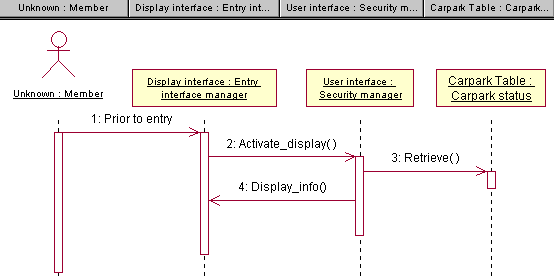
Before the entry of the member into the carpark, the system will always has the display of the carpark status on the screen for his or her viewing. The slots' status are retrieved from the carpark table.
|
||||||||
|
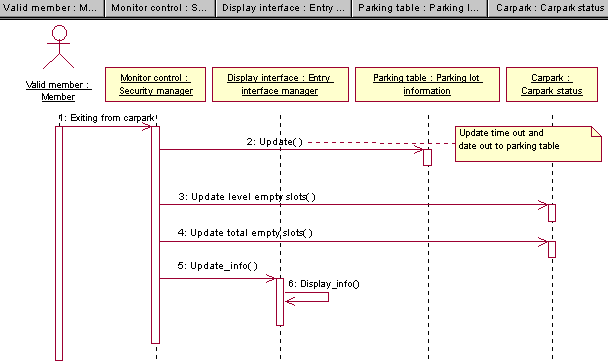
Upon exit of the member, the display will be updated to indicate the new current total empty slot numbers at each level as well as the total empty slot available. The corresponding tables will simultaneously be updated with the relevant information. There is no authentication needed for the departure from the carpark.
|
||||||||
|
Monitoring carpark slot info : Monitor sequence |
||||||||
|
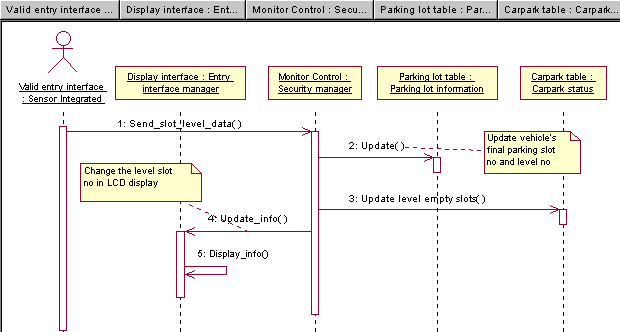
The sensor data (car parked information after entry) from the sensor Integrated system will be send to the monitor control for verification, so that the received raw data is in correct format. It will then update the respective tables and at the same time the display on the screen is also updated to the most current status standing by the display interface.
|
||||||||
|
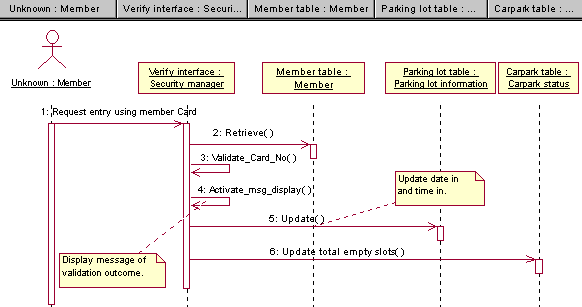
Verify entry access : Verify member identity |
||||||||
|
Prior to the member entry, his or her card number has to be verified ( same as the registered number that is stored in the member table). The result will be displayed in messages (either successful or unsuccessful).
|