System
Specification (Use Case View I) (back)
 (Home)
 (next)
|
|
The sequences diagrams for the various use cases are also available. |
| Pre condition
- The system user logs onto the system successfully when using his approved username and password. |
| Main Flow
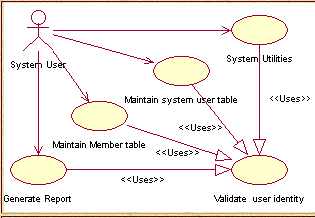
Upon entering into the carpark management system, he can choose the desired activity to be executed. If the activity selected is MAINTAIN MEMBER TABLE, the S-1: the Maintain member table subflow is performed. If the activity selected is MAINTAIN SYSTEM USER TABLE, the S-2: the Maintain system user table subflow is performed. If the activity selected is GENERATE REPORT, the S-3: the Generate report subflow is performed. If the activity selected is SYSTEM UTILITIES, the S-4: the system utilities subflow is performed. |
| Sub Flow
S-1: Maintain member table - The system user can choose to create, modify,delete member records. It can also replace the member's card but this is allowed only to authorised system user e.g. supervisor or higher ranking personnel. S-2: Maintain system user table - The only system user to access this function is the authorised user e.g. supervisor. They can select the desired activities e.g. adding or searching of system user record. The name, status, password will be entered for all new user created. Searching is done based on the userid or name entered. Editing and deleting of the found record is provided. S-3: Generate report - The user can select the report to be generated based on a specific data. For example, the report can be generated by displaying the cars that were parked in the carpark by specifying entry like date of parking or a date range (starting to ending date). It applies to the displaying of each car parking record. S-4: System Utilities - The user can select to purge all the information in the parking lot and carpark tables. In addition, it also provides the user to reset starting card number that will be given to any subsequent new members The supervisor or any highly authorized personnel will have access to these function and maintain the system's data.
|
|
|
|
Maintain member table : Modify/Delete sequence |
|
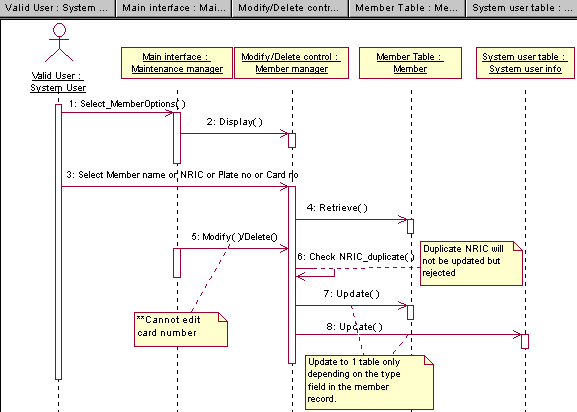
Under this maintain member table use case, a valid user will select first the member option prior to manipulate the member records. Upon selection, the user had to enter any choice of field selected. For example, the member's name or NRIC or Plate no or Card no can be used to retrieve the corresponding record. Any modifications or deletion of the current record found can be done. The changes will then be updated to the member table.
|
|
Maintain member table : Create sequence |
|
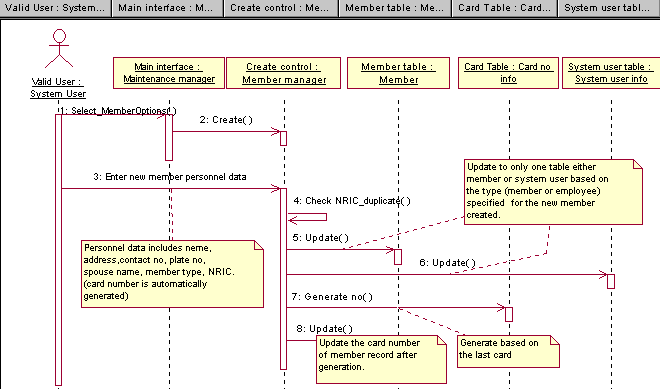
The valid user has to select the member option prior to accessing other functions, in this case, the creation of a new member. The information of the new member will be provided by the system user and automatically a new card number will be generated for it and the record and new card no will be updated to the member table. One thing to note is that the new member can be either the normal member or a system user.
|
|
Maintain member table : Replace card sequence |
|
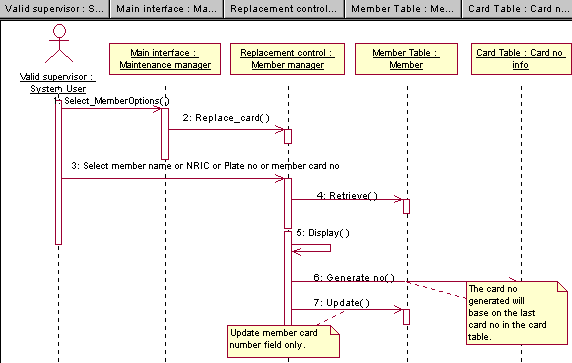
This function is only permitted for supervisor's or higher ranking personnel uses. Replacement of the card number of the desired record, based on user's entry, will be done by actually taking the next available card number in the system. Note that void card number, that is reported lost previously, can be issued during the replacement. (The reused is possible only if the supervisor has updated these number under the system utilities section).
|
|
Maintain system user table : Add new user sequence |
|
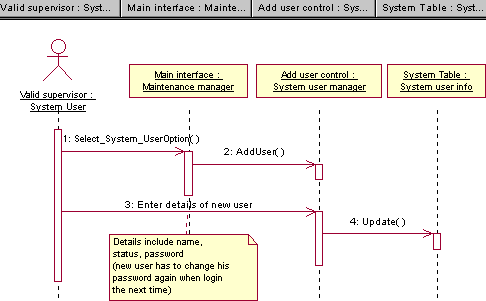
Any valid system user can add new system users to access the system. But most importantly there will not be any duplicated system user as the user id is generated automatically. The new record will be updated to the existing system user table.
|
|
Maintain system user table : Edit/delete sequence |
|
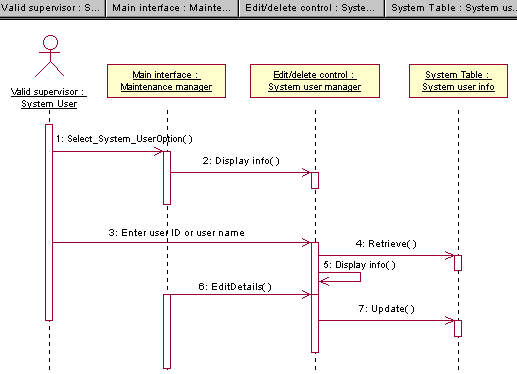
This diagram describes how a specified system user record can be retrieved by the user using his field namely the user id or user name. The changes can be made to the retrieved record and it will be update after confirmation of the new data entered. Duplicate user id is not allowed. Only supervisor has access to this function.
|
|
Generate report : Generate report sequence |
|
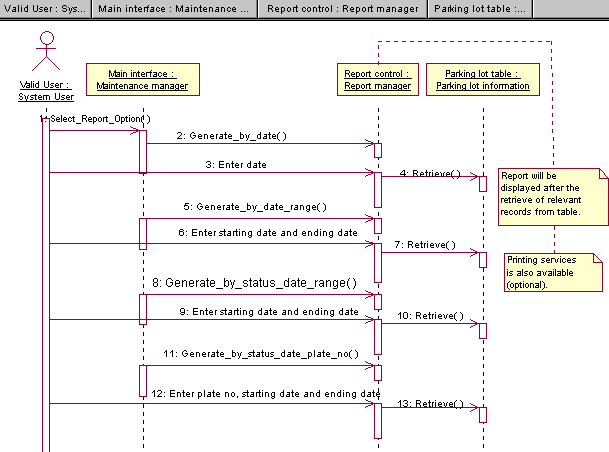
Under this section, the user can select the various option to generate a report that display the specified information. The record is retrieved upon user's confirmation and it is displayed in a form of report layout. The printing is only optional.
|
|
Validate user identity : Login sequence |
|
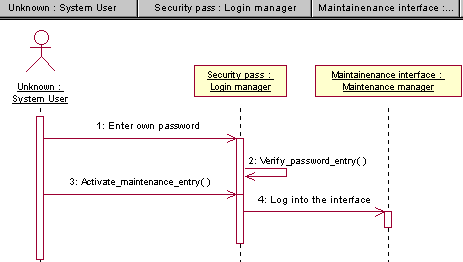
Before the access to the maintenance interface is granted to a system user, he or she has to be validated by the system to prevent intruder from meddling with the existing records. The verification of the user's password will be done prior to logging in to access the maintenance interface actions.
|
|
Validate user identity : Password change sequence |
|
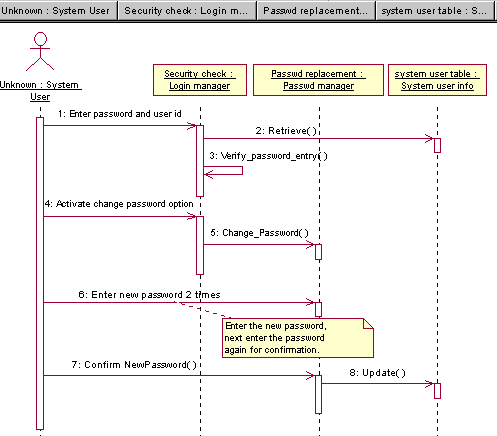
The user might only wish to change his or her password only after login in, hence they can simply change their password by selecting this option and proceed with normal login. The new password has to be entered 2 times for confirmation. After that, the changes will be updated to the system user table.
|
|
System Utilities : Purge sequence |
|
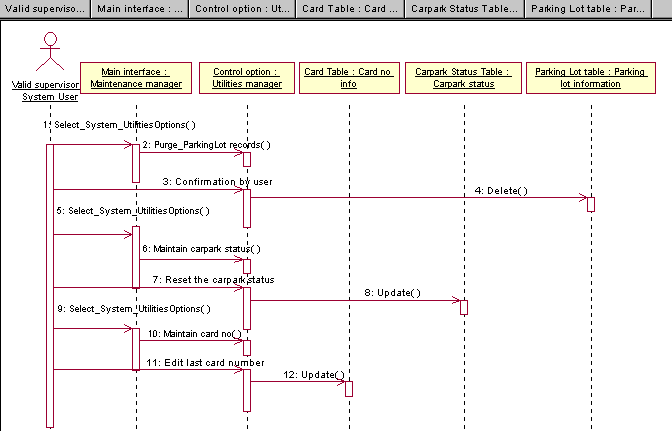
Under this section, we can select the various utilities functions to maintain the carpark and parking lots table. The maintaining of card no is also included to enable re-usage of void card number that is previously lost. Only supervisor has access to this utilities.
|