LEGO ROUTER PROJECT
Methodology - Software

SmoothWall is great! It can be a firewall for novices but has enough options for advanced requirements as well.  It can be found here.  It is about as easy to configure as the BEFSR41 but for any LINUX qualified person the installation is laughable. 

For those unfamiliar with firewall design, the term DMZ or demilitarized zone is used to describe an intermediate segment that has less protection than the private zone.  In fact you could literally have dozens of zones on a firewall with different rules.  The concept is that a less secure zone is only allowed into a more secure zone with a restricted set of rules.  The unsecured zone can get into the DMZ only for specified ports/ip ranges.  The DMZ can only access the private zone in the same manner.  The public zone should not be allowed into the private zone under any circumstances if the standard rules are followed.  This prevents the 'leet hackers from rooting your box.  The private zone can be configured (or sometimes by default is configured) to allow access from the more secure zone to the less secure zones with no restrictions.  We are trying to keep people out, not in.

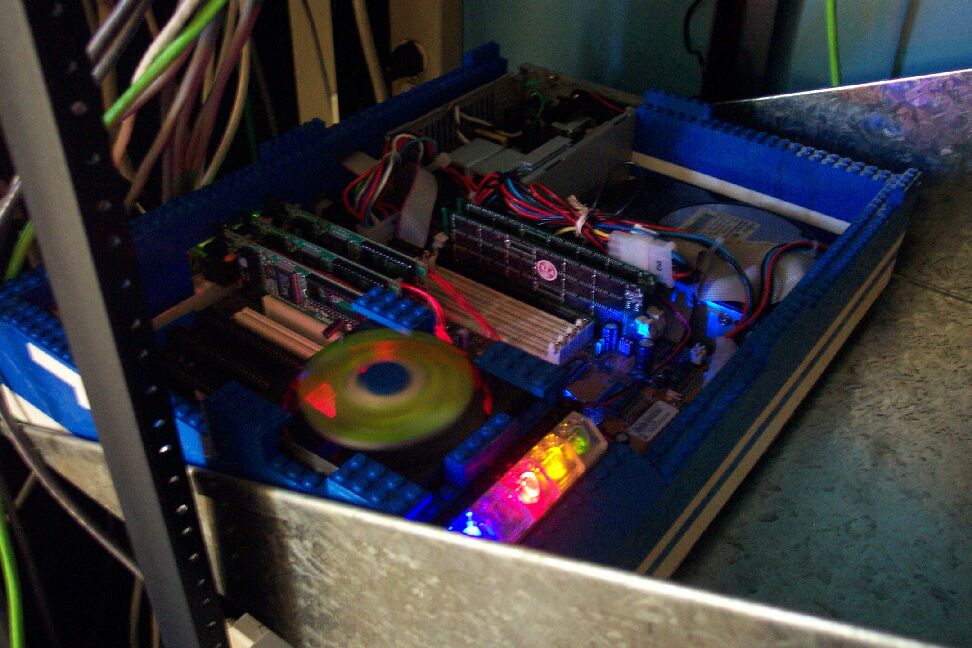
I set up three zones (simple menu pick for this install) - RED (outside), Orange (DMZ) and Green (Private).  This is specified by color in the configuration and I matched the LEDs on the panel to the zones.  

Here is my new network layout:

RED (External) ORANGE (DMZ)
GREEN (Private)
Cable Modem

Game/web server
Tenant PC
Our Workstations
File server
other machines if needed

24.0.0.0
192.168.3.0
192.168.2.0

All machines in the green zone have access out to the orange or red zones.  Access back through has to be enabled via a DMZ pinhole or by port forwarding.  Port forwarding allows a single or range of ports through to a specific host.  It is not recommended to allow a forwarded port access to the private zone.  If you have an application that requires port forwarding (generally not source IP address restricted) then I would suggest placing that service on a machine in the DMZ if possible.  A DMZ pinhole is more restrictive - in my case I've allowed a DMZ pinhole to allow my web server to mount (
read-only) an SMB share from my file server.  This type of hole is next to impossible to exploit.

The new router/firewall meant some rewiring and downtime but not too much.  The result is fantastic - a slick firewall with traffic graphs, usage reports and alarms if required.  While I cannot limit traffic to the DMZ, I can monitor usage. And the lights easily show me if anything is happening on the DMZ.  
This project took a fair amount of time, but the result was functional and looks good.  In case the 'leet hackers want a shot at cracking this baby the IP address of my router is 127.0.0.1 - fly at 'er.  I'd suggest a D.O.S. attack first.

Perhaps next time I will make the whole case out of plexiglass to avoid my kids trying to build on to the "LEGO house in the den".


Here is a shot of the system in action.

Bright pic

[email protected]


BACK


Hosted by www.Geocities.ws

1