ICPMM65dA
CREATE WEB PAGES WITH MULTIMEDIA
Describe the uses of HTML or XML on and off the Internet - XML is the Extensible Markup Language. It is designed to improve the functionality of the Web by providing more flexible and adaptable information identification.
SGML is the Standard Generalized Markup Language, the international standard for defining descriptions of the structure of different types of electronic document and is is very large, powerful, and complex.
XML is an abbreviated version of SGML, making it easier to define document types, and to make it easier for programmers to write programs to handle them. It omits all the options, and most of the more complex and less-used parts of SGML in return for the benefits of being easier to write applications for, easier to understand, and more suited to delivery and interoperability over the Web. But it is still SGML, and XML files may still be processed in the same way as any other SGML file.
XML allows the flexible development of user-defined document types. It provides a robust, non-proprietary, persistent, and verifiable file format for the storage and transmission of text and data both on and off the Web; and it removes the more complex options of SGML, making it easier to program for. HTML is already overburdened with dozens of interesting but incompatible inventions from different manufacturers, because it provides only one way of describing information.
XML removes two constraints which were holding back Web developments:
-
Dependence on a single, inflexible document type (HTML) which was being much abused for tasks it was never designed for originally.
-
The complexity of full SGML, whose syntax allows many powerful but hard-to-program options.
XML allows the flexible development of user-defined document types. It provides a robust, non-proprietary, persistent, and verifiable file format for the storage and transmission of text and data both on and off the Web; and it removes the more complex options of SGML, making it easier to program for. XML allows groups of people or organizations to create their own customized markup applications for exchanging information in their domain. For example, music, cooking, history, and engineering.
HTML is at the limit of its usefulness as a way of describing information, and while it will continue to play an important role for the content it currently represents, many new applications require a more robust and flexible infrastructure.

Principles
of design and navigation for web page viewing
The Principles
of Design utilise effective and pleasing ways to arrange text and graphics
on the page as well as the arrangement of individual elements within
the page, such as illustrations, logos, and the overall design of a
document. Good design utilizes the principles of
Balance - Visual balance comes from arranging elements on the page so that no one section is heavier than the other. A designer may intentionally throw elements out of balance to create tension or a certain mood.
Proximity - The principle of proximity refers to the relationships that items develop when they are close together. Close proximity helps the user identify items that go together.
Alignment- Brings order to chaos. How you align type and graphics on a page and in relation to each other can make your layout easier or more difficult to read, foster familiarity, or bring excitement to a stale design.
Repetition - The concept of repetition is that throughout a project certain elements are repeated that tie in all the disparate parts together. Consider repeating the following elements to polish the appearance of your site: colour, fonts, graphics and layout.
Contrast - Surrounding a block of text with a lot of white space, can actually draw the reader in, especially in a crowded layout.
White space - When text crowds all the way to the edge, it can leave the viewer feeling crowded and cramped. Long passages of text, written edge to edge can actually tire the eyes so the use of white space (which doesnt actually need to be white) can keep viewers at the site longer.
Navigation - Make sure the links are clear about where they will take the viewer. Remember to provide more than one way to navigate the pages of the site and use a visual theme.
Outline
the differences between page layout languages versus document content
description
Concepts about structuring information today stem largely from the organization
of printed books and periodicals and the library indexing and catalog
systems that developed around printed information. The "interface
standards" of books in the English-speaking world are well established
and widely agreed-upon, and detailed instructions for creating books
may be found in such guides as The Chicago Manual of Style. Every feature
of the book, from the contents page to the index, has evolved over the
centuries, and readers of early books faced some of the same organizational
problems that users of hypermedia documents confront today. Gutenberg's
Bible of 1456 is often cited as the first modern book, yet even after
the explosive growth of publishing that followed Gutenberg's invention
of printing with movable type, more than a century passed before page
numbering, indexes, tables of contents, and even title pages became
expected and necessary features of books. Web documents are undergoing
a similar evolution and standardization.
Design
precedents in print
Although networked interactive hypermedia documents pose novel challenges
to information designers, most of the guidance needed to design, create,
assemble, edit, and organize multiple forms of media does not differ
radically from current practice in print media. Most Web documents can
be made to conform to The Chicago Manual of Style conventions for editorial
style and text organization. Much of what an organization needs to know
about creating clear, comprehensive, and consistent internal publishing
standards is already available in such publishing guides as the Xerox
Publishing Standards: A Manual of Style and Design. Don't get so lost
in the novelty of Web pages that basic standards of editorial and graphic
design are tossed aside.
Source: http://www.webstyleguide.com/interface/web-conventional.html
Markup refers to the sequence of characters or other symbols that you insert at certain places in a text or word processing file to indicate how the file should look when it is printed or displayed or to describe the document's logical structure. The markup indicators are often called "tags." . Historically, markup was used to refer to the process of marking manuscript copy for typesetting with directions for use of type fonts and sizes, spacing, indentation etc.
Markup can be inserted by the document creator directly by typing the symbols in, by using an editor and selecting prepackaged markup symbols (to save keystrokes), or by using a more sophisticated editor that lets you create the document as you want it to appear (this is called a WYSIWYG editor).
Some exapmles of markup languages are:
Cascading Style Sheets - (CSS) is a style sheet mechanism that has been specifically developed to meet the needs of Web designers and users.
CSS-DOM - The CSS Document Object Model is an API (Abstract Programming Interface) for manipulating CSS (and other style languages to a certain extent) from within a program.
SAC - Simple API for CSS is a complement to the CSS-DOM. The CSS-DOM contains functions to manipulate a style sheet after it has been loaded into memory; the functions defined by SAC help in parsing a style sheet, i.e., in transferring a style sheet from a file into memory.
XSL - eXtensible Style Language. XSL builds on DSSSL and CSS and is primarily targeted for highly structured XML data which e.g. needs element reordering before presentation.
DSSSL - A document tree transformation and style language in with many adherents in the SGML community.
Dynamic HTML - A term used to describe HTML pages with dynamic content. CSS is one of three components in dynamic HTML; the other two are HTML itself and JavaScript.
HTML
or XML specifications and extension types are named
XML Documents:
.xml;.3dml;.biz;.cml;.ent;.math;.pad;.rdf;.smil;.svg;.vml;.vxml;.wml;.xdr;
Document Type Definitions: .dtd;
XML Schema Files: .xsd;
XSLT Stylesheets: .xsl;.xslt;.fo;
Cascading Stylesheets: .css;
XHTML Documents: .xhtml;
HTML Documents: .html;.htm;.shtm;.shtml;
File
types for images and other data are chosen to suit the intended viewing
environment
Image Formats
BMP The BMP format, for bitmap, is the native raster
format for Windows and OS/2. ImagePDF supports both Windows and OS/2
variants of BMP. Concerning Windows bitmaps, uncompressed, RLE-4,
RLE-8, JPEG, and PNG compressed images are supported. The OS/2 image
formats are also supported, including uncompressed, RLE-4, RLE-8,
RLE-24, Huffman, and multiple page bitmaps.
CALS CALS raster files are tiled and untiled black
and white raster files. ImagePDF can convert Type I, III (NIFF), and
IV (EDMICS/JEDMICS) CALS raster files. DCX The DCX format is a multipage
version of the PCX format. Standard DCX and PCX files are supported.
G3 CCITT, now ITU-T, Group III Facsimile files can be converted to
Group IV compressed PDF documents. Single page Group III Fax files
with Intel or Motorola byte order and with or without line endings
are supported, in coarse, fine, superfine, or other resolutions.
GIF
The GIF, for Graphics Interchange Format, is largely supported. Both
GIF87a and GIF89a images are supported. The image data is written
directly without being de- or recompressed.
JPG The JPEG File Interchange Format, or JFIF, is
supported. Grayscale, RGB, and CMYK files are supported. The default
behavior is to use the exact image data from the source file, so there
is no recompression of JPEG data.
PBM The PBM format, for portable bitmap, is an uncompressed
black and white image file, and is supported. PCX The PCX format is
a regular interchange format. Standard PCX files are supported. PGM
The PGM format, for portable graymap, is an uncompressed grayscale
image file, and is supported.
PNG The PNG image standard is supported. Generally,
the exact image data from the PNG file is transferred to the PDF file,
unless recompressed with JPEG. Most relevant image tags are retained
in the PDF file. PNG images use a compression which requires PDF 1.2
which is usable on the majority of reader software.
PPM The PPM format, for portable pixmap, is an uncompressed
color image file, and is supported.
TIFF TIFF is a broad image file format standard.
Most TIFF files are supported. Multiple page TIFF images are supported.
Both Motorola and Intel byte order files are supported. Tiled and
untiled images are supported. Compression support includes Group 3,
Group 4, Packbits, Thunderscan, and Zip. Many TIFF images that use
JPEG compression are supported. TIFF/IT and TIFF-FX support are planned.
Relevant colorimetry and other image tags are translated to the PDF
file.
Compression Types
CCITT Group 4 CCITT, now ITU-T, Group 4 compression
is a standard to compress black and white data as is largely found
in scans of documents. ImagePDF writes all black and white data using
Group 4 compression.
JPEG The Joint Photographic Experts Group or JPEG
standard is a method of compressing image data that is lossy and most
effective on continuous tone grayscale or color data. Being lossy
means that not all of the image data is reconstructed on decompression,
so minute details might be lost. This provides more effective compression.
Several image formats that use JPEG are readable by ImagePDF, and
color or grayscale image data can be written by ImagePDF, as PDF supports
JPEG. Palettized images are not written with JPEG. Some JPEG datastreams
are encoded with the progressive JPEG encoding, only newer implementations
of reader software support progressive JPEG data. LZW Lempel-Ziv-Welch
encoding is a compression format often found in GIF images and many
TIFF images.
LZW has some copyright and patent encumbrances and
is regulated by Unisys. Converting images with LZW might require a
separate license from Unisys. Deflate Deflate or Zip compression is
a variant of Lempel-Ziv that is not encumbered and outperforms LZW.
Deflate is supported in most PDF readers. ImagePDF
can write color or grayscale image data, as well as text, using Deflate
compression. Deflate compression is lossless, meaning all data is
recovered by compression.
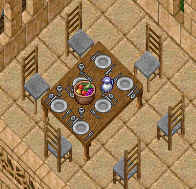
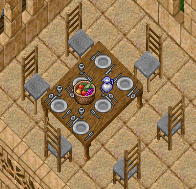
This website uses a combination of gifs, jpgs and png files. Due to the detail required on the Deco pages I elected to use gifs for the screenshots. To much detail was lost with jpgs as the example below will demonstrate.
 |
 |
jpg
image |
gif
image |
GIF file can contain the maximum of 256 colors (8 bit) or less, which is good for customizing your graphic files. For example, if you create a GIF image of a red arrow, , you can customize the file to have only two colors, read and white. This means that the file is very very small because its palette contains only two colors. GIF file will yield a higher quality and smaller size image, compared to JPEG, when it is used with computer generated graphics such as icons, logos, buttons, etc.
JPEG was built to contain 24-bit (16.7+ million colors) and was developed specifically for photographic-style images. JPEG stores the information of images by keeping track of color changes. The advantage of JPEG is that it can carry a smaller file size than GIF when used in storing photographs and images with a wide variety of shading. But, it will not yield a smaller file when dealing with low color level and details like computer generated graphics.
GIFs also has some special
features such as animation, transparency, and interlacing.
Types
of web authoring software are identified
Authoring
tools fall into two main types: basic HTML tools which require the
user to understand HTML, and WYSIWYG (what you see is what you get)
tools which hide the details of the HTML. WYSIWYG tools act like word
processor/desktop publishing software. Many programs are free but
some programs can cost hundreds of dollars. Playing with free trials
is a good way to find out what software works best for you.
Active Server
Pages
Active Server Pages (ASP) provide a framework for building dynamic
HTML pages which enable Internet and Intranet applications to be interactive.
They are implemented using server side scripting that can be performed
in any language such as Visual Basic, Microsoft's JScript, Java or
C. Originally developed for the Microsoft's IIS web server, it can
now be used on other servers as well.
ActiveX
ActiveX controls, formerly known as OLE controls or OCX controls,
are components (or objects) you can insert into a Web page or other
application to reuse packaged functionality previously programmed.
For example, the ActiveX controls that are included with Microsoft
Internet Explorer allow you to enhance your Web pages with sophisticated
formatting features and animation.
Animation
From the early days of the web, when the only thing that moved on
your screen was the mouse cursor - there's now a bewildering array
of methods for animating pages. Here's a selection.
Java.
Shockwave, Flash (formerly FutureSplash). Macromedia's
Shockwave plug-ins and Flash are leaders in plug-in animation.
QuickTime is the multi-platform industry-standard
multimedia architecture used by software tool vendors and content
creators to create and deliver synchronized graphics, sound, video,
text and music.
Java Software Development Tools
Java (tm) is a simple, robust, dynamic, multi-threaded, general-purpose,
object-oriented, platform-independent programming environment, created
and developed by Sun Microsystems. Some examples are;
JBuilder from Borland is a "visual Java development
tool for building cross-platform, web-delivered, multi-tiered client/server
applications".
Visual J++ from Microsoft is a IDE that has a very
fast compiler.
JavaScript
JavaScript is a compact, object-based scripting language for developing
client and server Internet applications. JavaScript statements can
be embedded directly in an HTML page. These statements can recognize
and respond to user events such as mouse clicks, form input, and page
navigation. Some sites to look at are;
The Javascript Source An excellent JavaScript resource
with tons of "cut & paste" JavaScript examples for web
pages. Plus, a JavaScript forum, JavaScript book recommendations,
and more.
JavaScript Scripts Local and off-site JavaScript
samples, examples, snippets, libraries
Web Authoring Software Packages
Microsoft FrontPage 2002 is a Web site creation-and-management
solution that gives you the tools you need to create and control professional-quality
Web sites. FrontPage version 2002 has been designed so you can create
exactly the site you want. You can use new PowerPoint-like drawing
tools and automatic web content to make your Web site more exciting
and dynamic. If you're familiar with HTML editing, you can also use
FrontPage to save time with the new paste options smart tag, a new
streamlined user interface, and new optional HTML and XML reformatting.
Macromedia Dreamweaver MX works within one
environment to easily create and manage any professional Web site,
whether it's built using HTML, XHTML, XML, Web services, ColdFusion,
ASP.NET, ASP, JSP or PHP. Dreamweaver MX is a complete solution combining
the visual layout tools of Dreamweaver, Web application features of
Dreamweaver UltraDev, and the code editing support of HomeSite.
The new integrated workspace shared with Macromedia Flash MX and Fireworks MX, includes tabbed document windows, dockable panel groups, customizable toolbars, and integrated file browsing. Pre-built layouts and code, including site structures, forms, accessible templates, and JavaScript functions for interactivity allow you to get started fast. A site setup wizard helps configure site information instantly for managing dynamic sites, staged sites, or sites hosted by ISPs.
Write code faster than ever before using features like code hints, tag editors, extensible colour coding, tag choosers, snippets, and code validation. Accelerate development with support for XML, including creating, editing, validating XML code, and importing XML schemas. Easily introspect XML web services. Ensure standards compliance with default creation of XHTML output, easy conversion from standard HTML to XHTML, and increased support for CSS2.
This site was built using
Macromedia Dreamweaver MX