Rui's Software -> ProjectManager
Launcher v1.2 (Win9x version)
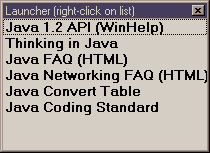
Description Starts applications by double-clicking them in a list.
   
Screen Shot
   
Requirements

- Windows 95/98/NT

   
Installation
  1. Download the Launcher.zip file.
  2. Unzip the files to any directory (e.g. c:\Program Files\Launcher).
  3. Double-click Launcher.exe to start Launcher.
Note: Check Win9x/NT help for instructions on how to create a shortcut to Launcher.
   
History

00/1/10 v1.2
- Changed list box to use full window
- Moved toolbar buttons to right-click menu

99/4/16 v1.0
- First release.

   
Download

Launcher.zip (v1.2, 109KB)

   
Links Java version
Microsoft's Windows


Last Updated: January 10, 2000 © Copyright 1995, 1996, 1997, 1998, 1999, 2000 by Rui M. Pereira ([email protected])
Hosted by www.Geocities.ws

1