| Description |
Starts applications by double-clicking them in a list. |
| |
|
| Screen Shot |
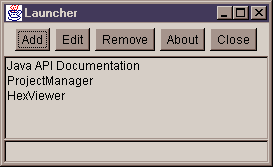 |
| |
|
| Requirements |
- Java
1.1 Virtual Machine (VM) (either Java Developer Kit (JDK)
or Java Runtime Environment (JRE) or equivelant) or higher. (Note:
Launcher will work with Microsoft's JVM (JView))
|
| |
|
| Installation |
- Download the Launcher.jar
file to a directory in the CLASSPATH (see JDK or JRE documentation)
entry (ie. c:\jdk1.1.7b\lib).
- Type java -cp Launcher.jar Launcher to
start HexViewer.
Note: You can add Launcher.jar to the CLASSPATH, in which
case then all you need is to type java Launcher.
|
| |
|
| History |
99/3/30 v1.0
- First release.
|
| |
|
| Download |
Launcher.jar
(v1.0, 7KB)
Java
JDK 1.1 (9+MB)
Java JRE 1.1
(2.7+MB)
|
| |
|
| Links |
Windows 95/98/NT version
Sun's Java site
Java FAQ
|