Site Development Foundations
Chapter 8 - Image Techniques
For a tutorial on graphics formats and issues, see General Topics - Images and Graphics.
Image maps
|
An image map ensures that areas of an image act as hotspots - hyperlinks leading to other pages. The locations of the hotspots do not appear on the image, but you know when you have rolled the mouse pointer over a hotspot, as the pointer changes to the pointing hand.
The areas on image maps can be rectangles (defined by the co-ordinates of the top-left and bottom-right corners), circles (defined by the co-ordinates of the centre and the radius) or polygons (defined by a series of x-y co-ordinates defining the vertices of the polygon).
Image maps use x-y co-ordinates on an image, with the top-left corner having co-ordinates (0,0) and the bottom-right corner specified by the width and height of the image. It is important that the image is displayed using the width= and height= attributes, in case the browser is tempted to use its own initiative when it displays the image. Add the usemap="..." attribute to the image:
|
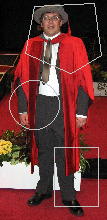 |
<img src="phd_ceremony.jpg" width="512" height="384" usemap="#example" border="0" />
I have added the attribute border="0" to prevent a blue box appearing round the image (the image way of indicating that it acts as a hyperlink). Note also the hash sign (#) inside the tag. This tells the browser that the image map named "example" is defined somewhere in this page. Here is the code you need:
<map name="example">
<area shape="rect" coords="160,0,330,384" href="me.htm" />
<area shape="circle" coords="450,250,80" href="flowers.html" />
<area shape="polygon" coords="210,200,250,230,150,190" href="ramp.htm" />
</map>
Include as many <area> tags as you need, one for each hotspot. The shape covered by the tag is defined by the shape="..." attribute, which can be rect, circle or polygon.
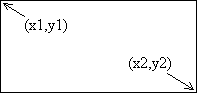
| shape="rect" specifies a rectangular area, with the coords="..." attribute defining the top-left corner (x1,y1) followed by the bottom-right corner (x2,y2). For instance, if you wanted the rectangle to stretch from (30,35) to (100,97), then the attribute would be coords="30,35,100,97".
|
 |
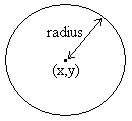
| shape="circle" specifies a circular area, withe the coords="..." attribute defining the co-ordinates of the centre followed by the radius (the number of pixels between the centre and the rim). For instance, if you wanted the centre at (200,150) and the radius to be 40, then use coords="200,150,40".
|
 |
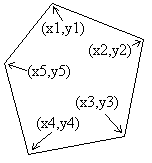
| shape="polygon" specifies any region enclosed by three or more straight lines (triangle, quadrilateral etc.) A polygon is defined by the co-ordinates of its vertices (corners). Use coords="..." to list these (x,y) pairs of co-ordinates in order (no jumping around) round the polygon e.g. coords="20,46,130,151,10,170" for a triangle with corners at (20,46), (130,151) and (10,170). |
 |