Site Development Foundations
Chapter 2 - Markup Language and Site Development Essentials
Standard Generalised Markup Language (SGML)
- It's a metalanguage (a language used to generate other languages).
- It describes the information in a document, not the formatting.
- It uses a Document Type Definition (DTD), a set of rules that all documents of a particular type follow.
- Files adhering to a DTD refer to the rules file in their first line.
Hypertext Markup Language (HTML)
- Contains hyperlinks to other documents.
- Hypermedia includes images, video, audio etc.
- Tags are formatting commands embedded in the text.
- Web browsers interpret the tags.
- The current standard is HTML 4.01 (since 1999).
Flavours of HTML
You can specify a type of HTML to use in the first line of a web pages. There are three types ("flavours"):
- HTML 4.01 Transitional allows compatibility with older browsers. You can specify formatting with Cascading Style Sheets (CSS) or the traditional way with tags. It also allows the use of deprecated (old fashioned) tags.
- HTML 4.01 Strict. All formatting must be done with CSS.
- HTML 4.01 Frameset. Used only when defining frameset files.
Extensible Markup Language (XML)
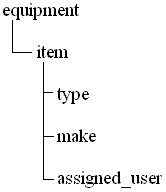
This describes data (like the records and fields in databases) not formatting. XML documents are taken by other languages and then formatted. They contain tags defined by the user to describe the relationship between data items in a tree structure:
<equipment>
  <item id="3607">
    <type>computer</type>
    <make>Dell</make>
    <assigned_user>Henry Smith</assigned_user>
  </item>
  <item id="3608">
    <type>mobile phone</type>
    <make>Nokia</make>
    <assigned_user>Fred Bloggs</assigned_user>
  </item>
</equipment>
|
|
Tags can have attributes (like the id="3607" in the example above). XML documents must:
- be well-formed (have a root tag that encloses all others, like the equipment tag above, and tags that are properly defined).
- be valid
- use a CSS and/or an Extensible Style Language (XSL) for a web browser to format it properly.
Extensible HTML (XHTML)
HTML reformated to incorporate some elements of XML. XHTML allows XML to store the data, HTML to format it. XHTML also has Transitional, Strict and Frameset flavours.
Validation
Web-based tools exist to check whether web pages meet the validation rules. The official one is the W3C Validation Service. Validators read the DOCTYPE declaration at the start of an HTML file and use it to select the flavour standard (the set of rules against whcih to validate). Validation ensures:
- pages will render properly even in future browsers.
- pages will be scalable - you can add more content without having to rewrite what you already have.
- pages will comply with legislation to heop disabled users.
Web development project cycle
- Create and document an initial web site plan/diagram/storyboard:
- A statement of purpose of site and intended audience,
- A rough outline of pages (default page, sections, what technologies will be needed),
- Get input from customer representatives, suppliers, shareholders,
- Consider what message you want to convey, the fonts and images to use, the colour scheme.
- You may have to comply with standards on organisational design and ethnic diversity (such as multi-language sites and colour schemes).
- Also provide a site map, a tree structure showing folders and files.
- Obtain input from stakeholders:
- Stakeholders are anyone with a legitimate interest in the site.
- They can advise on its purpose, look and feel, services it is to offer etc.
- Communicate the plan to stakeholders:
- Give presentations (PowerPoint, overhead projectors, whiteboards etc.) Don't forget to give handouts!
- Call meetings so you can discuss with stakeholders. These should have an agenda, and you should take and distribute minutes.
- Consider technical and non-technical concerns:
- You may have to explain technical matters to people with no technical experience and non-technical concerns to those who do. Do this in a non-patronising manner.
- Keep asking if people have questions, and check whether they have understood.
- Write regular updates.
- Develop the site:
- Create the pages and test them in as many browsers as possible. Check for things such as appearances of tables, colours, images, and whether scripting languages work.
- Make sure all stakeholders approve.
- Be careful of which version of HTML/XHTML you choose. XHTML 1.0 Transitional will render well in most browsers.
- Publish the site to a web server:
- Establish a domain name (or IP address) for the site.
- Determine space requirements.
- Set up an account with a web site provider with a user name and password.
- An ISP may provide you with web space in addition to simple access to the Internet.
- An Application Service Provider (ASP) will provide web space and additional facilities such as E-mail, site analysis tools, database facilities, additional bandwidth, ready-to-use CGI scripts and technical support.
- Manage the site:
- This is open-ended (can last years!)
- You may be asked to create new content,
- update/remove dead links and old parts of the site,
- resolve problems with access and connectivity.
- Obtain and process feedback from customers and stakeholders. Feedback is obtained from web-based forms, or by conducting surveys either directly or via E-mail.
Intellectual Property
This is material created by a company or individual and includes ideas and concepts, code, documents etc.
Trade secret - Intellectual property that could damage a company if revealed.
Copyright - Legal ownership of intellectual property. Copyright expires and must be renewed to remain in force. The law and time-limits differ from one country to another.
Trademark - A name, phrase, symbol or logo that represents a company, that only the company which owns it can use.
Licensing - Giving permission to use intellectual property or trademarks under the terms of a licence set by the copyright holder.
Infringement - Using copyrighted material without explicit permission.
Plagiarism - Claiming falsely to have created someone else's work e.g. using quotations from an article found on the Internet word-for-word in one's own essay without crediting the creator.
Non-disclosure agrrement (NDA) - A legally-binding contract saying that you promise not to disclose any trade secret or intellectual property owned by a company.
N.B. Materials such as websites are copyrighted by default. They do need to posses a "(c) Fred Bloggs"-type label. You should get an independent reviewer to check your site regularly for originality and ensure you have permission for anything copied from another site.