
Setting Your Resolution and Color
| What
is resolution? What do you mean by color? How do I set my resolution and color? What are hexadecimal colors and how should I use them? |
Resolution is basically the width and height of pixels you set your monitor to view. It ranges from 640x480 up to 1024x768 on the popular 15" - 17" monitors. It can range higher on 19" - 21" monitors which are slowly becoming more popular. Look at the image below to see the difference in resolutions... to top
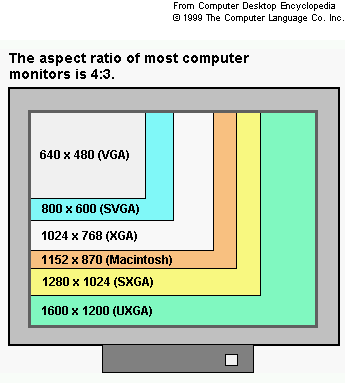
Then there are colors. You have three options for color. 256 colors (8 bit), High Color (16 bit), and True Color (32 bit). 256 colors is exactly what it sounds like. The computer only uses and displays 256 different colors for anything having color. High Color uses around 25,000 colors. True Color uses more than 16.7 million colors. to top
How do I set my resolution and color?
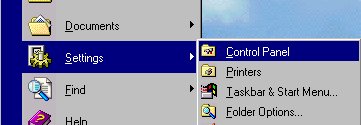
First click on start, go
to settings, and click on control panel (see example below)
 |
When your control panel menu pops
up click on display (see example below)
 |
On your display menu click on
the settings tab (see example below)
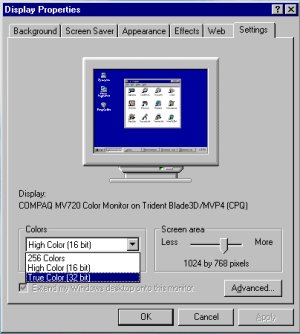 |
Above you see the options to set your Colors and Resolution. Play around with them to see the differences. **NOTE: When you change color settings you must restart your computer** to top
What are hexadecimal codes and how should I use them?
In HTML Code, colors are
defined by a hexadecimal number or code, where the overall color is
determined by its proportion of red, green, and blue. The
hexadecimal code begins with a pound sign (#) and is followed by a combination
of six letters and digits. The first two characters tell how much
red is in the color, second two tell how much green, and the last two
tell how much blue. Ever hear someone use the abbreviation RGB?
Well, now you know it stands for red, green, blue.
For those of you who aren't graphic designers, you may want to know
that most all great looking graphics are created with a 16.7 million
color palette. If you were to choose a color from that color palette
and use the hexadecimal code for the color of a font or link, then only
people who have True Color enabled on their computer would be able to
see the exact color you choose. To choose font and link colors
you should choose your colors from this browser safe color
palette.
to
top
©
Copyright 1997-2003. All rights reserved.
This site best viewed at 800
x 600
Last updated: 9.5.03
Design by
W3D3
Hosted by Yahoo! Geocities