
QUALITY ISSUES a DISCUSSION - Page 1:
Is this quality - captured from a playing SVCD on a computer screen using the software player SthVCD?
Link to my Home Page. -------- SuperVCD TMPGEnc Page. -------- LSX Encoder Page. -------- CCE Page.
Link to a specific discussion on perceived quality with VBR or CBR encodes as used for DVD authoring, page 2 of this subject.
GENERALITIES in perceived quality!
I have on other pages compared the SVCD image quality to that of the DVD image from the same source file and said there is not a lot of difference! Others disagree with that statement saying that DVD is far far better than the SVCD image. What then are the common aspects in this subjective analysis for "quality?"
In my view there are three components:
1) Actual image sharpness or detail - the camera contributes to this.
2) Artifacts and/or video noise in the picture, presentation of fine detail.
3) How well the image containing motion is played on the TV.
The important issues also relate to the source material, the process involved in achieving the SVCD (including capture and the encoder) and what you view the product on and from where you view it. In relation to viewing the charts to be described below I use 1x the height and for viewing the production on a TV a minimum of 4x the height of the TV frame, in letterboxed 16:9 this should be 6x the height of the letterbox.
Working backwards:
3) The mpeg2 format is designed to play interlaced fields and therefore the use of mpeg2 will give the best playback of motion, reversed fields, de-interlacing and mpeg1 will destroy across the screen motion and special effects on the TV, big time.
2) increasing the data rate of the encode to mpeg2 will reduce these problems and therefore one must expect a better quality from a DVD in this regard, no question about that at all. Encoders vary considerably in the way they encode "fine" detail such as is required with tree foliage, grass etc, some introduce very bad artifacts in the process. You may miss this in a "tame" production where there is little movement or no real fine detail to be presented.
1) image sharpness or detail requires the use of a standard test chart as shown in image 1 below. The video image is rated by the number of horizontal line pairs that can be perceived at the centre of the screen. To do this one must video the chart so that it fills the screen and then view it subjectively to determine what the horizontal definition is.
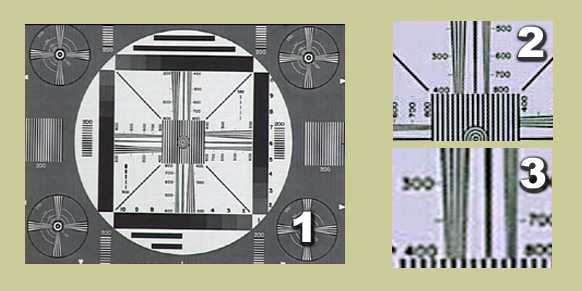
Notes on how to use this chart are available here.
Some results - image detail:
I used two cameras, my Sony TRV 110e digital 8 and a friends 3 chip Sony TRV 900e. Totally different in quality and in price. I compared them both with original DV tape, SVCD and DVD encodes, viewing the results on a professional monitor and on the lounge room TV, svideo/RGB component or composite connected.
Professional Monitor, (Svideo or RGB component):
Tape - 110e = 425+ lines, 900e = 500+ lines.
SVCD - 110e = 360 lines, 900e = 410+ lines.
DVD -- 110e = 400 lines, 900e = 450+ lines.
Lounge room TV (composite connected):
SVCD - 110e = 280 lines 900e = 320 lines. Interestingly these were the values obtained on the professional monitor with the DVD player connected in the same way.
Now sit back at the correct viewing distances from the TV and you will be very surprised at what goes missing when you view the image detail chart.

CONCLUSION:
Firstly, the derived images of the process did not equate to the original source materal on DV tape, not even in the DVD mode. In my view it is almost impossible for the average viewer to see the difference in image detail with only a difference of 50 to 80 lines resolution at the centre. It is possible then to have people not actually see the slight difference between SVCD and DVD, except, if they know what to look for in the artifact or video noise component of the quality issue.
Most people do not have any idea of quality and how to assess it! In my view the artifacts introduced become the real choice between images on the TV, given motion is played correctly and that one is not going to "see" a few lines difference in system resolution. Contrast is also a part of this impression of quality, increased contrast can give the impression of sharper detail and the lack of it can degrade the image as perceived by the viewer.
If you have a problem with quality from an artifacts point of view then make sure you use the composite connection to effectively hide the concerns and be sure to view from no closer than the 4x or 6x height rule.
Which encoder is best
On this web site I have tested and written articles on 3 encoders, TMPGEnc, LSX and CCE, all with differing results and have since been asked what do I recommend?
It depends on your target!
Bear in mind also that my process is MC DV Type 2 source - Premiere 6 - avisynth export plugin - patched standalone encoder and the views I have are based on that process alone and are as follows:
For DVD probably the CCE encoder at full data rate limit and if necessary multi pass encodes to increase the content achievable on the DVD-R media. The first use OP option is probably CBR and not VBR. The multipass runs (2 or 3) will reduce the introduced artifacts in fine detail areas of the picture. Applying filters will degrade the image and in that its your call. I liked the image, its saturation and the fact the encoder can be matched to the camera luminance settings. I am not sure about its capability with sound, it seems a total impost to be forced into using another encoder to get quality sound.
CCE was a poor 3rd in the SVCD stakes, with DV source material it introduces an un-acceptable level of introduced artifacts in fine detail areas or in slow pans and zooms. It would be acceptable for still presentations provided one is carefull in selecting transitions and special effects.
The LSX image is slightly less contrasty than that from TMPGEnc, both are equal in image resolution but LSX, in my view, performs better in the introduced artifacts area and is therefore an excellent choice if you do not need the additionl options available in TMPGEnc. For LSX you could add a gamma correction as an alternative to introducing a change in contrast during editing.
In TMPGEnc auto shutdown of the computer is a great feature, however, you can of course use one of the many freeware programs that achieve a shutdown at a specific time. TMPGEnc's supplied filters, tools range and other options associated with 16:9 are unique and very functional. TMPGEnc is slower in encoding a project except with build 12, that build can be faster than LSX when doing the same project, particularly when adding borders or working in 16:9. Neither approach the 1st pass speed of CCE which is about one third and probably a draw card for its use.
IF YOU WANT QUALITY BE SELECTIVE!
I hope these notes will be usefull in your quest for quality.