
QUALITY ISSUES a DISCUSSION - Page 2:
Is this quality - from a playing SVCD. What then of the DVD image and the effects of VBR v's CBR?
Link to my Home Page. -------- SuperVCD TMPGEnc Page. -------- LSX Encoder Page. -------- CCE Page.
Return or go to my page 1 quality discussion. ------------ my associated DVD by remote page. ============================================================================
This discussion, page 2 contains information also used for the source of postings made on the SVCD forum relating to DVD encodes and the quality that may or maynot be percieved when using VBR or CBR. The content is the result of testing full screen 16:9 prior to my New Zealand Shoot in that widescreen format. Of necessity these tests were carried out to achieve the best quality my system could produce.
VBR - CBR the DVD comparison!
1) The DVD industry agrees that a 9.8 Mbit per second compliant mpeg2 DVD encode is at the point of no further return in perceived quality. By inference then, data rates below that value have reduced perceived quality. It also could be interpreted to mean unless you achieve 9.8Mb/s for a clip the best quality will not be seen and to achieve that you will need CBR.
A DVD player must be capable of playing continuously a 9.8Mb/s data rate to comply with the spec. That I suggest, means an in spec DVD player will play a CBR encode of very high average probably with the limitation that the peaks do not exceed 9.8Mb/s. A player that will not play a high data rate encode almost certainly does not comply with the specification and you have been had!
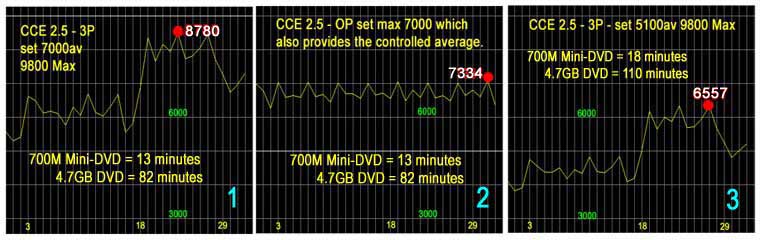
2) The graphics are from the same DV source file consisting of a slow pan from 3 to 18 seconds and a zoom out to about 29 seconds � the zoom out is more difficult to encode as the movement is across the �lines� and the slow pan is with the �lines�.
3) The encoder is set for averages of 7000 using 3Pass + vaf file and takes 4 times as long as the one pass (OP) also set for 7000 average. All averages are accurately achieved as the file sizes are just a few kilo�s apart. The other encode is a 5100 average using 3 passes + vaf file. All 3P encodes have an upper limit of 9800 set to allow that level if required. In all cases the Q factor achieved is 1.0. Data is read by Bitrate Viewer with correct values so as to relate it correctly to the encoder settings. Bit rate viewer like LSX uses k=1024.
Questions:
It is often said VBR uses only that which is required and CBR, as the OP encode is, wastes bits. What is the true effect of this waste if indeed there is a waste. There will be a discussion further down on this page which suggests there is no loss or waste!
Increase the set average and the peaks will be higher but never actually what is required, although set at 9800 no part of the source required or achieved that level. Maybe its only that which is allowed by the average setting in both VBR AND CBR? Big difference in concept!
People say that 6000 is acceptable so will one actually see a difference between any of these encodes � 2 of which are 4 times as long as the OP encode.
What happens to the wasted bits that occur in the OP encode in the up to 18 second part of the file if the 3P encodes indicate that which is required. Will you really subjectively notice the difference in the later part of the encode where the OP data rate is slightly lower?
These encodes are actually 16:9 files and although not shown, the 3P and OP encodes for a letterboxed 4:3 TV, are identical. In 16:9 LB 25% of the height is blacked out with bars, what happened to the bits in that area and will you see it reflected in perceived quality?
Further Comment and tests:
I have suggested above that peaks where controlled purely by what average is set. It is likely no comments will be made about this point on the forum, it seldom addresses the real issues in similar postings. It is wrongly assumed by most that VBR uses only what is required for a quality image. I suggest it uses what it requires to achieve the set average and that has nothing to do with achieving quality as the prime object. The idea of wasted bits is misplaced in my view and I would suggest that seeing a difference of a k is wishful thinking based entirely on a perception that it should be so.
Here is an image (4) based on the same test file but with the horizontal pan frozen to a still and if what I said has any base, the peaks will be higher and the average over the still content lower because there is no movement. Again 3P + vaf set average of 7000 accurately achieved, Q again is 1.0 throughout.
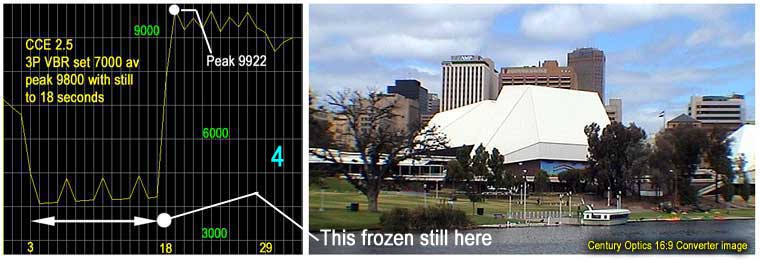
Compare this with image 1 and you can immediately see the "cost" of motion. But is it the limit of that required for quality, I think not. Raise the peaks at the top end and the data rate for the lower end must be raised to achieve or maintain the set average. The maximum peak now is over spec and actually will go close to not to be accepted for authoring as the true value is actually just over 10000 as I forgot to factor the result by 1.024. As is the norm, Bitrate Viewer graphics are not quite accurate with its X axis line positioning.
Here are two more images from bitrate viewer:
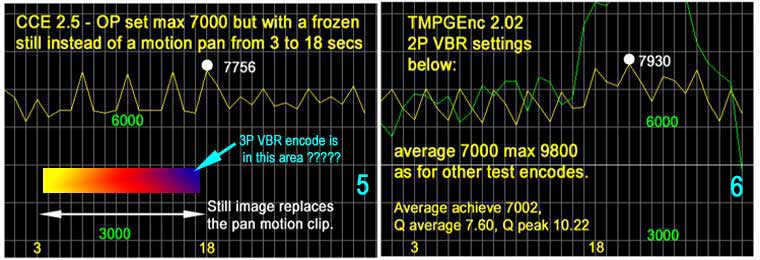
Image 5 on the left is an OP encode with the still image instead of the panned motion clip (as shown in image 4 right) and there are some rather interesting effects if you study the graphics and compare them with image 2. The achieved average is similar as previously, but just look at the �waste� in the still area and the peaks are all higher. The 3P encode shown in image 4 is in the 4000+ area and indicated with the color gradient section of this image. Gezzzzzz now I have wasted nearly a couple of thousand units � OR HAVE I?
The image on the right (6) is a TMPGEnc 2.02 outcome from its standard 2P VBR run with the same settings as used on the CCE encoder. Is it really VBR? This has not got the still image in the encode, it is the standard file with the panned content. Because the Q graphic results are much higher they now get into the picture. There will be people who say do not worry about the Q values, why I wonder, does Bitrate Viewer bother to show them then? I would certainly be intrued by process that comes out with Q=1 and not much higher averages as is the case quite often. Quality from this TMPGEnc run is poorer on my professional TV monitor than any of the CCE encodes. And not only that, it took 3 times as long for the equivalent multipass run in CCE. That�s an enormous difference when one considers it is possible to get the same job and quality in a 12th of the time by screwing a one pass encode hard.
For those who are using the Pro version 2.5 and its revised 2P encode the image below (7) indicates there is a difference and that the encode is more in the realms of VBR. Its just as slow and maybe just slightly better in quality but as with all the encodes you will never recognize the difference in 12 months time. The DVD PAL templates supplied with the encoder do not work because they have the wrong frame speed. 29.97 is not PAL Mr TMPGEnc!
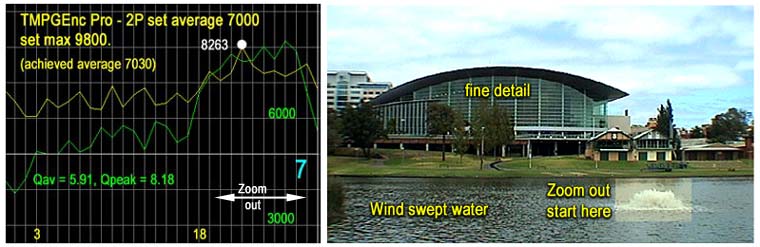
The image on the right is added to show the clip which generated the requirement for much higher data rates when compared to that shown in image 4. It may help you to recognise the conditions, only a 6:1 zoom out accross the frame, windswept water that is moving as a result (no blocks), and some fine detail in the buildings which are of course in motion during the zoom.
The Constant Quality Issue?
To complete these tests, at least for the moment, I have added some �Constant Quality� graphics using the TMPGEnc Pro 2.5 encoder. A number of people swear by this method as that which provides the best quality by far, certainly its only one pass and therefore quicker, indeed Mr TMPGEnc sets it as his default and that suggests he also considers it to be the best method for his product.
I have asked in the past what is this Constant Quality? What is its reference point, the default setting is 65%, 65% of what? No answers.
Constant quality for all settings? Constant quality for all data rates produced in the encoded file? Same quality for data rates of 4000 or 8000 in the same graphic? No answers.
I am still asking the same questions today!
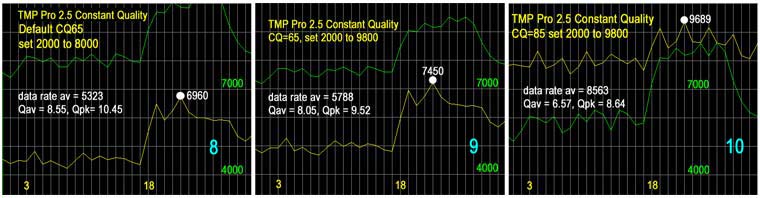
Make your own judgements of the graphics, consider when doing so that I have stated the encoder does not provide just what is required for the image but what is needed to provide a set average and I believe that holds good in these TMPGEnc tests as well.
Take for example those that think there are lost bits in the CBR encode. Consider the graphic associated with the default settings (image 8) and the first part of the encode for the slow pan is just over 4000 and in the high rate encode (image 10) its now at 7000+ so how can one possible consider a CBR encode as having wasted bits when it can also reach those heights? If VBR can be made to get those values by simply upping the average then surely if a CBR gives that level nothing is wasted at all. I doubt if you will actually see a loss for a diference of a "k" at the other end of the scale when the CBR encode is lower than the VBR encode.
I rest my case for CBR.
Note the CQ settings in the encoder do not allow you to set an average to be achieved and therefore it is more hit and miss when trying to accurately fill a disk.
My perception of quality from these tests is still lower than the equivalent CCE encodes. In my view, the CCE encode for a set average of 5100 (graph 3) is above the quality of the TMPGEnc default CQ 65 2000-8000 setting.
In Summary: So what have we got here, all 7000 encodes achieved the set average accurately so the same space is used on a disk whether it be VBR, CBR for a mini-DVD or a full DVD. A case has been put that there is no loss when a CBR encode is at a higher level than a VBR encode. The VBR encode can be made to reach the same heights merely by upping the set average. Heavens above one can double the VBR rate used for a still and I cannot accept that there is no improvement as a result. It is false logic to say there are wasted bits in a CBR encode.
Lowering the data rate may be seen eventually as a loss in perceived quality. The quality of the CCE 5100 data rate example is perhaps just beginning to show as different on the pro monitor. The two TMPGEnc examples are not up with the CCE product and they take too long to achieve.
So quality, as usual depends on the encoder and these tests and my perception of them on a professional TV monitor indicates there is or maybe nothing in the VBR to CBR comparison from the same encoder. If the encoder is better at VBR then you will probably see a difference, if its equal to VBR in CBR mode then CBR will provide a higher perceived quality.
If you want more on a disk, lower the data rate average, accept you may see a difference, accept that lowering the average will lower the peaks. Raising the set average will raise the peaks and there may in fact be a sudden increase in data rate between two differing clips that may become a problem. Be very aware the content in the file can change the outcome.
TEST it for yourself, same source, same encoder, SAME AVERAGE and CHOOSE! Its only a matter of whether YOU perceive a quality difference sufficient to pay the time penalty for true multipass encoding.
In relation to perceived quality on a professional TV monitor, let me say it is totally different to what you see on a lounge room TV. If I were to rate the lounge room as 100 then the professional TV monitor would rate 130+ indeed among the professionals it is said, �get it right on the pro TV monitor and let the lounge room TV destroy the image�.
=================================================================
Epilogue:
I rencently had my 4th "DVD by remote" burnt by a friend and this was one in which I was stuck for time as I wanted to see a 16:9 DVD based on the Century Optics 16:9 Converter before departing for the New Zealand shoot. The DVD was only to be 64 minutes in length because thats all I had on hand.
I took the option to fill the disk to a target of 4000M. I used my disk capacity calculator, made an allowance for the 1.5% overhead in a DVD and encoded all files at an average of 8.5Mbs using the CCE OP encode described above and on my CCE web page. I achieved 3970M. The data rate peaks were indeed very close to 9.8Mb/s.
The disk is a dual format disk containing 4:3, 16:9 letterboxed in 4:3 and full screen 16:9 versions of the letterboxed clips for the future, when I do purchase a 16:9 TV. All options are selectable by menu and instructions to set the TV as required.
It makes interesting viewing and yes the Pioneer 535 had no trouble playing the high data rate CBR OP encodes as described above. A most enjoyable end result and 16:9 in the future on a 16:9 TV I have no doubt will provide quite an impact.
=================================================================
First written 05 March 2002