Configuring JDBC Connectors in SAP Portal 7.0
Summary
This paper describes the JDBC connectors of the Connector Framework of the Portal Runtime
1. Introduction
Two type of connectors can be used to access a database in the connector framework of SAP portal 7.0. They are:
a- The BI JDBC Connector
b- The “native” JDBC Connector
You configure the BI JDBC Connectors in Netweaver AS Java. They are then ready for use in the portal. The “native” JDBC connector is defined and configured in the portal; that is the reason for the term “native”. The standard one or SAP jdbc connector comes with the installation of the portal. But you can also install your own if you don’t trust the standard one.
2. The BI JDBC Connectors
You configure the BI JDBC connectors in AS java with help of the Visual Administrator. In the portal, the BI JDBC connectors use the BI JDBC template when you create a system that represents the backend database. The name in the connector factory is the name you defined for the BI connector in the connector container of the VA. Figure 1 shows an example of a BI JDBC connector to a DB2 on zOS database. Figure 2 shows a successful connection test with that connector.
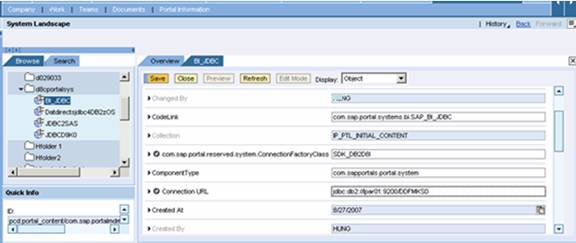
Figure 1.
Configuration of a BI JDBC Connector to a DB2 on zOS
Database
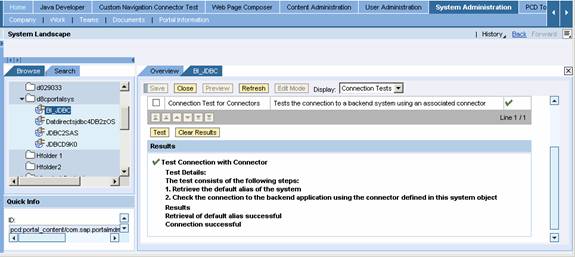
Figure 2.
Successful Connection Test of a BI JDBC Connector
3. The JDBC Connector
You can use the standard jdbc driver that comes with the installation of SAP portal. In fact, this driver is not really SAP’s but DataDirect’s jdbc driver branded for SAP. This driver works with “all” databases but SAP tested only on three of them. They are MS SQL Server, Oracle, and DB2 (both LUV and zOS). SAP note 773401 shows the details. However, regarding DB2 on zOS, there is an error in the note. You should use the parameter LocationName rather than Location as the note suggested. The value of LocationName is the location value when you run the TSO command “DIS DDF”. Figure 3 shows the configuration of a DB2 on zOS connector. Figure 4 shows the result of the connection test.
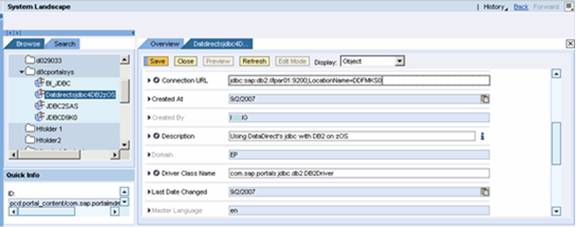
Figure
3. Configuration of a DB2 on zOS Connector in the
Portal
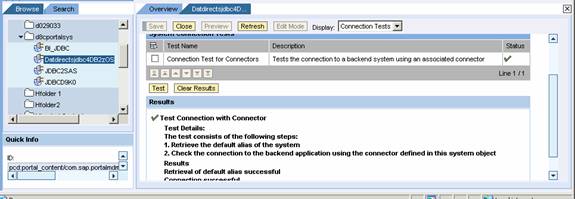
Figure 4.
Testing the JDBC Connector to DB2 on zOS
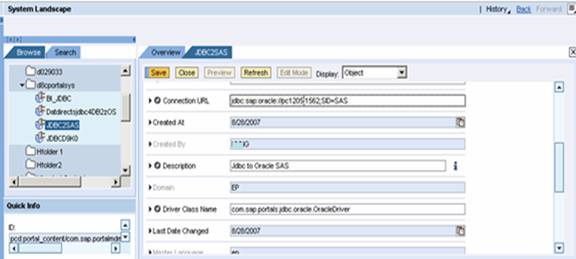
Figure 5.
Configuration of an Oracle jdbc Connector in SAP Portal 7.0 to an Oracle
Database
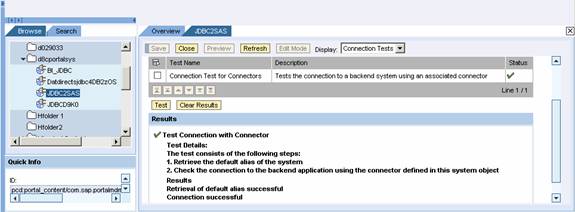
Figure 6.
Testing the JDBC Connector to an Oracle Database
3. Conclusion
The previous examples show how to configure a DB2 on zOS and an Oracle jdbc connector in SAP portal 7.0. Any question, email me.
Pete,
April, 2007
Washington, DC

