Psion Kware
Page
Review Section
click to see bigger image
Review of Psion 5mx
First of all, I have to make
it clear that I have used the PalmPilot for two years before I
buy my 5mx a couple months ago. Therefore, I will be reviewing
the 5mx with a very strong bias in favour of the use of a
PalmPilot. You might ask why you brought a 5mx. I brought my 5mx
for the following reason:
its large screen and the keyboard.
I hope the large screen could make me more comfortable when
viewing the schedule worksheet I need to refer very often in my
daily work.
The keyboard would be a very nice device to use if you need to
input some considerable amount of text such as this review.
its built-in word and sheet application
This two built-in application could easily offset the price other
PDA available if extra software are required.
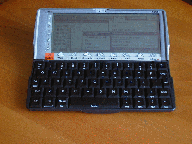
The mechanical design of the folding display and keyboard is
really excellent. It make use all the available size for the
keyboard, and make the keyboard really good for typing. The LCD
is as large as the outer dimension of the case when closed. In
fact the keyboard and the LCD panel is hinged together and when
open the keyboard will slide out nicely from the base with the
LCD resting in an angle comfortably for viewing.
However. the sharpness of the LCD and the response of the
keyboard is not really not up to my expectation. If comparing the
sharpness of the 5mx LCD with my two years old Palm III, The
sharpness of the Palm III still outperform the 5mx although the
glaring in the 5mx screen is lower. I think the Psion guys really
need to consider having a better supply for their product now and
future. In my opinion, the sharpness/visibility of the LCD really
determine if a PDA is useful or not. Can you imagine if you turn
on your PDA to find a phone number and find that the lighting
condition make it very difficult to read? Will you still willing
to carry it with you when you leave home next time?
The response of keyboard is also disappointing. Although the
keyboard is large enough for typing, the feeling of the keys make
it difficult to judge if a key is pressed or not. This really
make typing faster difficult as you need to check if there is any
letter missing as you type along. Switching on the click sound as
an audible feedback is not useful in all occasion because the
click sound is to soft that it could hardly heard in an
environment other than a very quiet room. The punctuation key
arrangement is also wired. I don't really understand the often
used punctuation mark such as the . and , are placed off their
normal position in order for a better arrangement/placement of
the four cursor control key. The debounce of the keyboard is also
bad and I keep getting repeated letter as I type this review. In
the beginning, I think that is due to the setting with the
auto-repeat but after changing the setting with no improvement, I
start to reallize that this should be a debouncing problem
instead.


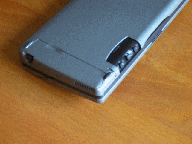
On the bottom of the case, there is one swing open door on both
left and right side for accessing to the backup battery and
compact flash card respectively. After you open the swing door
for the backup battery, you will find the reset button there. But
I don't think you will use this button as you did in WINCE or
Palm device. As from my own experience after using the 5mx for
more than a month's time and with many software programs
installed, the OS is very robust and there is no ocassion that I
need to reset my machine.
On the right of the front side bottom is three buttons and an LED
for controlling the sound recording program. The function of the
buttons are labelled by some easy to recognise symbols. One thing
need to mention about is the cover designed to protect the
buttons from accidental activation. It is really strange to find
that there is nothing in the manual about how to slide open this
cover. In fact, what you have to do is to press the small slot on
the bottom of the cover doen beforee sliding the cover about 3mm
from its original postion to let the three buttons protrude far
enough for your operation. The red LED on the side of these
button is for indication of recording in progress. These buttons
are really handy for recording short voice memo (If you need to
recording long voice memo, continuous pressing and holding the
record button seems a bit difficult. You also need to keep an eye
on the recording led to make sure recording is actually in
progress.). The microphone for recording is on the left side of
the machine. Similar to the microphone on the Casio E-100 I have
tried. you need to place the microphone close to your month in
order to get a clear audible recording. For example. if you put
you 5mx on the desk of a conference intends to get a meeting
reocord. you won't got a satisfactory result.
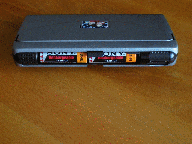
The 5mx is powered by two AA size batteries situated on the back
of the unit. The cover door of the batteries compartment is
semi-circular in shap and a stylish roll up action to open. The
latch on the battery door on my unit is very tight and I need to
push the latch downward before the roll up action so that no
excessive force is used. On the right side of the battery door is
the IR widow and RS232 port which is also cover with a
semi-circular cover.
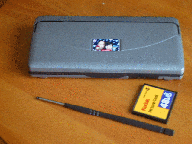
The stylus of the unit is long enough for you to tap the left
side of the screen when your hand leaned on the right side. The
stylus is housed on the rear of the compact flash card cover when
is held in place by a push to lock/release mechanism. The tip of
the stylus is so big that it is rather unnatural when drawing
stretches or using handwritting recognition.
The unit is power on by pressing the Esc key and turn off by
pressing the Fn-Esc. However, the power on when clamshell open
and power off when clamshell close option in the Control Panel
-> Switch on/off is really handy and you don't need to worry
about forgeting to switch off the power of your 5mx and use
excess power from the battery.
CONTINUE.....PLEASE DON'T
MISS MY REVEIW ON THE BUILT-IN APPLICATION.
To know more about how to
connect to the internet via you desktop PC, Click Here
Email Me
Please send me email about
your comment of this review.
Return HOME


