Your resource to the fundamental assembly language programming . © 2004
An Overview.
The concept of a microprocessor.
An analogy
Let us understand the fundamentals of any general processor ( not just intel 80x86 family based processor ). Consider your microprocessor as a living entity, who is a CEO of a large organisation( The entire PC unit ). All the processes occuring inside your PC are always scrutinised under it's authority. It is certainly impossible for a CEO alone to run an organization without the support of his subordinates. In a similar way the microprocessor alone can't handle the working of the PC without the aid of the external peripheral chips. Understanding the hardware aspects of a microprocessor thoroughly, is imperative for programming fast, flawless and fabulous programs. The Binary Number System format of the programming would be the most effective way of programming, since it is based only on ' 0 ' (off) and ' 1 ' (on). However to the programmers it would cause inconvenience, rather a daunting task for programming bigger programs. So the obvious choice left to the programmers was to code their logic in the Octal Number System. This became a conventional programming system , which is implemented in the assemblers available even today.
Working of a PC
- INPUTS : keyboard, mouse, scanner, webcam.
- OUTPUTS : monitor, printer, projector.
- CORE : microprocessor, memory.
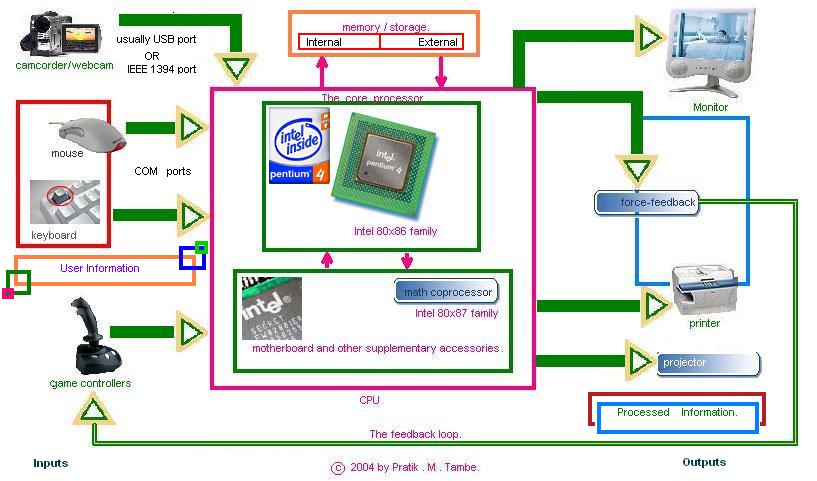
A general block diagram of a computer system.
Classification of the computers.
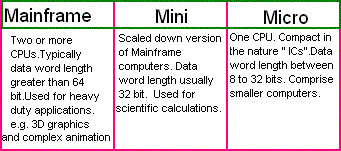
A general classification of a computer system.
- MAINFRAME computers : two or more CPUs , data word length >= 64 bits
- MINI computers : data word length = 32 bits.
- MICRO computers : one CPU usually an integrated chip.
Important Terms Pertaining To A PC
- BUS: A set of wires through which an electronic signal flows rendering logic design to establish communication between the various peripherals inside a PC.
- ADDRESS BUS : ( UNIDIRECTIONAL ) 16/20/24 ...LINES. They govern the address location IN THE MEMORY from where data is to be retrieved or to be placed.
Unidirectional means data transfer is possible only one way.( In the diagram, arrows at one of the ends of the bus attached to the peripheral devices.)
- DATA BUS : ( BIDIRECTIONAL ) 8/16/32 ...LINES. They govern the part of the software on which the manipulations are performed.
Bidirectional means data transfer is possible both the ways.( In the diagram, arrows at both the ends of the bus attached to the peripheral devices.)
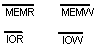
- CONTROL BUS : ( ACTIVE LOW SIGNALS)MEMR, MEMW, IOR, IOW. These signals bring about the co-ordination between the various peripherals.Active low I/O is indicated with a bar on the top of that signal.
- I/O (Input/Output) PORTS : The collection of pins to establish communication between the core processor and the outside world ( Mouse, Keyboard, Monitor, Printer, etc... ) .
- MEMORY MODULE :
- External : Hard-disk, floppy-disk, Compact-disk ( ROM / Write Once Read Many (WORM) / REWRITABLE ), DVD, Zip-disk, etc...
- Internal : RAM, ROM
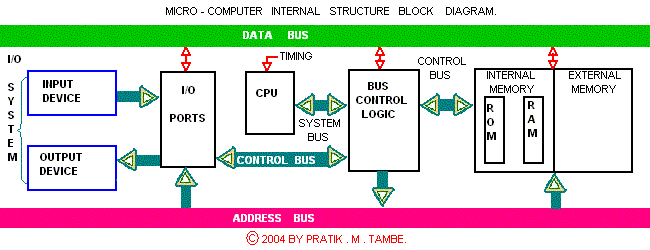
A general block diagram of a micro-computer system.
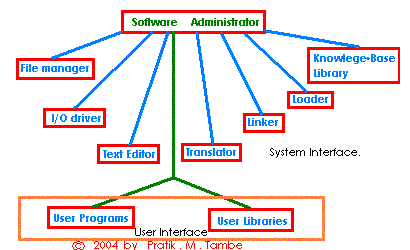
The Software Environment.
Important Software Tools Required For Our Programming
- The Editor : It is a program through which our code is edited. It supports many letters, digits, punctuation marks, symbols etc....A common example is "NOTEPAD".
- The Assembler : It is a program through which our source file is translated to binary/machine/object code. It generates two passes.The first file is "OBJECT FILE" containing binary codes as well as the addresses of the instructions.The second file contains the List file which contains the offset of the instructions and the assembly language statements alongside their binary codes.... Common examples of the assemblers are "A86", "Masm", "Nasm", "Tasm".
- The Linker : It is used to merge smaller object files/ modules to form a single object file in a project.The advantage of dividing larger programs into modules is that ; it becomes easier to debug and test the individual modules for their reliability before linking them to the other modules.
- The Locator : It assigns precise addresses where the object code is to be loaded into the memory....A good example is EXE2BIN.
- The Debugger : It allows us to load our object code into the memory,execute it and debug it. We can inspect the contents of the registers and memory location.We may also introduce the break points i.e. The program will execute till the break point is encountered and then it will hault.
- The compiler : It takes the entire program of the HLL languages like C/C++,PASCAL,COBOL... and then translates the entire program into the machine code.It is 20 times faster than Interpreter; however if an error is detected the entire program needs to be rerun on the correction.
- The Interpreter : It reads program line by line and executes one statement at a time.If an error is detected then only that statement be rerun on it's rectification.
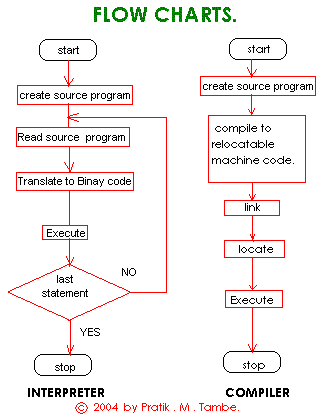
The Assembler Action.
- First Pass :
- Reading the source.
- Creating a symbol table along with the attributes.
- Replacing Mnemonics with the respective codes.
- Detecting any errors.
- Assigning relative addresses to the instructions and the data.
- Second Pass : It looks out for the symbol from the code field and tries to match with that from the symbol table.If a mismatching occurs that symbol is replaced with its address.
The Types Of Assemblers.
- Macro Assembler : A macro is the designation assigned to the set of instructions.In Macro Assembler macros are expanded prior to ther transformation into an equivalent machine code.
- Cross Assembler : It is machine independent since it is written in HLLs such as C/C++ i.e. Programs can be executed equally well on different processor families. e.g. Z80( written in C ) can run on both Intel 80x86 family , Zilog family as well as Motorola 6800 family.
- Meta Assembler : It has an inbuilt multi processor support for a wide variety of the processors. It is the most versatile and dynamic of all the assemblers.
Next : Instruction for Assembling with TASM 2.01 .
Understanding 80x86 Architecture
Refer this link to understand 80x86 Architecture
© 2004 by Pratik.M.Tambe.