|
DELL
or DES?
Q:
Dell seems to be the best choice for my next office desktop purchase.
Why should I consider a DES XP System?
A: We actually recommend Dell for many office applications. In fact,
we often recommend other brands as well, depending on the application,
especially if you have few 3rd party applications to install or
configure on your new machine. On the other hand, if you have a
lot of third party software and don't have the time to separately
reinstall in each machine, DES is a real bargain:
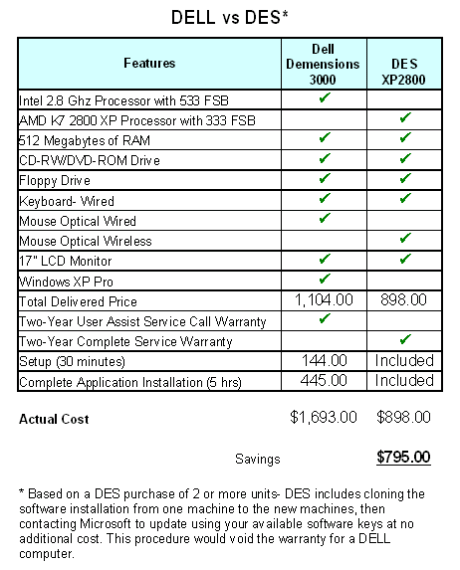
But all too often our clients want to get fast service without going
through a timely "qualification process" over the phone.
If the unit has to be returned for any reason, the hard disk is
wiped clean, which, for many of our clients, represents an employee
spending two hours or more reinstalling applications or restoring
from a backup. A DES computer owner need only call or e-mail the
problem, and we we'll make arrangements show up and perform all
necessary repairs. So when comparing the DES brand to Dell (or other
major brands), keep in mind the hoops you must jump through to obtain
a resolution to your problem:
1.
User must wait on hold until a Dell support person answers your
call. Depending on the day and time, this could take up to an hour.
2. User must go through a troubleshooting session with an online
technician before a service tech is dispatched. If a tech is dispatched,
it may take one to four days for the technician to appear.
3. If there is a keyboard, mouse or monitor issue, user must wait
for new item in the mail, then return defective item to manufacturer.
4. If the CPU is replaced, DELL will erase the hard disk and user
must reinstall all software or backup & restore the data when
the unit is returned.
Here's
an example for the warranty
repairs procedures for a DELL.
Ouch!
Call us.
DES
SWITCH
Q:
Why should I consider DES for support?
A: There are several. One; if you call us, we will come. Two; one
way or another, you're problem is going to be resolved. We're used
to getting challenging problems that others abandon. When you call,
relief is on the way! Third; unless you request otherwise, we will
send the tech that has the most experience resolving your issues,
so you won't get the "new guy" that you may end up paying
to educate on your system.
Whether
you're a private individual or a business, you should know that
our techs are equipped to get the job done. We know that "time
is money" and that's why our first priority is fixing the problem
to get you back up as soon as possible. Our techs devote 100 percent
of their time servicing your issue when on site, not someone
else's. After the remedy is found, if our records indicate that
it's happened before, we'll find out why it happened, and offer
solutions to prevent future calls for this issue. So when you consider
DES consider this:
- If
you schedule an appointment, we'll show at the specified time
or we'll call to reschedule.
- Within
60 minutes of arriving on site, we will notify you that: a) the
problem has been resolved, or; b) we have a resolution, and provide
an estimate of the time required to complete the resolution, or;
c) we have been unable to find a resolution, provide details of
our progress and let you decide if we should continue analyze
the problem. If we are unable to diagnose the problem, we will
recommend a trusted specialist who can resolve the issue, or should
you authorize, bring in other qualified specialists and supervise
the process to resolution.
-
If you sign an agreement with us, at no charge we'll set up remote
services that will allow us to quickly resolve many issues from
our office. This is a sure bet to even faster resolution to future
issues.
Sound
like sweet music to your ears? Call us.
DATABASES,
DATABASES, DATABASES
Q:
We need a database system to organize daily tasks at our office.
Spreadsheets are difficult to share and maintain. MS Access is too
inflexible. Any suggestions?
A: You've come to the right place! We know this is a challenge at
many offices, but DES has expertise in developing shared
access database systems that will boost productivity and leave
no job left undone. These databases can also be configured for Internet
access, so if your people are spread out, it's not a problem. Call
us.
|
|