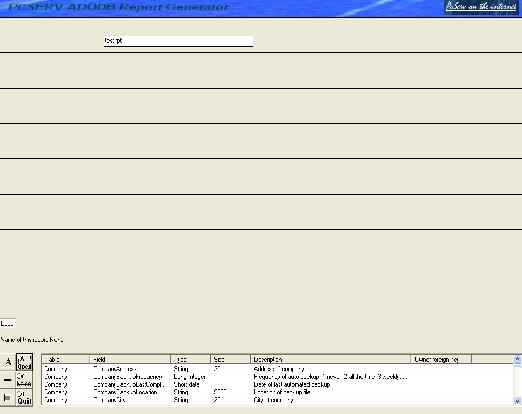
Development history of report generator project
Estimated development hours = 500, actual hours = 20, actual start date 8/28/2004, estimated completion 6/30/2005, actual completion date ??/??/????
PROJECT ON HOLD
Future project, this will not be a free tool since much work and effort is required than originally anticipated. I am developing a simple report generator tool that requires data in a specific format (.txt) to be created by a programmer within their visual basic .net application. Visit EZReporting to view more details.
8/28/2004 Initiated project. Need to develope a .net control to permit reporting, totalling, easily without too much development.
Steps to build adodb report:
1. Design your report, set default access database path, which can also be programatically overridden in vb.net
Specifications of the .rpt file. Each item must be in the same sequence to be shown on your generated report.
field#1:
SELECTSQL (this is auto generated after your report is created)
SORTFIELDS (list of fields and sort sequence of ascending or descending)
SELECTFIELDS (record.fieldname, operator, record.fieldname or literal/today>
TITLE
field#2:
field#3:
field#4:
field#5:
field#6:
field#7:
field#8:
All fields are delimited in the .rpt file with an untypeable field. Lines and other graphics can be dropped into a title, heading, detail, group or final. A report editor will provide the auto generation of the report content.
Sneak peak
7/6/2008 This project is incomplete and will be left incomplete until a larger desire is needed by myself or a business interest. As an alternative you may view the following code: Generic Dot net print and report utility
This page last updated July 6 2008
PcServ Report Generator addin tool component
8/29/2004 Report development will center around providing reporting with adodb msaccess supported database.
2. Drag and drop lines or your database fields in their proper position on the report
3. Save the .rpt file
4. Within vb .net, add reference to the adodbrpt dll
5. Set your run time database
6. Set your report name
7. Initiate a build report method
MSDB (this is the full filename of the database for report creation
PAGING
TODAY
HEADING
DETAIL
SHOWFIELD
CALCFIELD
NEWLINE - indicates break to a new line
GROUP
SUMFIELD
COUNTFIELD
FINAL
POSITION within the line
LENGTH within the line
HEIGHT of item
FONT, SIZE, BOLD, ITALIC, UNDERLINE
LABEL, MS ACCESS TABLE and FIELD NAME
MASK or format; numeric is $999,999.99 or $999,990.00 or blank or 9999, etc
HIDDEN or SHOW
Notes