|
To install an ABS patch, follow these steps:
- Log on to D3 as user dm to master dictionary (account) dm.
- Make sure all users are logged off. To view a list of users currently
logged on, enter listu from TCL.
- Enter verify-system to verify the integrity of the ABS file.
If the ABS file verifies, proceed to step 4. Otherwise, continue as
follows:
- At TCL, enter clear-file abs
- Enter set-device and select the pseudo floppy /usr/lib/pick/dt
.
- Enter sel-restore abs (oiz
- At the Restore from prompt, enter F
- At the Account name prompt, enter dm
- At the File name prompt, enter abs
- Enter verify-system again. If the system verifies,
proceed to step 4. Otherwise, continue as follows:
- Shutdown the D3 virtual machine with the shutdown
command.
- Reboot the D3 virtual machine using d3 -0 -b
-l (lower case L)
- At the options prompt, type A to load ABS.
- Select the tape device corresponding to the ABS pseudo floppy, and
load the ABS as directed.
- At the options prompt, type X to boot the machine.
- Enter verify-system once more. If the system verifies,
continue with step 4. Otherwise, you cannot continue with the
patch installation.
- Enter exit at TCL, and connect to the D3 virtual machine
using d3 -b -l (lower case L)
- Enter maxusers (fsu from TCL to set the system to single-user mode.
This will log off any remaining users.
- Enter compile dm,bp, :ccompile (d
Note: If the process enters the BASIC Debugger (displaying *E1
followed by an asterisk prompt), enter g to continue.
The message [241] Successful compile! should appear.
- Insert the patch media into the drive. If the ABS patch was downloaded,
use the D3 chg-device command to change the name, type and
density of an available device to those of the ABS patch pseudo floppy. For
instance:
chg-device 3 name=/tmp/rs71xaXXX type=floppy density=pseudo
Where XXX is the ABS patch number.
- Use the set-device command to attach to the device.
- At TCL, enter t-rew, then t-load md (oi to load the
installation macros.
- Enter patch to begin the patch loading procedure. You may be
prompted to load additional volumes as necessary.
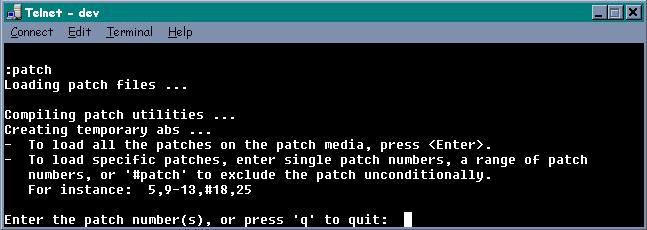
- Press <Enter> to load all of the patches on the patch media.
Specific patch numbers or a range of patches can also be entered to load
only those patches. In addition, the # character
can be used to exclude a patch within a range of patches. In the
example above, 5,9-13,#18,25 indicates that patch 5, patches 9
through 13, and patch 25 should be loaded. In addition, #18
indicates that patch 18 should not be loaded (regardless of whether or not
patch 18 supersedes any of the patches requested).
At this time, the requested patches will be installed.
- After installation of patches, if any of the patches made changes to the
DM master dictionary, a prompt will appear to propagate these changes to all
user accounts. By pressing c, all accounts on the system will be
updated automatically using the update-md command.
- If a reboot of D3 is not required (as designated in the Notes
column of this patch document), the logon prompt will appear.
Patch installation is complete.
If any of the patches that were installed require a system reboot, D3
will initiate the shutdown. Enter y at the prompt to continue.
- Remove the patch media and reboot D3.
- Log on as dm to the dm account.
- Enter maxusers (m to set the system back to multi-user mode.
|
