12.0 Design and Management
of Learning Environments
Candidates must demonstrate understanding of how to create
learning environments that complement the use of technology in teaching.
12.1 Develop performance tasks that require students to:
(a) locate and analyze information as well as draw conclusions and
(b) use a variety of available and appropriate media to communicate
results clearly
Evidence / Artifact:
Here is a database where students can
fill in more information about the states of matter to extend it out.
NOTE: The above link must downloaded and opened using Microsoft Access
Here are sample spreadsheet and
database questions that students can use in learning the two applications.
They can also create their own questions for classmates to answer.
These are the accompanying spreadsheets and databases that the questions
come from,
(They were all created by Dr. Robert Houghton at Western Carolina University)
SPREADSHEETS:
DATABASES:
(You must use Microsoft
(You must use Microsoft
Excel to open these files)
Access to open these files)
muffins
Gradebook
bowling scores
Foods
nutrient
States and Territories
Reflection:
It is important for students to analyze and draw
conclusions from documents that they use. By completing the existing
database, they must find items that fit what the topics are and by completing
this information the students are creating relevant learning experiences.
When they are finished with the database they are then able to analyze
information and communicate their results in ways that others can see.
When the students have a hand in creating at least part of their work it
becomes more relevant to them and they can make connections easier.
By offering examples for the students to follow, you show what you as a
teacher expect and then give the students a base for where their work comes
from. By having students create questions from the information you
have given them, they are required to analyze the information and process
it carefully so that the questions will be answerable by others.
By using pre-created spreadsheets and databases, students have a reference
point to return to when they begin to create their own spreadsheets and
databases. This will help them communicate their information clearly
and will give them a choice of the most appropriate way to display their
data.
.................................................................................................................................................................................................................................................
12.2 Use computers and other technologies as available to effectively
and appropriately to collect information about student learning.
Evidence / Artifact:
Here is a spreadsheet that I have created
that could work as a gradebook.
If you would like to view this file by using Microsoft Excel please
click
here
Here is a database that is used to keep information on students. This link must be opened using Microsoft Access.
Reflection:
Having information about student learning within
the classroom is one of the most important things that we do as teachers.
Having this information available in a way that is easy to manipulate and
change is much more effective in analyzing how your students are doing
in your classroom. Many times desks become overloaded with work that
needs to be checked and other things that teachers must work on.
By having the information stored on a computer it is much easier to keep
track of and to have it ready when any questions about a student arise.
You can look over the data and find the methods that would be most effective
in helping your students. You can also see what students are understanding
and what you will need to re-teach in a different way. By using a
database you can have numerical and text data, this can offer details about
what the student is excelling in and what problems the student might be
encountering. Having this information helps when talking with other
teachers that might work with the students as well as administrators and
parents. It is also imperative to have important information such
as allergies, medications, and contact information in a place where it
is easy to access. This way you will always be prepared for anything
that might happen in your classroom.
.............................................................................................................................................................................................................................................
12.3 Use computers and other technologies as available effectively
and appropriately to communicate information in a variety of formats on
student learning to colleagues, parents, and others.
Evidence / Artifact:
Here is a gradebook I have created using Microsoft Excel.
Click here to view the gradebook on-line
Click here to view the gradebook using
Microsoft Excel
Here is a newsletter I have created to
show what students will be learning.
NOTE: You must use Microsoft Publisher to view this file
Here is a classroom website that I have created to use
Reflection:
It is important that as a teacher we keep information
about what students are learning and how they are doing in our classroom
in an easy to understand format. By having things such as newsletters,
websites, and computer based gradebooks it is easy to show others exactly
what you are doing in your classroom. When you are communicating
with colleagues you need to have information stored in a way so that it
is possible to easily access and give examples. By using a gradebook
created with Excel, you can add written notes as well as grades.
This can be helpful in parent conferences and meetings with colleagues
that help the students in your class.
Having a newsletter to keep parents informed is
also important. This is something simple that can be created and
sent home with every child in the classroom. This way parents will
know what is happening in your classroom and they will be able to
stay involved. There will also be no question as to what goes on
daily in the classroom. The web-site can also offer this type of
information. Parents who have internet access can see what is going
on in the classroom in addition to the newsletter. They can also
access any homework assignments and find important upcoming events.
Having these forms of communication open give parents, colleagues, and
others the chance to take a peek into your classroom and find out exactly
what it is you are doing.
...........................................................................................................................................................................................................................................
12.4 Create physical settings that support active student involvement,
inquiry, and collaboration.
Evidence / Artifact:
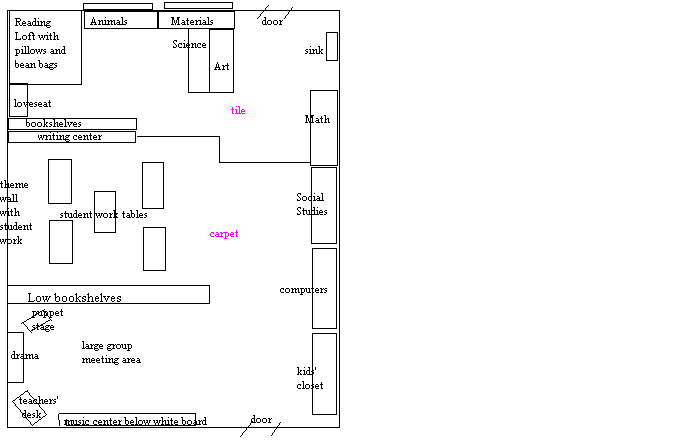
Here is a layout of a dream classroom that I created.
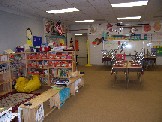
Here is a photo of the class where I am currently working. My cooperating teacher and I worked on setting the class up together.
Reflection:
It is important that we as teachers have
a classroom that creates an active involvement of our students and facilitates
inquiry in their learning. The classroom must be somewhere that the
students feel comfortable in sharing ideas and where learning can easily
take place. This is not something that can be done on the spur of
the moment, but it must be planned and you should always leave it open
to modifications if they are needed. Technology should be incorporated
into areas where all students have equal access to the materials and it
can also be used for small or large group lessons depending on the technology
available. Technology can actually be a tool used to facilitate the
learning that you want to take place, therefore it needs to be in an easily
accessible place. In my dream classroom layout you will see that
there are several computers for the students to use and that they are positioned
in a way that creates interactivity among everyone in the classroom.
In the photo of the classroom where I am now working you will see that
the computer which we have is in a place that is conducive to small group
learning and collaboration. The setting of the classroom can be one
of the most important factors of how the year goes, therefore it is important
that we utilize what we have available inside the classroom.
.........................................................................................................................................................................................................................................
12.5 Employ technology (where available and appropriate) to organizational
and management strategies that support active student involvement, inquiry,
and collaboration.
Evidence / Artifact:
Here is a powerpoint that I would use to teach the 5 themes of geography. I would then have students in pairs choose a place and create their own powerpoint on the themes.
Here is a unit plan that I created that incorporates multiple types of technology into a study on matter.
Here is a database of student information
that would be helpful for a teacher.
NOTE: You must open this link using Microsoft Access
Reflection:
In any classroom it is important for
the teacher to be organized. This automatically facilitates an environment
where learning is active and powerful. Using technology can help
you to easily organize data for students or for your lessons. By
incorporating it into other parts of the curriculum you are gaining the
attention of the students and you are offering ways for them to collaborate
in their learning and become active participants. By using technology
a teacher can see progress by simply opening up a file. Comments
can also be made easily and you can record information for students in
this manner. Technology also offers assessments that allow students
to be creative rather than just taking a multiple choice test.
When you are looking at student information, it
is imperative that you create an organized way to keep this material.
If you keep it in a database you can manipulate it and find anything
that you need to know quickly. For teachers this is vital for anything
that might happen in the classroom. The more organized you stay,
the more interaction and time you will have with your students. This
helps you to have a well managed classroom where students are active and
engaged and work collaboratively.
.........................................................................................................................................................................................................................................
12.6 Utilize available resources including satellite, cable, wireless,
and ITFS (Instructional Television Fixed Service) to develop and deliver
curriculum.
Evidence / Artifact:
Here is a list of television web-sites that would be helpful in curriculum planning and delivery.
Here is a copy of e-mail correspondence I have had with the President of Eduware Software company about wireless technology software.
Reflection:
Utilizing resources that most students are familiar with can be very helpful in any classroom. In today's world the majority of schools offer cable to each classroom and even have televisions in every classroom. Having a listing of the shows that come on a particular station and interactive activities that accompany these shows is useful to have. You can find shows that match the unit you are teaching as well as use some of the suggestions that the cable sites offer to teachers. Most students are familiar with television and when it is used it can increase attentiveness and learning. When available, wireless technology is a wonderful way to engage students and create excitement. For many students wireless technology is a new and exciting adventure they are getting ready to explore. By using a variety of products you can find exactly what will work for your classroom and your students. Utilizing offers for free trials is a great way to explore all of the possibilities available to you.
...........................................................................................................................................................................................................................................
12.7 Select and create learning experiences that are appropriate
for curriculum goals, relevant to learners, based upon principles of effective
teaching and learning, incorporate the use of media and technology for
teaching where appropriate and available, and support learner expression
in a variety of media using a variety of media communication tools.
Evidence / Artifact:
Here is a lesson plan that incorporates a powerpoint introduction along with internet exploration for a weather unit.
Here is a lesson plan that uses a webquest to complete a unit on matter.
Here is a unit plan on matter for second grade. It incorporates many different technologies and media.
Reflection:
Using technology in a classroom can help to engage
your students and stimulate their learning. Making sure that those resources
you use are appropriate and not just pulled from anywhere is even more
important. As teachers we need to make sure that the technology activities
we choose to use with our students create real life learning for them.
It is important that we use a variety of resources so that our students
are excited and engaged and not bored with the same thing. By selecting
and creating learning experiences for the students we are deepening their
knowledge and excitement about what they are learning. Students can
use knowledge from the different technologies we show them to begin creating
their own products. When students begin creating their own works
with technology they are able to use their strengths to grow in their understanding
of the subject matter. These experiences help students to grow and
excel in their work and prepare them for the future they will be working
in.
.............................................................................................................................................................................................................................................