? -- The Big Dilemma -- ?
Last update: March 9, 2004
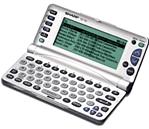 I am a fan of the Sharp Wizard Organizer, model OZ-770. Unfortunately, as most of you know, Sharp no longer makes this wonderful Personal Data Assistant (It's really more than a mere "organizer.") They make other models, but none so powerful and easy to use. And none with such a great wealth of programs, games and other resources written by interested third parties on the internet.
So, this is my dilemma: When our OZ-770s wear out or break, what shall we do? It IS still possible to find a new OZ-770 on EBay, but the price is getting to be over $200, and even those will soon be gone.
This is my question for you fans of the OZ-770, 750 or 730: When your Wizard no longer works, and you can't replace it, what will you do? What can you buy for about $100 US (The OZ-770 sold retail for $100) that will be similar to the OZ-770? What would you advise others to buy? Send me your thoughts by email, and I will post those emails here below. Thanks for your contribution!
 Date: December 3, 2003:
"I think that it is a good idea to save some money, and buy the new Sony Clie. It hurts that a company like Sharp doesn't want to continue to develop or update the OZ700 series. Lots of people would continue with Sharp, if Sharp would show a proactive pattern of business."
William Martinez
Date: December 6, 2003:
I got your link from your post up at Molyda.
Thanks for doing this, and I hope other OZ folks respond, too.
My OZ770 screen is starting to go blank vertical line whacko. So, I'm planning
to replace my OZ770 with something that does the following (these are the things
I value on the 770):
-contacts, schedule, and birthdays (duh)
-reading e-books
-an occasional game
-keyboard that I can type on (like the OZ!)
-small and lightweight (like the OZ!)
In addition, I'm looking to upgrade to include:
-wireless option
-send/receive emails
Here are all my notes so far from watching Ebay, etc.
I'm looking for what these guys classify as a "Handheld PC"
http://www.pdabuyersguide.com/hpc.htm
(look along the left column for links to old HPCs)
http://www.dynamism.com/ also helps with news on the latest, but usually too
expensive, stuff.
Here's where I watch on ebay:
http://search.ebay.com/search/search.dll?query=keyboard&sacategory=38331
(most of what comes up are palms with external keyboards, but you run into the
right kind of models there, too)
Okay, first of all, I can start with what I will NOT go for:
I don't like the new Sony Clie with keyboards, like the CLIE PEG-UX50, because
the keyboard is way too small (go check em out at Best Buy and you'll see what I
mean).
It looks like the keyboard is too small on the Sharp Zaurus SL-C750, too, and
it's linux. http://www.dynamism.com/zaurus/.
The NOKIA 9290 Communicator GSM 1900 MHz is out of my price range, plus it's a
mobile phone, which I'm not looking for.
Samsung Nexio S160 is cool, but out of the price range:
http://www.techworthy.com/Laptop/TestTrack-September2003.htm?Page=2
I'm not going for any of the old Psion stuff (nor the various newer models like
Diamond Revo) because they're outdated running their own software.
So, what looks good lately?
The NEC Mobilepro 770, 780 up to the new 900 look good.
Right now, I think this would be my system:
http://cgi.ebay.com/ws/eBayISAPI.dll?ViewItem&item=3062164000
It has a color screen and can go wireless.
The SHARP MOBILON HC-4100 (winCE 2.0) go for cheap mostly because they're black
and white, but they go up to color at the 4600, and are still cheap.
The Various HP models - Jornada 720 etc (winCE2.0 or earlier I think), go for a
bit more.
The big problem with these is that they're all running HPC2000 while we should
be looking for stuff running PocketPC, because it seems to me that's where
things are going...
And last, this seems like a good forum to me:
http://www.pdabuyersguide.com/ubbthreads/postlist.php?Cat=&Board=UBB4
(go up levels to find many, many, categories of discussion)
But let's not get too distracted there and let's keep posting on the Molyda
forum and sending emails here to Marshall :)
Thanks, -Brian
Date: January 5, 2004
Marshall here....I've been thinking and researching. What do I like about the OZ-770?
- 1. The large screen
- 2. Excellent battery life
- 3. Ease of use
- 4. The keyboard for data entry
- 5. Reasonable price (used to be!)
- 6. Plentiful software
- 7. Fairly big memo size
- 8. Ability to read ebooks
- 9. Not too big or heavy
- 10. Three megabytes of memory
I think I have found a solution, though not a perfect solution. (The only perfect solution would be for Sharp to resume manufacturing the OZ-770. I don't think that will happen.)
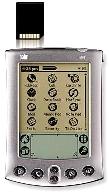 My solution: A Palm m500 combined with a Seiko Thumboard. The Palm screen is not as nice as the Sharp, but it is big enough to be acceptable. Battery life is not so hot, but the m500 screen is gray scale, which draws less power, and the Palm's lithium battery recharges automatically while in the sync cradle. It is supposed to go several weeks without needing a recharge. If you want a color screen, you can get a Palm m515 for just a few more dollars. But I'm sure the battery life will suffer.
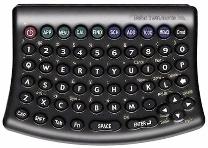 The Seiko Thumboard is not as nice as the OZ-770 keyboard, but it is larger than a blackberry thumb pad, and gets good reviews. Units are readily available on EBay for reasonable prices. I just bought an m500 for $50 (new in the box), and the Seiko Thumboard for $10 (new in the box). Shipping was $10. So, for $70 I have the entire system. Memo size on the Palm is adequate, and actually unlimited for me, since I have the Blue Nomad "Wordsmith" word processing software. Also, since the m500 is a Palm, there is an incredible amount of software (much of it free) available for downloading from the internet.
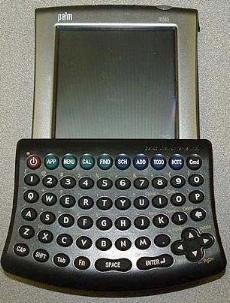 There are several good ebook readers for the Palm. The m500 is especially good for ebooks, because it also sports a slot that will read sd and mm memory cards. I already have a 64mbyte mm card that will fit in the m500, so that gives me plenty of memory. Neither the Palm nor the Seiko Thumboard are very large and heavy. It is possible to carry the system around without feeling burdened.
This is all just theory right now, however my Palm m500 and Seiko are on their way in the post, and when they arrive I will take photos, and do a review on this website.
Date: January 6, 2004
For the truly exasperated (or the truly poor)...A cheap pocket calendar book.
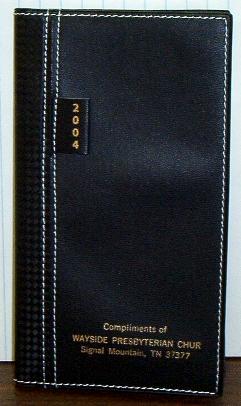 |
I usually get a couple of these free in the mail every December. But you can buy them in the Dollar Store for only $1. The front page is always for personal information. If you lose your calendar book, some good Samaritan may find it and mail it to you. The pocket calendar has several advantages as a PDA. Initial cost is low. No batteries are needed. Your data never disappears due to a crash. It is light-weight, easy to carry; slim, fits easily in a pocket (this model measures 3 1/2 by 6 inches). Ease of use can't be beat! Believe it or not, you can also sync with your PC (read on). |
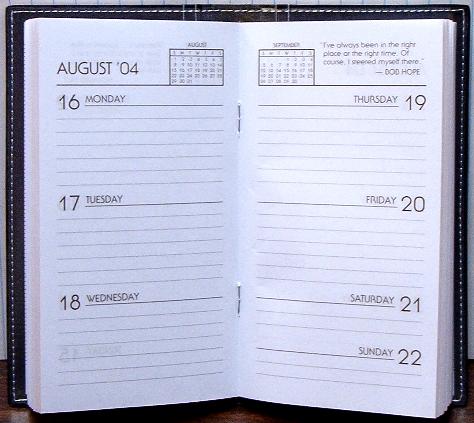
The paper covers of the calendar slip into the protective vinyl cover. These plastic pockets then provide places to keep business cards, and small blank sheets of paper for writing little memos.
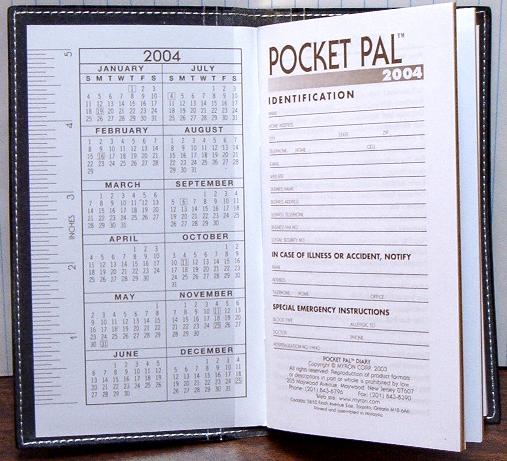
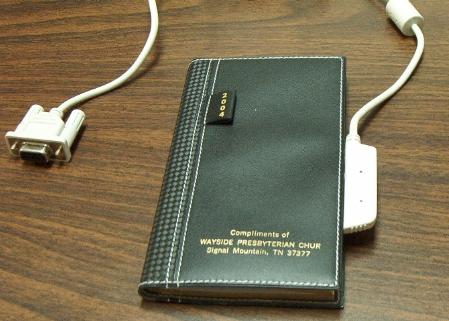
What about syncing with your PC? This is necessarily a one way process, but is easy to do, and protects against data loss. Begin by creating text files on your computer for information that you want readily available in your pocket calendar. (You may already have these lists in Outlook or your Sharp Day-timer PIM.)
For example, you can type a list of names, addresses and phone numbers, print it to come out about three inches wide, and then paste it on unused pages in the pocket calendar. This particular pocket calendar has an 8-page world atlas. I don't need that, and I can paste information lists on those pages. Now you have the info in your pocket, and also on your computer. If you lose your pocket calendar, it is easy to get another one (for only $1), and then print out the info from your computer again, and paste it in the new calendar. Thus you ARE synced with your PC, and your information is backed up. If you want to back up your appointments, too, just get a duplicate calendar book, keep it in your desk, and copy info once a week.
Date: March 9, 2004
MY FINAL SOLUTION - HANDSPRING TREO 90
Here's a list of what I enjoyed about the Wizard OZ-770, and what I
am looking for in a replacement PDA:
- 1. Large screen
- 2. Excellent battery life
- 3. Ease of use
- 4. The keyboard for data entry
- 5. Reasonable price
- 6. Plentiful software
- 7. Fairly big memo size
- 8. Ability to read ebooks
- 9. Not too big or heavy
- 10. Plenty of memory
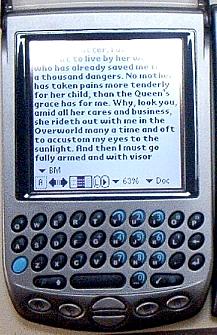 I have tried many PDA's, and have finally settled down on the HandSpring Treo 90. The screen is not as large as that of the Wizard OZ-770, but it is large enough, and it is a color screen, and more "readable" than the 770 screen. It has a rechargeable lithium battery that seems to have a good life between charges. It is easy to use, and has an integrated keyboard. It weighs less that the OZ-770, and is smaller, and easy to carry. The price is reasonable, and they are easy to find on EBay for under $100 (I got mine for $75 plus $6 for shipping). Since it runs on the Palm OS 4.1 there are literally thousands of free software applications available from the internet. Memo size is limited only by the Treo's memory, which is 16MB, plus an expansion card slot for 64MB additional storage. There are several good free ebook readers, and applications for easily converting any text to an ebook. Of course it comes with all the ordinary PDA applications, and syncs with either MS Outlook or the Palm Desktop. I like the Treo 90 better than my Palm M500 with Seiko keyboard because 1) The Treo has twice as much RAM; 2) The Treo has a color screen; and 3) The Treo is easier to carry in a pocket, since the keyboard is integrated. The price is about the same. In my opinion, the Treo 90 is the ideal replacement for the Wizard OZ-770. For more information, see my review and links.
