Browsers, Java & Yahoo GeoCities PageBuilder | pbtester2002 |
|
If these solutions for common problems don't help you launch Yahoo GeoCities PageBuilder, to test your browser for Yahoo GeoCities PageBuilder readiness, &/or for much more detailed information about launching Yahoo GeoCities PageBuilder, please visit smsu_63's Yahoo GeoCities PageBuilder-readiness test page: |
Your helpers are Yahoo customers, just like yourself. Unlike Yahoo, we'll tell you when Yahoo GeoCities PageBuilder is broken.
All links on this page open new browser windows.
...Except pbtester2002 & this one: which will take you to the Yahoo GeoCities PageBuilder Launch Problems & Solutions page.
For best results, AOL & SBC users should minimize, but not close, the AOL or SBC browser & access both the Yahoo GeoCities account & PageBuilder with one of the browsers considered on the browsers, Java & PageBuilder page.
If you have Norton Internet Security 2004, please visit smsu_63's page: Fine-Tuning Norton Internet Security for Yahoo!/GeoCities
Even if you launched the Yahoo GeoCities PageBuilder successfully in the past, installing, upgrading or un-installing any of a number of programs (like the Google Toolbar, Norton Security, Yahoo Companion or ZoneAlarm Pro) can require re-configuration of your system to continue launching PageBuilder. It's usually not too hard to do...
However, Yahoo cannot help you re-configure your computer (usually just the browser, really). So, you need to rely on us: volunteer helpers. Please be nice to us...
When I wrote the Yahoo GeoCities PageBuilder Launch Problems & Solutions page, I solicited suggestions; &, corwings posed this question:
I know it is not a real solution and sort of cheating, but do you think the subject of alternative browsers is worth mentioning? Some people report success with that. (Netscape and Opera both)
It might be better to fix the problem they have with their browser, but on the other hand, if people keep messing with their browsers, adding the extra toolbar here and whatnot there, perhaps it would be easier if they had a "for PB only" browser.
I don't think it's cheating to have a "for Yahoo GeoCities PageBuilder only" browser, or, at least a back-up browser that will work properly with Yahoo GeoCities PageBuilder. Many current Yahoo GeoCities PageBuilder launch problems stem from gadgets designed for Internet Explorer.
At this time, Yahoo GeoCities PageBuilder is clearly made to work best with Internet Explorer & Microsoft Virtual Machine (MS VM). There could someday be a Yahoo GeoCities PageBuilder update to optimize it's performance for Sun Java as more & more Internet Explorer users are forced off Microsoft Virtual Machine & onto Sun Java; but, for now, Yahoo GeoCities PageBuilder works best with Internet Explorer (MS VM).
To test your browser's readiness for Yahoo GeoCities PageBuilder, for much more information about configuring your Java, & for download links for the most up-to-date Microsoft Virtual Machine, please visit smsu_63's Yahoo GeoCities PageBuilder-readiness test page: http://www.geocities.com/smsu_63/pb-test/
Here is an early report of the Yahoo GeoCities PageBuilder-Sun Java problem from smsu_63:
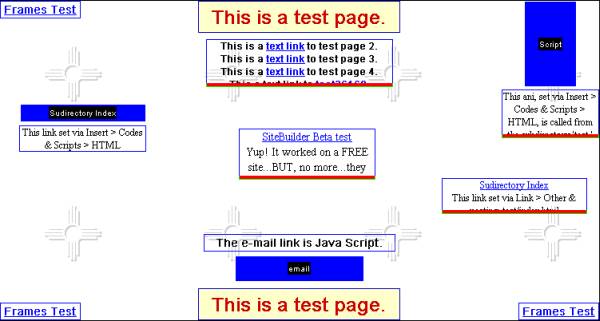
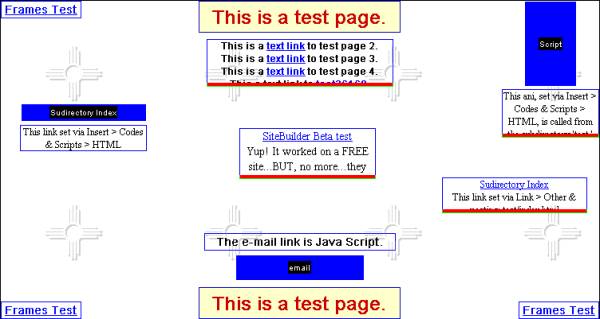
The observed problem with Yahoo GeoCities PageBuilder running under Sun Java is that in the PB edit view, the spaces between the lines in a PB text box are quite a bit greater than they need to be.
smsu_63 has provided a work-around for the Yahoo GeoCities PageBuilder/Sun Java text-spacing problem.
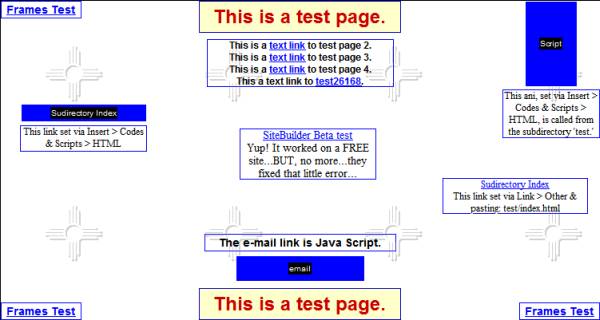
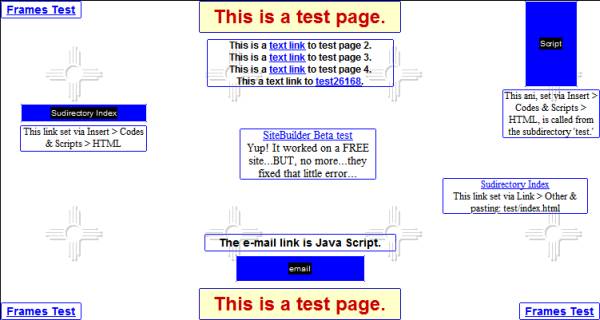
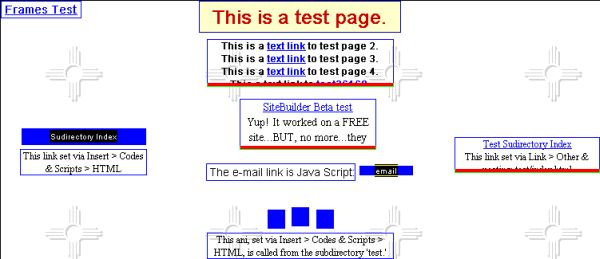
Since a picture is worth a thousand words, here are 5 screenshots of the same page in Yahoo GeoCities PageBuilder (page made with Yahoo GeoCities PageBuilder, Internet Explorer 6 (MS VM)):
| Internet Explorer 6 (MS VM) | Netscape 4.79 | Netscape 7.1 | Opera 7 |
Internet Explorer 6 (Sun Java) (different day, same page, same PC) |
As you can see, Internet Explorer 6 (MS VM) & Netscape 4.79 give the same view in Yahoo GeoCities PageBuilder. Netscape 7.1, Opera 7 & Internet Explorer 6 (Sun Java) also give a consistent view; but, their view is distorted as described by smsu_63.
So, if one wanted a back-up browser to Internet Explorer for launching & using Yahoo GeoCities PageBuilder; or, if one were unsure of her/his ability to control the Internet Explorer browser (as we all should be, facing transition from Microsoft Virtual Machine to Sun Java); the Netscape 4.7 - 4.79 series is a useful choice for Yahoo GeoCities PageBuilder-users.
Download your choice from the Netscape 4.7 - 4.79 series (you probably want a 'Complete Install'). You can keep Internet Explorer as your default browser & just use Netscape 4.7 - 4.79 for Yahoo GeoCities PageBuilder if that's all you need.
Try here if you want to download Microsoft Virtual Machine.
If you need to post a question somewhere, it's best to post it & wait for an answer. Don't post all over the place & ignore the replies...you'll never know what you missed...
I think the Yahoo GeoCities PageBuilder Help Group is a great place to post questions about Yahoo GeoCities PageBuilder.
Here is the BIG question:
What, exactly, happens when you click the 'Launch PageBuilder' link on the Yahoo GeoCities PageBuilder launch page?
Please see smsu_63's Yahoo GeoCities PageBuilder-readiness test page, Step #6 for great instructions on how to post the exact information we may need to help you.
Remember, your helpers are Yahoo customers, just like yourself. Unlike Yahoo, we'll tell you when Yahoo GeoCities PageBuilder is broken.
The author of this page is a Yahoo customer who tries to help other Yahoo customers. My thanks to boostmom, ladapup & smsu_63 for many conversations which lead to the development of this information.