Getting Started With OnChat
Next Tutorial: OnChat Member Page & Chat Applet WalkThroughs. Click right Arrow To Continue.
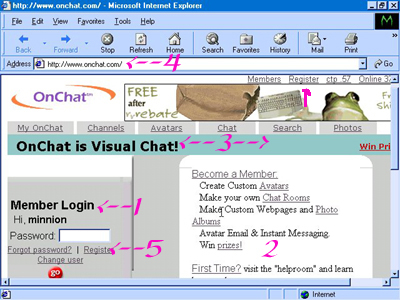
Getting Started: Getting started is easy with OnChat. First decide if you'd like to enter as a guest or as a member. Please keep in mind membership is free. ((Unless you choose to upgrade later. The free memberships are AWESOME in their own right and upgrading is a matter of CHOICE not necessity.We'll cover the difference between regular member accounts and upgraded ones later.)) If you'd like to try OnChat as a guest first than simply return to our main page and you'll see 2 Boxes. One for Shadow Town and One for White Angel's Chateau. Simply choose one, type in a nickname and click go and you'll be transported to OnChat. Both Shadow Town and White Angel's Chateau are rather extensive Chat Communities and are low volume as far as crowds so you won't be overwhelmed your first time. Both communities are Moderated ((these are rooms "Helpers" That can remove people that break the rules and help people with the chat as needed)) and welcome newcomers warmly. We recommend however that before you do this you finish reading the selection of helpful guides we've provided for you. If you choose to try Onchat as a member (((It's FREE!!))) than please proceed to this section for a walk through of the Sign-In Page at OnChat. Signing In At www.onchat.com Please note the screen captures provided below, with an explainations of their functions.
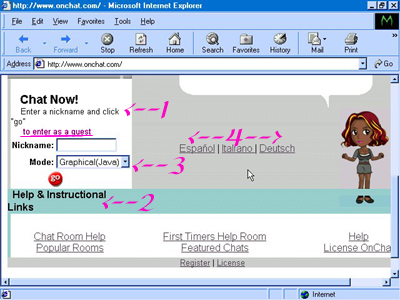
1:This is the member sign in area, where members already signed up can enter their member pages and via them into OnChat itself. To use this feature you will need to have your member name and password ready to type into the boxes provided and either click enter or click the go icon provided. 2: These are Quick links that will allow quicker access to portions of OnChat's various help guides, walk-throughs, or sign-up features. 3: These are more quick links that will allow you to access various OnChat features like your memberpage (members only), Onchat's Search Chat System Search Capabilities (Finding specific rooms, chatters, ect.) , your Onchat Photo albums, ect. 4: Thje Main Site Address .. : www.onchat.com (we recommend bookmarking) 5: Member Links: Forgot Password: If you've forgotten your password click this link and type in the address you opened the account under and OnChat will mail you your password (and as well as any other accounts and passwords opened under that email address inccidentially). We recommend saving this email...especially if you have more than one account (we advise however it's best to have just 1 or 2 to avoid confusing people and to prevent a lot of unused accounts.) Register: Non-Members can click this link to Sign-Up as a member. Change User: Where you (or other members of your family, friends, ect.) can switch which account is active. Please Note The Next Screen Capture: This is the GUEST Sign-In Area
1: You'll need to have a nickname ready to type into the box provided. Then click go for immediate entrance to OnChat and chatting. 2: OnChat Help and informational links. 3: Chat mode:OnChat offers several "modes" of entering the chat that will accomidate just about all computers and processor abilities. 4: OnChat is also available in other languages, click the appropriate language choice to activate a translator which will then display the pages in the language of your choice!! OnChat has communities where just about every language is spoken!