eRRion's
Sigma BC-700 Backlight instructions
Here it is! This page was specially made for those people from the CBR900 list that e-mailed me!
Note: Please walk through the entire procedure before trying this so you can e-mail me with questions.
Materials:
| Electrical tape |
| About 12" to 18" of wires |
| 12V Green LED from Radio Shack. They also have a red one, but the contrast is very bad on the Sigma's LCD background. |
| Wire coat hanger (or 12-gauge wire) |
| Very fine sandpaper (about 1000 grit) |
| Dremel w/ buffing wheel or your living room carpet |
| Plasti-Coat Rubber tool dip (optional) |
1. Prepare the LED
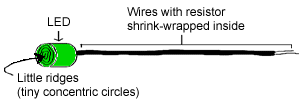
This is probably the most difficult step. (Please pardon my lack of artistic talent.This is just a simple sketch :) This is what the LED looks like when you buy it:
|
The goal here is to get rid of those little concentric circles on the face of the LED (they scatter the light and decrease the net luminosity of the light). What we want is a beam of light we can aim. |
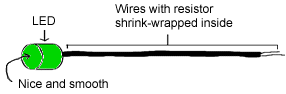 |
Sand the face of the LED with the 1000 grit sandpaper
until the ridges are gone. If you are really careful, you
can even make the surface slightly convex, which will
help in "focusing" the light. Next, buff the sanded surface using the Dremel with the buffing attatchment until the surface is shiny and polished (like a lens). If you don't have a Dremel handy, you can give it a few good swipes through your living room carpet to buff it, but you'll have to be a little more careful. |