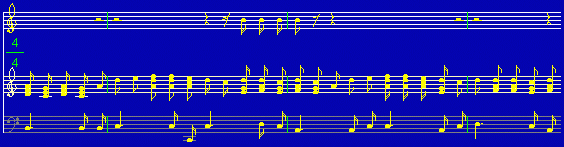
If you are running NM as an application, you can load music files
in *.text format from your directory. If you are running applet,
NM will load a hard-coded demo file.

You can modify, but unless you are running application, you won't
be able to save.

Use the four arrow keys to control the upper cursor. Use 'Z','z',
'X','x','C','c' keys to control the lower cursor.

Use Delete key to delete chords.
Use mouse to turn on/off the Insert mode at the lower left corner.

If there is more than one page, you can use PgUp,PgDown keys.
To input a new chord, use Return key, to add note to a chord use
left mouse button. To delete a note from a chord, use right mouse
button to click on that note.

To enter a space on the staff, position the lower cursor on "Bar",
and hit Enter.

To Enter a "#" or "b" sign, position the lower cursor on that symbol,
hit Enter, then move the lower cursor to a note and hit Enter. The
program will check if it is legal to have a sign there. If there
shouldn't be one there, it won't put it there.

The first seven positions are reserved for the "#" and "b" signs, the
cursors will automatically adjust themselves.

Use the mouse to click on the lower right corner for "Voice","High"
or "Low" on the staff.

Use "Esc" to escape without saving.

Time/Measure(i.e. 3/4), Speed and Percent can also be adjusted by left
and right mouse buttons.
|