| |
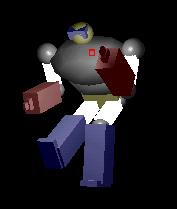 |
This is a simple
example of object hierarchy. We can imagine of object hierarchy
as a mode of representing complex object composed by more simple
ones related together. In this tutorial we'll learn two
new GL commands:
glPushMatrix()
& glPopMatrix()
to accomplish our target
and we'll model a simple robot.
|
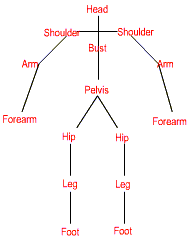
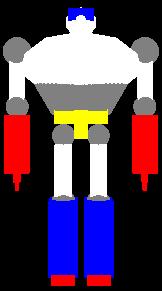
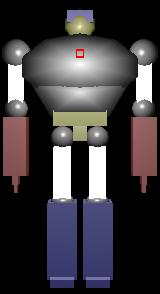
The robot structure:
|
|
|
|
| Fig. 1a - Object Hierarchy |
1b - GL model |
1c - GL light model |
Note the relationships between objects.
Leg is pelvis child and pelvis is
bust's child ...., forearm is arm's child and arm is shoulder's
child and shoulder is bust's child too and so on...
So, if we move bust for example,
legs and arms move too.
This is an object hierarchy.
Every piece of the robot is modeled
into a function and store in a display list so we'll have:
void struct_part_name(void)
{
glNewList(part_name,GL_COMPILE);
.../* GL Commands to model */
glEndList();
}
So, for example here is the code
for left arm:
void struct_left_arm(void)
{
glNewList(left_arm,GL_COMPILE);
// Shoulder
glTranslatef(1.1,0.25,0.0);
glScalef(0.5,0.5,0.5);
glColor3ub(128,128,128);
glutSolidSphere(0.5,20,20);
// Arm
glTranslatef(0.0,-1.10,0.0);
glScalef(0.5,1.5,0.5);
glColor3ub(255,255,255);
glutSolidCube(1.0);
glEndList();
}
>Note that in this example
I'll use some GLUT commands to draw Spheres and Cubes so remember
to link gl/glut.h in header's section as indicated below
...
include <gl/glut.h>
...
The most important function is DrawRobot()
that draws all parts of robot and with GL commands glPushMatrix()
& glPopMatrix() it establishes the relationships between objects.
Pseudocode:
void DrawRobot()
{
glPushMatrix(); /* all objects are bust's son
that is if we move bust all other parts move too */
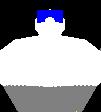
/*-------------------- DRAW HEAD & BUST -----------------------*/
glPushMatrix();
/* Draw head */
/* Draw bust */
glPopMatrix();
|
 |
/*---------------- DRAW RIGHT ARM & FOREARM --------------*/
glPushMatrix();
glPushMatrix();
/* Draw Right arm */
glPopMatrix();
glPushMatrix(); /* forearm is arm's child */
/* Draw Forearm */
glPopMatrix();
glPopMatrix();
|

|
/*-------------- DRAW LEFT ARM & FOREARM -----------------*/
glPushMatrix();
glPushMatrix();
/* Draw Left arm */
glPopMatrix();
glPushMatrix(); /* forearm is arm's child */
/* Draw Forearm */
glPopMatrix();
glPopMatrix();
|

|
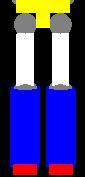
/*------------------ DRAW PELVIS & LEGS ----------------*/
glPushMatrix(); /* another glPushMatrix because
if we move pelvis the legs move too...
(legs are pelvis son) *//
glPushMatrix();
/* Draw pelvis */
glPopMatrix();
glPushMatrix();
glPushMatrix();
/* Draw Right thigh */
glPopMatrix();
glPushMatrix(); /* leg is thigh's child */
/* Draw Leg */
glPopMatrix();
glPopMatrix();
glPushMatrix();
glPushMatrix();
/* Draw Left thigh */
glPopMatrix();
glPushMatrix(); /* leg is thigh's child */
/* Draw Leg */
glPopMatrix();
glPopMatrix();
glPopMatrix();
glPopMatrix();
} |
|
The Code:
void DrawRobot(void)
{
/*----------------BUST & HEAD-------------*/
glPushMatrix();
glRotatef(bust_angle_y,0,1,0);
glRotatef(bust_angle_x,1,0,0);
glPushMatrix();
glCallList(bust);
glCallList(head);
glPopMatrix();
/*-------------------RIGHT ARM & FOREARM----------*/
glPushMatrix();
glTranslatef(0,0.25,0);
glRotatef(right_arm_angle,1,0,0);
glTranslatef(0,-0.25,0);
glPushMatrix();
glCallList(right_arm);
glPopMatrix();
glPushMatrix();
glTranslatef(1.25,-0.7,0);
glRotatef(right_forearm_angle,1,0,0);
glTranslatef(-1.25,0.7,0);
glCallList(right_forearm);
glPopMatrix();
glPopMatrix();
/*------------------LEFT ARM & FOREARM---------*/
glPushMatrix();
glTranslatef(0,0.25,0);
glRotatef(left_arm_angle,1,0,0);
glTranslatef(0,-0.25,0);
glPushMatrix();
glCallList(left_arm);
glPopMatrix();
glPushMatrix();
glTranslatef(1.25,-0.7,0);
glRotatef(left_forearm_angle,1,0,0);
glTranslatef(-1.25,0.7,0);
glCallList(left_forearm);
glPopMatrix();
glPopMatrix();
and so on...
In function main I'll added some keys
to control robot. They are:
'1' &
'Q' right arm control
'2' &
'W' - right forearm control
'3' &
'E' - left arm control
'4' & 'R' - left forearm control
'5' &
'T'- left thigh control
'6' &
'Y' - left leg control
'7' & 'U' - right thigh control
'8' &
'I' - right thigh control
KEY ARROWS:
Rotate model
PGUP &
PGDOWN: light control
'V'
'B'
'N'
'M': camera control
And finally here the bin & source...tutorial2.zip
Happy coding...
Arturo
"IRIX"
Montieri
: [email protected]
|
|