


|
You should have detected a positive relationship between education
and income. We are interested in how such a relationship is
significant -- that is, the explanatory power of Education on
Income. To see this, we need to apply an econometric model. We
will run linear regression now. The model is the following:
Incomei =
 + +  Sexi + Sexi +  Educationi + Educationi +  . .
 is the intercept, is the intercept,  is an intercept dummy, and is an intercept dummy, and
 is the slope coefficient. Here, we don't make any
assumption on the statistical distribution on is the slope coefficient. Here, we don't make any
assumption on the statistical distribution on
 . That
is unnecessary for an ordinary least squares (OLS) regression. For
more detail on OLS, see Statistics Refresher. . That
is unnecessary for an ordinary least squares (OLS) regression. For
more detail on OLS, see Statistics Refresher.
Back to Excel now. Select the data range, including the data
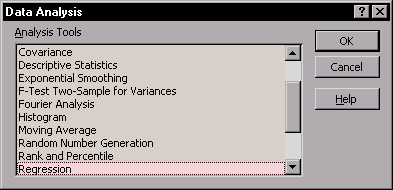
labels. Select Data Analysis... option from Tools
menu. Select Regression option and click
|
|
 .
.
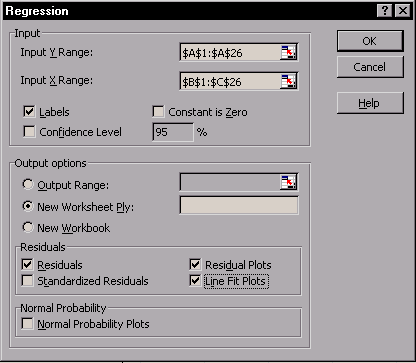
 Click on
 to change to the selection view. Left-click on cell A1, hold the
left mouse button and drag the cursor down to cell A26. This will
select the range A1:A26.
to change to the selection view. Left-click on cell A1, hold the
left mouse button and drag the cursor down to cell A26. This will
select the range A1:A26. to return to the normal view.