| Night Vision Golf TW2003 Library Visual Installation Tutorial |
 |
 |
 |
 |
 |
 |
 |
 |
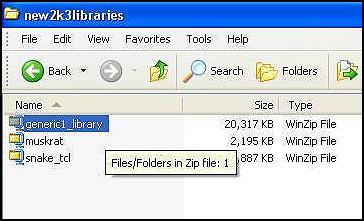
| Note: The original (6) 2002 "(coursenamehere).tcl" libraries found on the TW2002 CD and are also available for download at EA or from Notapro, need to be installed into a folder under courses by themselves as per EA's instructions. The link there is on my main page. After downloading the "zipped" library file you will need to locate it on your hard drive. I use the folders "C:\new2k3libraries" or "C:\new2k2libraries" that I created just for saving those hard to locate zipped files. The location you save the download zips themselves doesn't matter so much as just being consistent and being able to find them. After locating them on your hard drive, doubleclick the zipped folder to open the zip program. You should already have something like "PowerArchiver", "WinZip 8.1", or "PkZip". I utilize WinZip 8.1 in this visualization tutorial. |
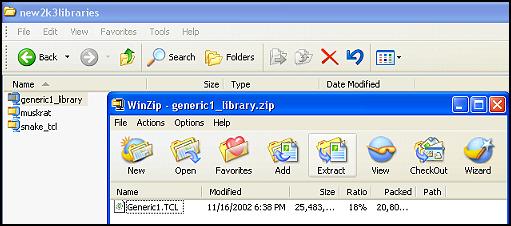
| Double-clicking the zipped file above will open the Zip program and in the preview window you will see the library.tcl file you need to install. In this case I am installing "Generic1.tcl" which is used in some of Steve Opfer's 2003 designs.. |
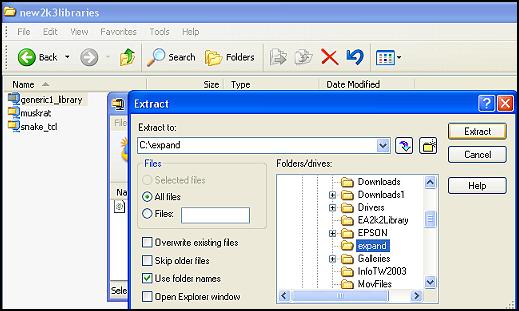
| After clicking the "extract" button above on the zip program you have the option as to where to extract the files. I recommend the folder I created below which is "C:\expand". This folder is optional and can be named anything you choose or you can even extract them to your desktop. They can be safely deleted after a successful install if you keep the original zip files. |
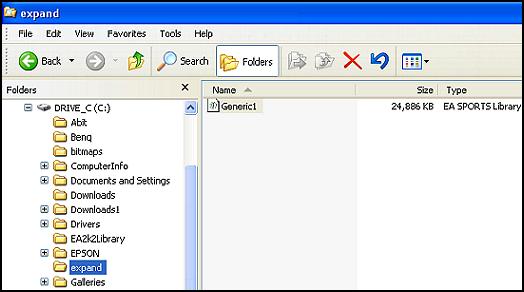
| Once the library file has been extracted to the c:\expand folder or your own location you can then close the winzip program and navigate to the location you extracted the files (mine is shown below) using an explorer window and in my case that was the c:\expand folder. |
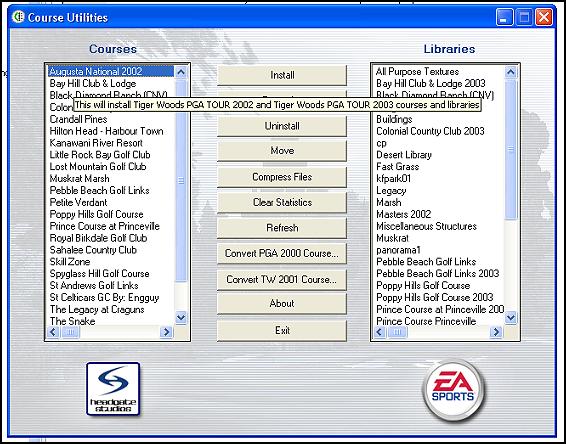
| Double-clicking the library file from your location or from my recommended c:\expand folder will open the Course Utilities program for TW2003. Click the install button on the Course Utilities window below: |
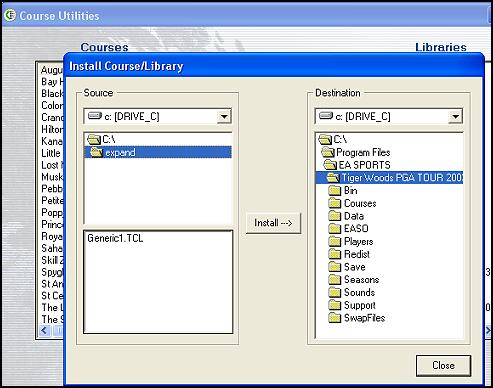
| Clicking install brings up the "Install Course/Library" program built into the Course Utilities. The default folder setting on both sides is Tiger Woods PGA Tour 2003 so you need to find the extracted files at your own personal location chosen or from my recommended "c:\expand" folder as shown. Once the folder is located the Generic1.TCL file will be shown in the bottom source window. (Note: because the default locations on both side of this window is TW2003, I normally just click on C:\ to locate the folder named C:\expand that I need to access. If you are using another drive you will need to access the C:[DRIVE_C] Source box at the left top.) ----RD |
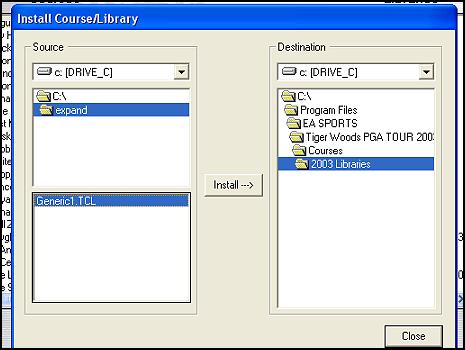
| Highlight the Generic1.TCL (my example file) and on the right side which is the Destination window open the "courses" folder and find the library folder you created. I use the folders "2003 Libraries" and "2002 Libraries" as explained in an earlier titorial. If you choose not to use individual folders for TW2002 and 2003 user created courses, then install the library files directly into the "courses" opened folder. |
| Once the destination and source folders are open and everything is highlighted as shown on the left click the "Install" button now. The install will take only a few seconds at most depending on how big the file is. Also notice that when you make the install make sure the destination folder is OPEN. It's a critical error a lot of people make. |
| Always install library files first before installing the course file itself. |
| Course installation procedure is real similar to the above with the exception you have the option to make a course folder to install your courses (*.tcx ) files into along with moving the flag.dds files into the same folder if necessary. A link to a course install procedure is to the right---------------> |