 |
 |
 |
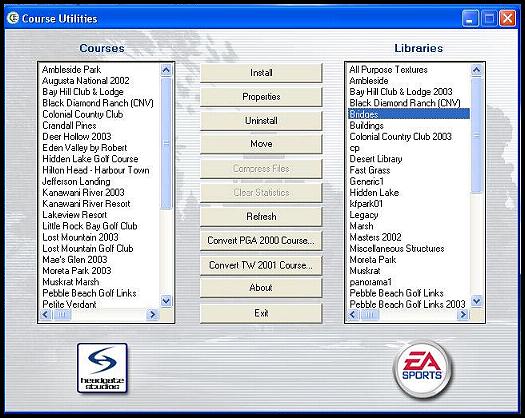
| Functions of the Course Utilities for EA Sports Tiger Woods 2003 PC version: "Install" After starting up your TW2003 Course Utilities this is what it will look like depending on what courses and libraries you have installed in your game.: Install: When clicked on brings up the "Install Course /Library" window of the CU itself. It is used to install courses and libraries as needed into the TW2003 PC game. The course itself is a *.tcr file. The libraries used all carry a *.tcl extension. A compressed EA course carries a *.tcx extension and may include other files with the course. You will find that out when you open it with your zip program. Properties: This brings up the "Course Properties" window of the Course Utilities. There are basically 2 sections to this part of the CU. Courses on the left and Library files on the right. It is always referenced to whatever course you have selected on the left side or whatever library on the right side you have selected. It is a multi-function utilility built into the Course Utilities. For example: If you have a library called "Bridges" highlighted when you open "Properties" then you will get the Bridges Library properties shown in the window that follows. At the top you will see the number of courses that utilize "Bridges". On my machine there are 14 courses utilizing the same "Bridges.tcl" library. This gives you an idea as to why we install only one file and utilize it as often as required by each course installed. The middle section is named "Filename" and references the location of the "Bridges.tcl" file. In my case it is located here: "C:\Program Files\EA SPORTS\Tiger Woods PGA TOUR 2003\Courses\Architect Libraries\Bridges.tcl" in my Architect Folder located in TW2003. The next small window denotes the "Size:" of the file at 4,353 KB. Let's look at the "Courses" side of this window. I will select Augusta National 2002 that I installed into TW2003. Clicking on Properties brings up a window with several small windows of information. The largest of these is "Libraries:". In it will be all the libraries that are installed for the Augusta National 2002 course. I count 12 total libraries. The "Filename:" box has a link to the course location: My location is here: "C:\Program Files\EA SPORTS\Tiger Woods PGA TOUR 2003\Courses\Augusta2k2\Augusta National 2002.tcr". Notice that I utilize the file folder named Augusta2k2 under the "courses" folder in TW2003. The next small window is named simply "Size:" and gives the size of the Augusta National 2002.tcr course file itself at 21,351 KB. The "Course Picture" is usually the splash screen *.tga file, but it can also be the flag.dds file. It needs to be a certain size and sometimes they aren't exactly right. Augusta 2002 uses the Masters Flag.dds file for a course picture and on the scorecard. The "Course music" if any is located in the next small window. Augusta National 2002 does not have one on my screen, but I intend to fix that someday...lol. It is not required to play the game. The "Course Text:" is the next and last small window. On my machine this file is included inthe course folder: "C:\Program Files\EA SPORTS\Tiger Woods PGA TOUR 2003\Courses\Augusta2k2\Read Me.txt". It is simply a readme.txt file but it can be viewed in TW2003 if it is properly referenced in this window. Part 2 will be dedicated to the "Uninstall" button on the Course utilities. -RD Allen 12/7/2002 |
| A Player operated & managed Website dedicated to all who love "The Game" and to EA Sports Tiger Woods 2003 PC Golf |
 |
