II.
PLANNING AND DESIGNING
LEARNING ENVIRONMENTS AND EXPERIENCES.
Teachers
plan and design effective learning
environments and experiences supported by technology. Teachers:
II-A: Design
developmentally appropriate learning
opportunities that apply technology enhanced instructional strategies
to
support the diverse needs of learners.
Evidence/Artifact 1
3rd Grade Science Lesson and Power Point
Reflective Statement 1
During Internship I I taught this lesson to my third graders and I plan
to use this lesson in my future teaching with revisions as
needed. When I taught this lesson to my students they had not had
much experience with technology inside the classroom. They
enjoyed having the Power Point displayed in the classroom and also
getting to interact with it. During the lesson the students were
able to add information to the slides as we found out more information
about the seeds we were dissecting. They also enjoyed correcting
my typing mistakes. I think through applying technology to my
lesson I was able to reach more of my students and meet their needs.
In the future when teaching this lesson I would like to have the
students have even more interaction with the Power Point. I believe
that the more interaction that the students have with the technology
the
more I will be able to reach the diverse needs of all the learners in
my classroom. This lesson could even be made into a longer unit
where we add information about our seeds in graphs and other
forms. I think that students would like being able to see their
work on the big screen.
Evidence/Artifact 2
Collecting
Family Stories Lesson
from Learn NC
Reflective Statement 2
When looking at Learn NC I found this lesson and think that it would be
a great technology enhanced lesson that would reach many students in a
classroom. I like the fact that the students get to share
information about their culture and background while using technology
that helps their learning needs. This artifact reaches not
only the students diverse learning needs but their diverse
backgrounds. I want all my students to shine through their
academic work and through their cultural background.
I would like to use this lesson with students in my classroom.
There are many different types of technology used. The students
will be able to use the Smart TV, Kidspiration, and a word
processor. These are some of my favorite technology resources and
would really enjoy sharing them with a class. Not only does this
meet many of the computer goals and objectives it reaches so many
learning styles.
II-B: Apply
current research on teaching and learning
with technology when planning learning environments and experiences.
Evdience/Artifact 1
PBS
Teacher Source
Technology Research
Reflective Statement 1
This artifact from PBS provides research about
technology and teaching. Through this web site I can find
information about how technology is impacting teaching through a list
of web sites on various topics. This web site provides links that
are about the pros and cons on effects of technology in the
classroom. I would like to use this web site to help me find
technology teaching practices that will benefit my students. I
feel that the research provided through PBS is current information
about the impact of technology on teaching.
Evidence/Artifact 2
Learn NC Best of the Web
Reflective Statement 2
Learn NC offers a section where teachers can find links to what they
call
the Best of the Web. I have used this web page several times and
really like how it works. There are links for each of the content
areas or you can search for a specific topic. In the educational
technology section there are a variety of links that relate to
teaching and technology. I would like to use this web page to
find
technology for the learning experiences of my students. I want to
be able to provide my students with the best information I can find and
I think that this web page would be a great place to find reliable
information. The educational technology link especially will
provided me with current information related to teaching and technology.
II-C: Identify
and locate technology resources and
evaluate them for accuracy and suitability.
Evidence/Artifact 1
Fact Monster
Reflective Statement 1
Fact Monster is new to me but every time I use it I find more
attributes
about the web site that I like. I think that this web site would
be
great for students to use during their free technology time.
There are so many educational links, games, facts, activities, and more
for the students to explore on this web site. I also like that
this web site offers information from history to math
conversions.
I think that Fact Monster would be very suitable to use in an
elementary classroom for a variety of things. I also think that
students could use this artifact at home. From what I have seen
on this web site I think that is reliable. Students could use
this
web site to begin work on research projects even. The history
section offers facts about a large variety of topics on an appropriate
level for third graders and above. For second grade and down I
think the the students would need more guidance with the site. I
think that students could read the information on their own and
understand it. I would like to use this with my Internship II
classroom of third graders.
Evidence/Artifact 2
Kidspiration
Reflective Statement 2
Kidspiration is one of my favorite technology resources. During
my technology class I was able to use the program. I think that
this program would be a great resource to use with a variety of
lessons to help students plan their thoughts out and help me explain
how ideas connect to one another. There are so many clip art
choices,
colors and designs. Students can express their thoughts and ideas
in so many creative ways. I believe that students really would
enjoy learning with Kidspiration.
Kidspriation is designed for the use of elementary age students.
When looking at other teachers lesson plans and in the planning of my
own lesson plans I have seen so many ways to use Kidspiration if it is
available to the school. Kidspiration would be suitable for such
activities as creating webs for writing, brain storming about
projects, it could even be used for math showing how different
operations connect to other ones.
II-D: Plan for
the management of technology resources
within the context of learning activities.
Evidence/Artifact 1
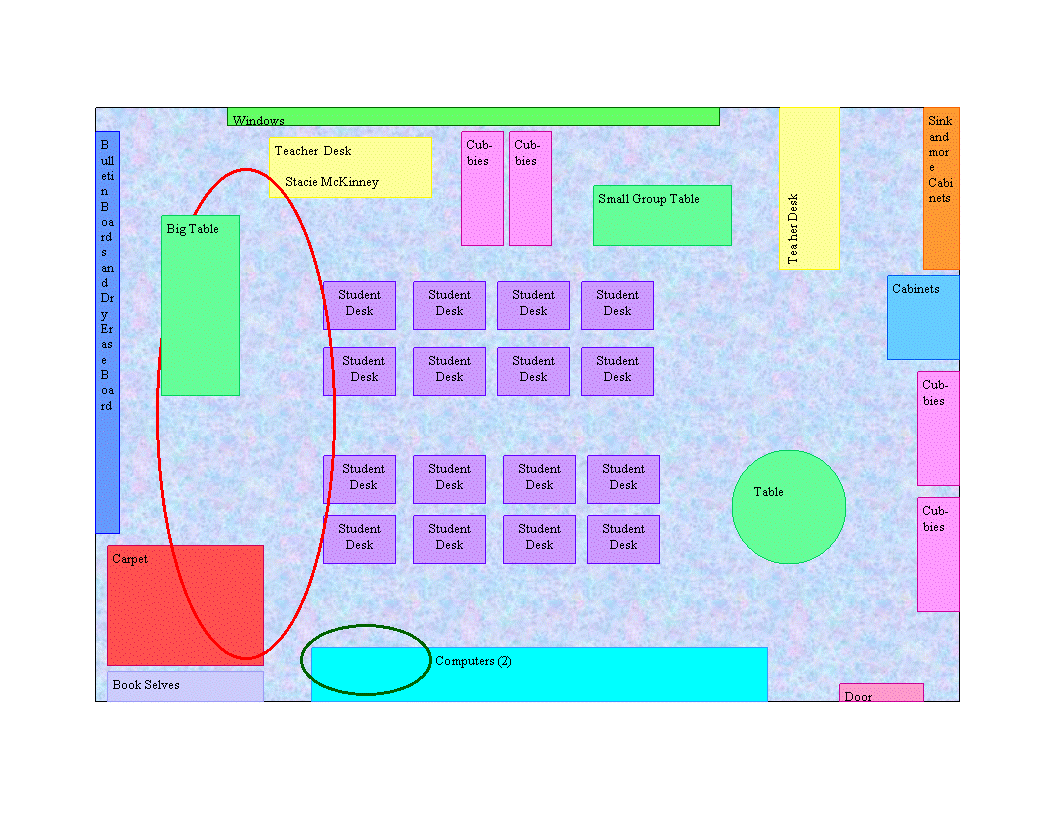
Classroom Setup
Reflective Statement 1
For this artifact I choose to use the layout of my classroom.
This is the lay out of my Internship I classroom. The layout of
the
classroom was created in Microsoft Publisher. In this program I
am able to move the pieces of my classroom around so that I can manage
the resources of my classroom. In this particular layout the
students have access to the computers in the classroom but they are not
used much during the lessons of the day.
I think a big part of planning for the management of technology
resources is where the resources are located and the students access to
them. When using this virtual classroom I am able to rearrange
several times to see what I think will work for my students and then if
the layout does not work in the real world I can come back again and
make a
new plan of management. When planning the layout of my classroom
I want the students to be able to use the technology resources as much
as possible but not distract other students working on other
assignments. I think this classroom setup is a very important
part of planning out the management of technology resources.
Evidence/Artifact 2
Unit
Plan
Reflective Statement 2
Throughout my unit plan I have planned for the management of technology
resources. This unit plan is full of technology resources, so
when planning it out I had to think about how to manage them.
When beginning my unit I thought about the technology goals I want to
have for my students. In order to have successful
management
of this unit I think that the goals have to be planned out first.
Then I
used technology resources for my research. I also have several
activities for the students to experience technology resources.
In
my lessons I have parts where I talk to my students about the
technology
we are using and how we should behave during this time. I think
that students need have standards told to them in one way or another so
that they are aware of what I expect them to do.
II-E: Plan
strategies to manage student learning in a
technology enhanced environment.
Evidence/Artifact 1
Assignment Calendar
Reflective Statement 1
The Assignment Calendar is made to help students and teachers through
an electronic calendar of assignments and other important classroom
dates. I believe that this web site would be a great technology
resource to use in a classroom. I would like to setup a calendar
for my students to be able to look at their assignments. I think
that a web site like this would be great for when students are absent,
this way they could stay up to date with what is going on in the
classroom. I believe that it would also be good for when students
get home and just cannot remember what they had for homework or when a
due date is. This artifact would be a great resource for managing
student learning through technology. Students will not only be
able to see their assignments and due dates they will be building on
their technology skills. Also this web site will make them more
prepared for assignment deadlines so that we will not have to prolong
activities because of late work. I want to use the Assignment
Calendar in my classroom to help manage my students learning through
technology.
Evidence/Artifact2
Blue Wet'N
Reflective Statement 2
Blue Wet'N is a web site provided through AT&T for educators to
find
quality web sites. This artifact would be useful in plan
strategies
for student learning in a technology enhanced environment. When
using web resources I want to use the best for my students, this
web site seems to be great resource for finding web resources that will
suit the needs of my students. In comparison to other education
web sites Blue Wet'N can be searched by grade level, format, or subject
area. I think in order to manage student learning I need to know
what is out on the web and how to find the best of what is on the web
through an educational point of view.
Page Author: Stacie McKinney [Back]