 .
.
.
Comparison with other methods
.
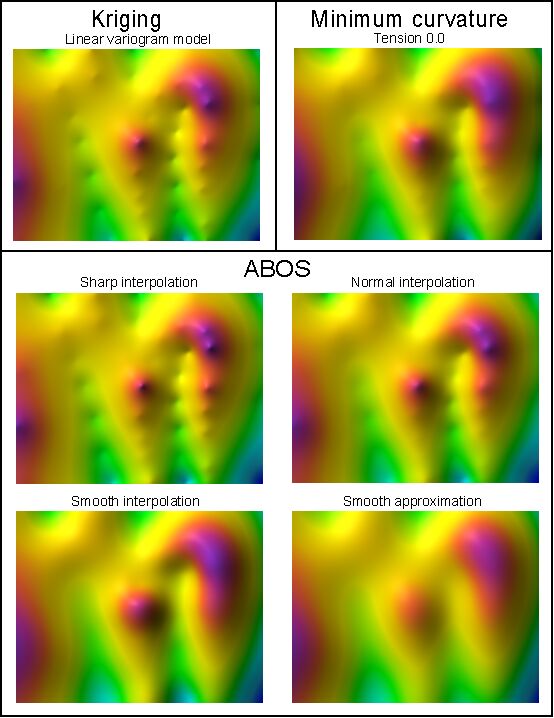
The program SurGe contains an interpolation / approximation method named ABOS (Approximation Based On Smoothing), which is described in User's manual. The quality of the resulting surface is affected by the parameters Smoothness and Accuracy. The effect of these parameters and the comparison with commonly used methods is illustrated in the next picture. It is obvious that ABOS can create surfaces comparable both to Kriging and Minimum Curvature methods.
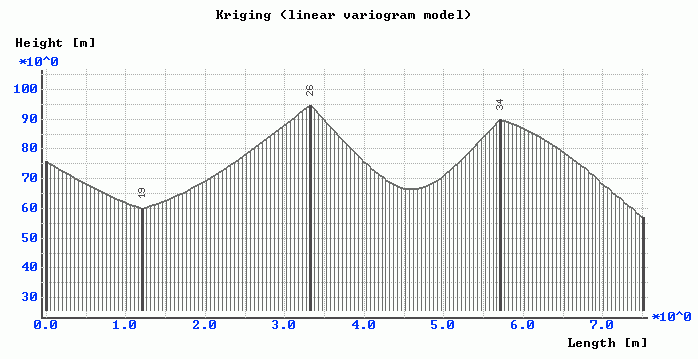
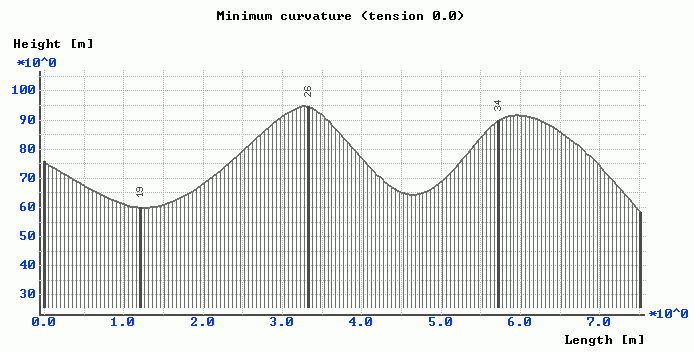
Cross-sections through created surfaces provide another interesting comparison.
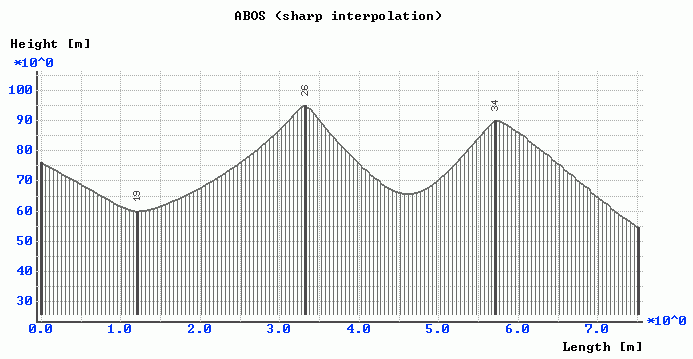
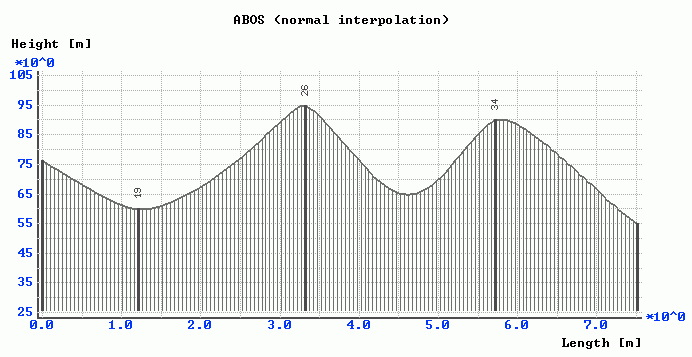
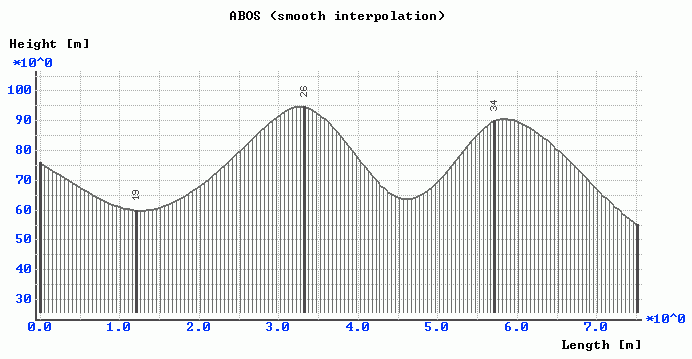
The mathematics of ABOS is very simple in comparison to the mathematics of commonly used interpolation / approximation methods, such as Kriging, Radial Basis Functions or Minimum Curvature methods. For example, the Kriging method needs to compute an experimental variogram, to fit the variogram model and to solve the system of linear equations. If the number of input points is large (say thousands), the number of linear equations is also large and cannot be solved in an acceptable time - in such case, additional parameters influencing the quality of the resulting surface must be specified - search radius, number of search sectors, maximal number of points in each sector and so on.
The mathematical complexity is related to the computational time -
Kriging needs for example 115 seconds for interpolating 9500 points
into a grid of 200x400 nodes, while ABOS needs 10 seconds (time was, of course,
measured on the same computer).
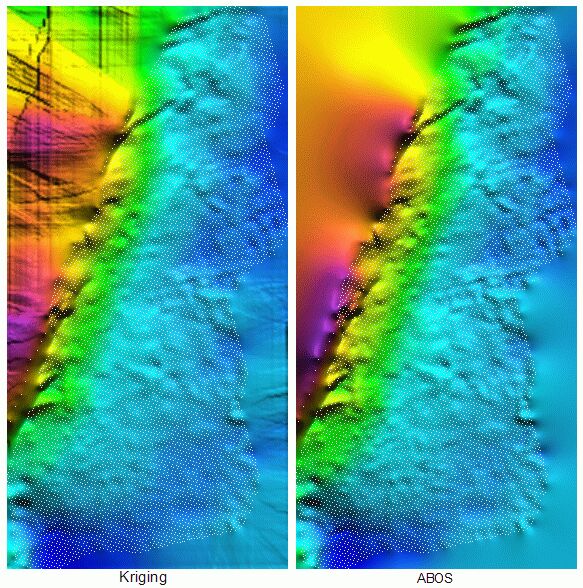
The result of both interpolations is shown in the next picture. While the
surface in regions with no data is smooth in the ABOS case, Kriging
created, in these regions, strange jumps resulting from the search
algorithm. The Radial Basis Functions method has the same problem.
10.12.2008
- version 6.50 released
06.12.2008
- new 3D OpenGL surface viewer SurView was
created as a stand alone utility, suitable namely for displaying of the large
broken grids. Main features are:
- display of shadowed surface with optional change of light height
position and light intensity
- move, zoom, rotation and z-scaling using shortcut keys or by mouse
dragging
- parallel (orthogonal) or perspective projection
- switch between color + shadow / only shadow / only color
display modes
- switch between wireframe and filled surface
01.11.2008
- change of my ordinary mail address - see Main
page
04.06.2008
- SURGEF.EXE was compiled with GNU Fortran v. 4.4.0. Now it is about 7% faster.
11.02.2008
- output of isolines as ASCII file (see the menu item Output /
Isolines as ASCII file) now contains 11 decimal places.
04.11.2007
- error in isoline computation corrected.
- better diagnostics in input data procedures.
26.06.2007
- bug fixed in internal filter.
25.05.2007
- Gallery
of surfaces created and displayed by SurGe was added to web pages.
22.05.2007
- SurGe documentation now contains animated GIF showing interpolation process.
See User's Manual.
20.05.2007
- transmission of grid size between SurGe Project Manager and SurGe was not
correct.
23.02.2007
- Linux users may try to use SURGEF interpolation engine as a console application
(see Main Page.).
19.02.2007
- number of input points is limited only by available computer memory. SurGe
was successfully tested with 5000000 points.
- new algorithm of internal filter - now it is about 7 times faster (5000000
points are filtered within 5-15 seconds).
- reading of input data is more than two times faster thanks to the new routine
ATOFL for reading real numbers in ASCII format.
07.11.2006
- version 6.30 released
05.11.2006
- cosmetic enhancement of the cross-section display.
04.11.2006
- new sections in the SurGe Tutorial:
How to simulate wedging out of
layers and Maps of thickness and
volume calculation.
03.11.2006
- new section in the SurGe Tutorial:
How to directly convert seismic reflection
times to structure depth.
29.09.2006
- running of new SurGe instance with selected map detail - see section
Detail of map in the SurGe User's
Manual.
27.09.2006
- text specification in the background mode. See section
Background in the SurGe User's
Manual.
21.09.2006
- derivative of surface can be computed as the size of gradient vector -
see Math calculation with grid.
19.09.2006
- using of SURGEF in applications was extended. Follow
this link for more information.
30.08.2006
- interpolation with trend surface was extended. See
Interpolation with trend surface
in the User's Manual.
12.05.2006
- all points XYZ now may have the same z-coordinates.
10.05.2006
- bug fixed in gradient lines computation
04.04.2006
- display of shadowed relief (shortcut key Alt+Q) is three times faster.
29.03.2006
- output of grid in the ArcGIS format - see the menu item Output / Grid
as ArcGIS file.
- new command line utility ARCGRD supporting import of grid in ArcGIS
format.
- supported map formats are listed in the new section in
Support for other map formats.
28.03.2006
- cosmetic enhancements of 3D view display and print.
20.03.2006
- bug fixed in DEMGRD utility.
15.03.2006
- version 6.10 released
11.03.2006
- iteration process in SURGEF.EXE can be stopped by Esc key. In this
case the actual iteration step will be completed before the stop.
09.03.2006
- new algorithm of internal filter - now it is about 10 times faster.
- maximal number of input points was increased from 100000 to 300000.
05.03.2006
- SURGEF.EXE now uses dynamical allocation of memory in spite of the fact,
it is compiled by FORTRAN 77. Grid size is limited only by available memory.
17.02.2006
- a view point in the 3DVIEW mode can be changed by mouse movement, if the
left button is pressed.
13.02.2006
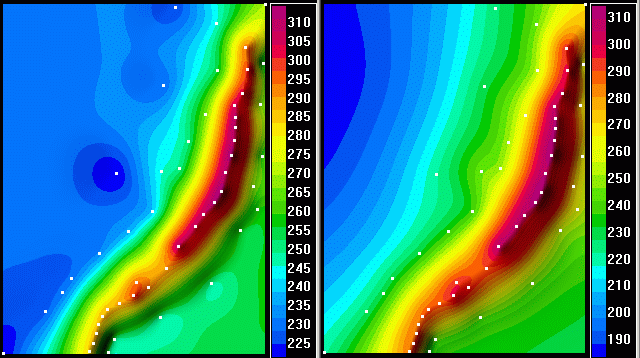
- SurGe now automates the interpolation based on a trend surface. This feature
improves extrapolation properties of resulting surface in areas not containing
points XYZ (compare the two pictures below). Details are in the section
Interpolation with trend surface
in the User's Manual and in the SurGe Tutorial in sections
How to obtain trend surface and
How to utilize trend surface for improving
extrapolation. This new function is under the Interpolation
menu.
11.02.2006
- new item under the Interpolation menu was added - see the section
Data analysis in the User's
Manual.
01.02.2006
- information about upper Filter limit in the documentation is obsolete
and was corrected to 9999. Special value 0 means that only the points
having the same x and y coordinates will be filtered.
25.01.2006
- name of GRASS output files was corrected - see the
User's Manual.
19.01.2006
- boundary in the digitization mode can be created as a convex envelope of
XYZ points. See the section about
Boundary in User's Manual. Practical
usage of convex envelope is described in the section
How to modify the size and the shape of the
grid area in the SurGe Tutorial.
12.01.2006
- SURGEF.EXE enables to create a boundary as a convex envelope of XYZ points.
See Using SURGEF in applications.
05.01.2006
- new dialog Scaling and translation (see the menu item
Transformation) enables to multiply and/or translate any combination
of coordinates. It is recommended to save transformed coordinates (use the
menu item Save objects) and to perform new interpolation, because
after any transformation of coordinates the surface does not correspond to
changed data.
12.12.2005
- version 5.90 released
08.12.2005
- a click on mouse right button in move/zoom mode now enables to select
the way, how to perform interpolation. For details see
SurGe Tutorial.
01.12.2005
- dialog box Interpolation parameters now contains the list of pre-defined
parameters suitable for desired type of interpolation / approximation. For
details see SurGe Tutorial.
25.11.2005
- new interpolation mode (LES interpolation) suppresses an exceeding of local
extreme values. It is suitable for zero based maps.
16.09.2005
- correction of wrong boundary display in case of extremely great enlargement
of map.
04.09.2005
- command line utilities supporting import of DEM, GRASS and Shapefile data
formats can be now downloaded as a separate file. Details are in
SurGe conversion utilities.
03.08.2005
- the maximal length of point labels was increased from 10 to 23.
02.08.2005
- in the digitization mode it is now possible to measure horizontal distance.
See How to measure horizontal
distances in the Surge Tutorial.
28.07.2005
- computation of cross-section was improved and the error message Too
small distance between cross-section points was removed, because now
there is no reason for it. Maximal number of cross-section points was increased
from 99 to 333.
13.05.2005
- minor bug in FMEW fixed.
29.04.2005
- installation program now detects, if your CPU supports MMX and SSE2
instructions (for example Pentium 4, Pentium Centrino, Xeon, ...). If yes,
the program installs SURGEF.EXE utilizing these instructions. Then the
interpolation is about 25% faster.
28.04.2005
- section Using SURGEF in
applications in User's Manual was updated.
21.04.2005
- computation of the matrix NB is
now more than three times faster for surfaces with faults.
20.04.2005
- computation of
DZ values near faults was corrected.
This problem caused bad convergence if there were points XYZ too near to
faults.
15.04.2005
- section Output in User's
Manual was updated.
10.04.2005
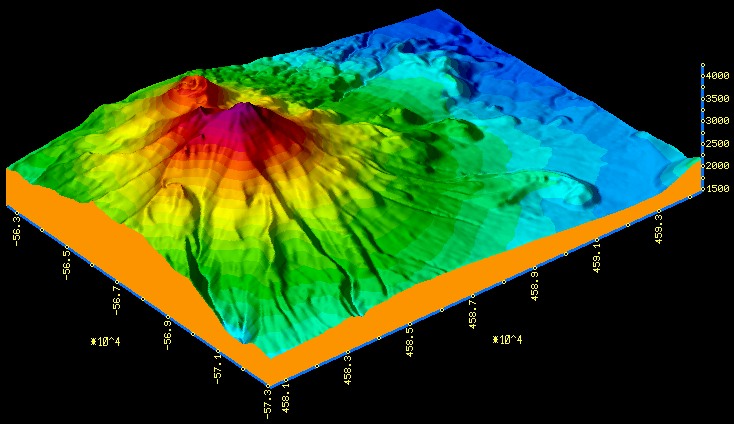
- new shadowed display mode in 3D view:
Shortcut key E displays the surface with pure colors and clears all shadows.
Shortcut key Alt+Q adds shadows with specified angle and intensity. It can be used several times with different angles and intensities (see the next picture).
Shortcut key W displays the surface with actual setting of shadows (after rotation, zoom, ...).
09.04.2005
- error in faults definition is now described in the
User's Manual.
03.04.2005
- new section in the User's Manual
describing a possibility to call SURGEF.EXE from user applications.
25.03.2005
- filter built in the program SURGEF is now more than two times faster. For
example, 30000 points can be filtered within 5 seconds.
18.03.2005
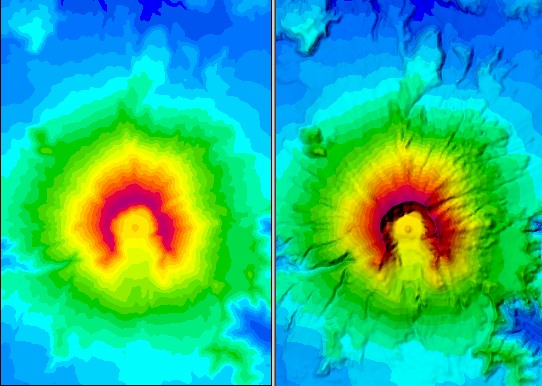
- shadowed relief display (shortcut key Alt+Q) improves a 3D feel
of raster color map - compare the next two pictures.
04.03.2005
- points (and labels and / or z-coordinates, if they are displayed)
can be displayed (using the shortcut key Alt+S) in colors indicating
their z-values. See the next picture:
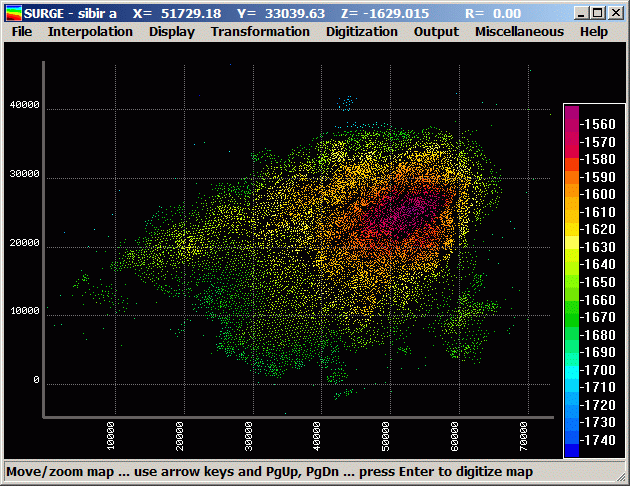
This function is enabled only if raster color map or isolines are not displayed.
03.03.2005
- the speed of interpolation algorithm has increased by cca 25%.
24.02.2005
- SurGe Tutorial was extended - see new chapter
Print.
23.02.2005
- cross-section display was enhanced and bug in the description of layers
was fixed.
21.02.2005
- two Excel macros were created for Excel users. The first one enables to
write selected block of data into ASCII file, the second one creates auxiliary
file #EXCL#.DTA and runs SurGe on this file. See
SurGe and Excel in documentation.
- SurGe now exits properly, if one of input files has wrong format.
17.02.2005
- new shortcut key Ctrl+E enables to display a mesh and labels, while
previously implemented shortcut key Ctrl+S displays only a mesh.
Ctrl+E also displays axes, if there is enough space on the left or/and
bottom side of the map. If there is not enough space, use arrow keys for
moving of the map. See menu item Display / Mesh labels.
09.02.2005
- version 5.70 released
08.02.2005
- shortcut key Ctrl+F3 enables quick creation and preview of map
- if 0 0 (zero space zero) is typed as a response to SURGEF prompt
SMOOTHING [ 16]: 0 0
then only per partes constant interpolation is performed
29.01.2005
- implementation of new tensioning algorithm (see the
User's Manual for details).
- interpolation process is two times faster in average
(the speed was tested on data sets provided by SurGe users):
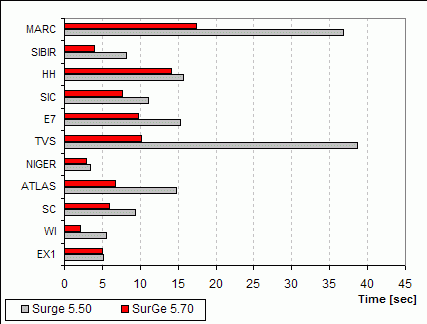
- linear tensioning has four degrees (0-3). The level
3 corresponds to the level 2 in the previous version.
- shape of generated surface near to faults is apparently
better.
- estimation of number of smoothing and tensioning repetitions was enhanced
and default values ensure good quality of generated surface outside the convex
envelope of points XYZ.
28.12.2004
- the estimation of grid size in SURGEF.EXE was improved.
21.12.2004
- algorithm of Faster convergence was improved.
14.12.2004
- in the working directory there can be two new files for common definition
of color / isoline levels, NAME.CL and
NAME.LV. See the
User's Manual for details.
- fixed problem with color scale, if values out of boundary are blanked.
10.10.2004
- fixed problem with mouse cursor in the move/zoom mode.
- SURGEF.EXE now computes average deviation
1/NB*åabs(DZi)
at each iteration step and displays overall time of interpolation.
22.09.2004
- new menu item Output / Z-values at points was added. It reads
X and Y coordinates from the specified input
ASCII file, computes corresponding Z value and writes the
result (X, Y and Z values)
into specified output file. The input file must contain X
and Y coordinates in the first two items of each row.
The rest of row is copied into output file.
The format of the input file rows must be:
X Y [any-text]
The format of the output file rows is:
X Y Z [any-text]
20.09.2004
- fixed problem with installation directory, if the name of the directory
contains spaces.
20.07.2004
- SurGe Project Manager did not work on some computers with Windows95
and Windows98. The problem was fixed.
14.07.2004
- SurGe Project Manager now enables to create copy of actual subproject
or actual map.
- fixed problem with mouse cursor blinking in the move/zoom mode.
01.07.2004
- the background is printed, if it was displayed
- fixed problem with blinking display, if the "Show window contents
while dragging" is switched on (see the system setting of
"Effects" in the desktop "Properties").
23.06.2004
- the raster color map is printed, if it was displayed
21.06.2004
- the axes in the printed map can be switched on / off - see the dialog box
for map printing.
- bug fixed in the initial setting of the mesh scale.
11.06.2004
- version 5.50 released
08.06.2004
- Surge Project Manager was extended. Now it contains pre-defined grid size
and buttons for editing color map levels and isoline levels.
If the grid size in the X direction is zero, SURGEF.EXE suggests appropriate
value.
If the grid size in the X direction is positive and the grid size in the
Y direction is zero, SURGEF.EXE accepts the first value and suggests appropriate
second value.
If both values are positive, SURGEF.EXE accepts them.
08.06.2004
- new level of linear tensioning was involved into SURGEF.EXE. Now there
are three levels of linear tensioning:
0 ... no linear tensioning - corresponds to the "Linear interpolation"
switched off in the previous version
1 ... medium linear tensioning - corresponds to the "Linear
interpolation" switched on in the previous version
2 ... strong linear tensioning - new level of linear tensioning.
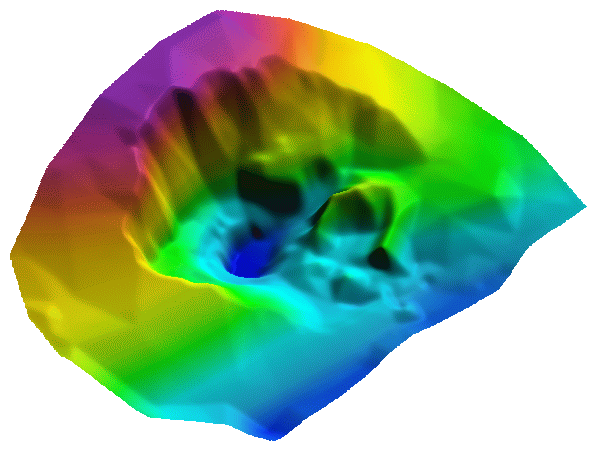
If the second level is used with the small number of smoothing (say from
1 to 5), the SurGe can be used for so called digital model of terrain - as
an example see the digital model of a stone quarry in the next picture.
07.06.2004
- update of User's Manual
20.05.2004
- update of User's Manual
15.05.2004
- sharp/smooth model at local extremes was improved by extending of the smoothing
parameter. Now the smoothing parameter can have two formats:
1) number 0.00 - 9.99, which is equivalent to the original smoothing
parameter
2) number 100.00 - 999.99, where the first two digits divided by 10
determine so called shape factor, which has influence on the shape
of surface in the surrounding of sharp local extremes. The smallest value
1.0 means, the shape will not be changed and any greater value (1.1-9.9)
means, the local extreme will be sharper. The remaining digits have the original
meaning.
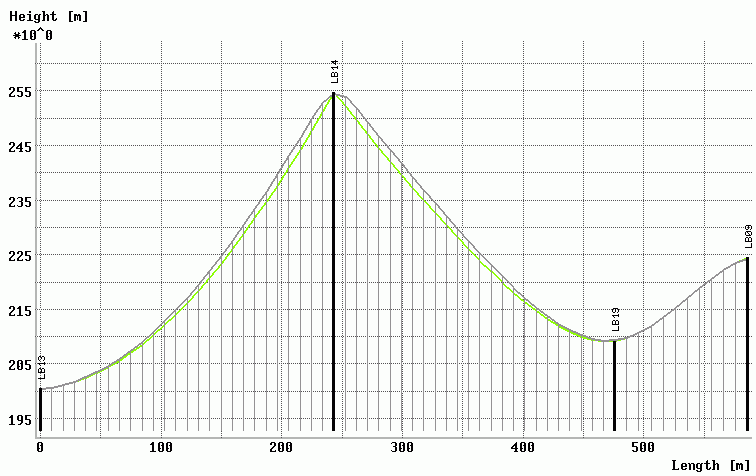
Example: extended smoothing parameter 300.5 means, the original smoothing
parameter is 0.5 and the shape factor is 3.0. The cross-section plot illustrates
the effect of such shape factor - the gray curve corresponds to the shape
factor 1.0 and the green one corresponds to the shape factor 3.0.
Remark: If the smoothing parameter has the first format, the shape factor has default value 1.0.
05.04.2004
- cosmetic improvement of 3D display.
31.03.2004
- error in compilation of the FMEW.EXE - wrong compiler switches were used.
Sorry for this failure. Now FMEW runs OK.
21.03.2004
- as a response to request of many users, project levels in the SurGe
Project Manager was extended from 2 to 3 - see the documentation
for SurGe Project Manager.
17.03.2004
- GFILTR was rewritten as a dialog-based windows application (see description
in the Tutorial) and integrated
into SPM.
14.03.2004
- version 5.00 released
12.03.2004
- SurGe now uses free installer for Windows programs "Inno Setup".
The installation is quite easy now.
11.03.2004
- the first version of SurGe Project Manager
(SPM) was released. SPM enables to manage projects and maps, to run SurGe
for selected maps, to edit data of map objects (using stand-alone editor
FMEW or using any ASCII editor selected by the
user), to calculate volumes between two surfaces (using stand-alone program
VOLUME) and much more. SPM and FMEW has some
limitations for unregistered users.
26.02.2004
- in most cases the number of iterations can be now decreased by the
transformation Pnew =
A*Pold+B, where
P is smoothed matrix (see
User's Manual) and
constants A and
B minimize the term
å(A*f(Xi,Yi)+B
- Zi)2. The resulting surface is
somewhat smoother, but the number of iterations is decreased by cca 30%.
See new check button Faster convergence in the dialog box
Interpolation parameters under the menu Interpolation.
- new dialog box Point and label display setting under Display
menu. Replaces menu items under Display / Font size and enables
to set all display combinations, which are also available by keys Ctr1+1,
... ,Ctr+4 (font size setting), Ctrl+Alt+L (hide/display labels
and/or z-coordinates), Ctrl+Alt+P (display of points) and
Ctrl+Alt+T (display of added points).
25.02.2004
- new dialog box Objects for interpolation in the menu
Interpolation. Replaces checked menu items in the menu File.
24.02.2004
- display of points can be changed using shortcut key Ctrl+Alt+P and
display of added points using shortcut key Ctrl+Alt+T. These keys
switch between modes:
- hide all points
- display points as pixels
- display points as small rectangles
- display of point labels and/or z-coordinates in map and 3D view can be
changed using shortcut key Ctrl+Alt+L. This key switches between:
- hide all labels and/or z-coordinates
- display only point labels and/or z-coordinates
- display only added point labels and/or
z-coordinates
- display all point labels and/or z-coordinates.
13.02.2004
- bug fixed in 3D display of labels, if the grid is doubled
- correction of 3D view, if the surface is approximative
11.02.2004
- version 4.30 released
10.02.2004
- levels of raster color map can be specified in the ASCII file
NAME.CLs, where
s is a suffix (see
User's Manual for details).
29.01.2004
- SURGEF now suggests "reasonable" dimensions for grid.
22.01.2004
- shortcut keys F2,...,F9 were added into menu item Interpolation.
13.01.2004
- bug fixed in the smoothing of the existing grid, if the grid is read
from a file
09.01.2004
- isoline levels can be specified in the ASCII file
NAME.LVs, where
s is a suffix (see
User's Manual for details).
- bug fixed in isolines calculation
05.01.2004
- correction of color map display, if the function "Substitute below" or
"Substitute above" is applied
- calculation of the difference vector has been corrected to obtain better
information about convergence in case of data with great difference of z-values
at very near points.
19.12.2003
- change of e-mail address: [email protected]
14.12.2003
- possibility to change font size using shortcut keys Ctrl+1, ... ,
Ctrl+4 (see new item in the Display menu)
09.12.2003
- bug fixed in formatting of the ASCII grid file
- warning message about no existing grid file at start of program was
suppressed
- installation did not contain the file SURGEF.EXE as referenced in
documentation, but an identical file with a different name - 3DGRAFF.EXE.
Thanks to Avijit Chowdhury for warning! The problem is now corrected
in the new installation package.
08.12.2003
- flexible formatting in some dialogs
- flexible formatting of records in output ASCII files
05.12.2003
- bug fixed in color scale
03.12.2003
- color scale enhanced
- correction of axes description in 3D view
01.12.2003
- new SurGe presentation at WEB page
http://www.digitalgrove.net/Toolbox_mappers.htm.
(Thanks to Paul Pingrey!)
10.11.2003
- version 4.20 released
- extension of documentation
- correction of minor bugs
10.03.2003
- the first publication of SurGe on the Internet
- version 4.10 released