|
What is TCP/IP?
TCP/IP stands
for Transmission Control Protocol/Internet Protocol. TCP/IP is a piece of
networking software.
The package will
contain two main things:
A set of
networking protocols
Network
applications which use the networking protocols
The TCP/IP
protocols provide the ability to connect machines regardless of the
underlying network cabling and also regardless of the operating systems in
use.
The main feature of these protocols is that they provide an internetworking
capability.
The network applications are called services. TCP/IP provides the three core
services:
File transfer,
Remote login, Electronic mail
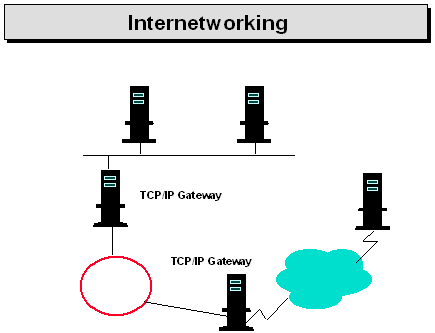
Internetworking
Most networks are established to server the needs of a particular group. The
groups will choose a hardware technology appropriate to their communication
needs. Some might choose slow links over great distances others would choose
fast links over shorter distances...
Internetworking is the technology which allows the connection of separate
physical networks. One of the main goals of TCP/IP was to provide an
internetworking architecture. The connection of a number of separate
networks results in an Internet.
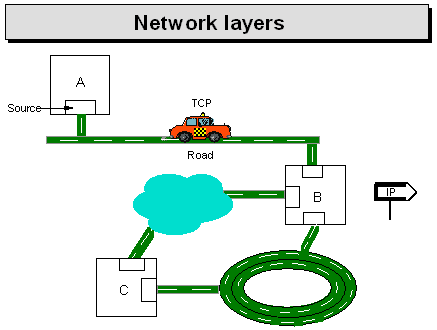
Four Layers of
TCP/IP
For a long time all communications have been layered in their architecture.
A simple layering might involve just two layers:
Software,
Hardware
A more
sophisticated model would divide the hardware layer into two (resulting in
three layers):
Software, Network
card, Cable
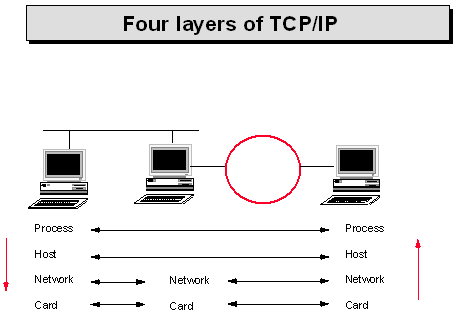
Each layer
performs a discrete task. The layers are often called protocols. The layers
sit on top of each other.
When data is sent over the network it is passed down through all the layers
and then when it reaches its destination the data is passed up through all
the corresponding layers. (What comes down, must go up!)

TCP/IP actually
comes in four layers. A set of layers is often called a protocol stack. The
TCP/IP stack contains the TCP/IP layers.
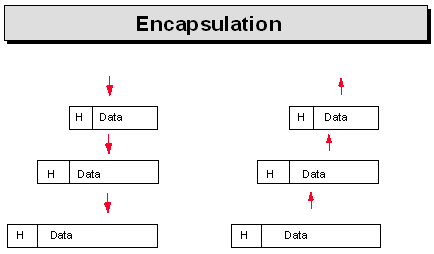
With layering
comes three main fundamental concepts:
Encapsulation,
Demultiplexing, Fragmentation
Encapsulation
Each layer takes data from above and encapsulates it into the data area of
its own "packet". An analogy is that each layer will take the data and
envelope from above and place it in its own envelope which in turn is passed
to the layer below.
Demultiplexing
This is the reverse of multiplexing. When a packet arrives at a host the
layers must pass the packet up to the layer above. It is not untypical to
have more than one layer sitting on top of a layer. In this case the lower
layer must decide which layer to pass the information up to. In other words
some form of Demultiplexing is required.
Fragmentation
Briefly fragmentation is where the data in one layer is split up into
smaller units so that the lower layers can handle the data correctly. This
will be explored in detail later.
History
Beginnings
In the late 1960s The Advanced Research Project Agency (ARPA) wished to
connect its computers.
Note: ARPA later became known as the Defence Advanced Research Project
Agency (DARPA).
The network produced became known as the ARPANET. This network linked
universities and government agencies together. It is important to remember
that the ARPANET was essentially a hardware project. The American Department
Of Defence (DOD) was heavily involved in funding at this stage. The initial
protocol used by the ARPANET was called NCP. No thought had been given to
expansion.
By the mid 1970s NCP could no longer cope with the size of the network and
was therefore replaced with the Internet Protocol Suite. The Internet
Protocol Suite was later named as TCP/IP after its two main protocols.
From January 1983 all computers wishing to connect to the ARPANET were
required to use the TCP/IP protocols. Also in 1983, The Department of
Defence separated the network into separate networks:
ARPANET For
experimental research
MILNET For
military use.
Berkeley
In the early 1980s Berkeley University ported the TCP/IP protocols to their
version of UNIX. This made TCP/IP ever more popular and also ensured that
TCP/IP became the main method of connecting UNIX machines. As well as
porting the protocols Berkeley also added UNIX like TCP/IP applications.
The Internet
From the ARPANET came The Internet. The researchers who developed the
Internet architecture thought of the ARPANET as a dependable wide area
backbone around which The Internet could be built.
The Internet began around 1980 when DARPA started converting machines
attached to its research networks to the TCP/IP protocols.
Today the ARPANET has been replaced by new technologies but MILNET still
forms the backbone of military communications. The success of the TCP/IP and
the Internet led other groups to adopt it. The National Science Foundation
took an active role in enabling TCP/IP to connect as many scientists as
possible.
At the time the ARPANET was declining a new backbone network was produced.
This new backbone was called NSFNET. NSFNET is now the main backbone of the
Internet.
The Internet
The Internet is an example internet. It consists of over 5000 LANs and is
based on TCP/IP. Many problems on the Internet result in developments in
TCP/IP to overcome these problems.
The Internet connect most of the US research institutions. The Internet
expands across the world and is not just limited to the US. The Internet has
been described as a large research project to which anyone can contribute by
way of RFCs.
The IAB and RFCs
TCP/IP did not arise from a particular vendor or recognised standards body.
TCP/IP is "controlled" by the Internet Activities Board (IAB). The main role
of the IAB is:
to set the
technical direction of TCP/IP
Standardise
relevant protocols.
Documentation for
TCP/IP comes in the shape of documents called Request For Comments (RFCs).
Prior to RFCs the documentation was known as Internet Engineering Notes (IENs).
A funded group called the Network Information Centre (NIC) distributes RFCs
to the world at large. RFC 1261 gives the address of NIC as:
Government Systems Inc.
Attn: Network Information Centre
14200 Park Meadow Drive
Suite 200
Chantilly, VA 22021
Help Desk number: 1-800-365-3642
All RFCs are numbered. An update to an RFC will result in a new number and
the old RFC being obsolete.
There are two main types of RFC:
Information and
discussion
For example: RFC 1118 Hitchhikers guide to the Internet
Protocols
Not all of these are standard. The standard protocols are referenced in
RFC1100 IAB Official protocol standards.
The OSI Reference
Model During the late 1970s the International Standards Organisation (ISO)
set up committees to define an architecture for further development of
standards in the networking world.
This architecture became known as the Open Systems Interconnect Reference
Model. The OSI/RM consists of 7 layers (The author prefers 7½). The model
defines a layered peer to peer networking architecture.
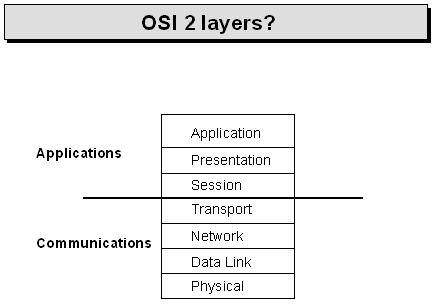
The model is
often split into two main parts:
Communications:
Layers 1-4 are responsible for transferring data between two systems.
Applications:
Layers 5-7 provide application oriented services.
A short
description of the seven layers follows:
Layer 1: Physical
Sends/receives bits along a medium.
Layer 2 Data Link
Performs the actual sending. Detects errors in transfer.
Layer 3 Network
Connect networks. Provides routing through intermediary systems if
necessary.
Layer 4 Transport
Provides data transfer between end processes.
Layer 5 Session
Manages the comms session from the application side.
Layer 6 Presentation
Ensures that data is represented in the appropriate format for different
machines.
Layer7 Application
Not the actual application itself but the part dealing with the network.
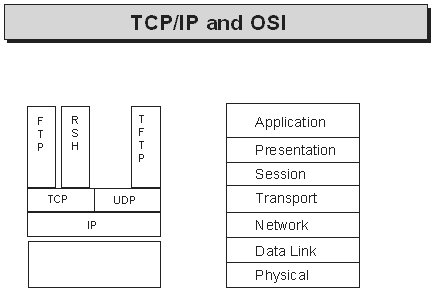
There are two
ways to use the OSI Reference Model
To implement it.
To use it as a
reference to compare different protocols.
There are not
that many implementations of OSI. The main use of the model is as a
reference. Note that it is a stated aim of the Internet to migrate to OSI at
some stage. The author believes this time span to be in the region of 3-50
years time.
TCP/IP Networking - IP
Addressing
All hosts on a
TCP/IP internet must be able to talk to each other. To allow this a unique
address is needed for each and every host on the network.
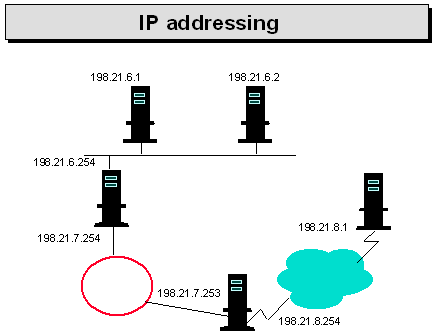
Ethernet
addresses are guaranteed to be unique but cannot be used because TCP/IP can
run over many different physical media.
The unique addressing in a TCP/IP network is carried out at the network
layer. Since it is the IP protocol which sits at the network layer the
addressing scheme is commonly called IP addressing. The IP address hides the
physical network details.
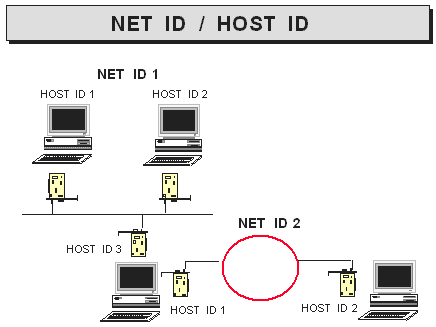
Basic format
IP addresses can be broken into two main parts
The Network ID,
The Host ID
This separation
allows routers to know whether a destination is local or needs to be routed.
Golden rules are for any two machines to communicate with each other:
The addresses are
unique
The machines have
the same Network ID unless there is a router between them.
Every host will
have at least one IP Address maybe more. There will actually be one IP
address for every network card. If a machine has three network cards then it
will have three separate IP addresses.
Registering IP addresses
Although the IP
addressing scheme allows unique addresses there is only one way to guarantee
that a given address is unique.
To get a unique
address you must register with NIC.
Government
Systems Inc.
Attn: Network
Information Centre
14200 Park
Meadow Drive
Suite 200
Chantilly, VA 22021
Help Desk number: 1-800-365-3642
Officially you need only register your addresses with NIC if you wish to
connect to the Internet. It may be worthwhile registering in any case so
that you can rest assured that your IP addresses are unique and that you can
easily connect to TCP/IP machines that are outside your control. Please
note, however if you are absolutely sure that you will never have to connect
to machines outside your internet then you can just pick numbers out of the
air.
The only problems will arise when you need to connect to other machines that
have by chance chosen the same IP addresses as yourself. Most people do not
deal with NIC directly. Most sites will have a central network team that are
responsible for assigning IP addresses within your organisation.
Normally a whole network id is assigned and you are at liberty to use any
valid addresses within that network ID. If you run out of addresses in the
range given then you will need to apply for another network id. One problem
is that IP addresses are running out. This is an issue which must be
addressed in the next year or two.
Address
classes
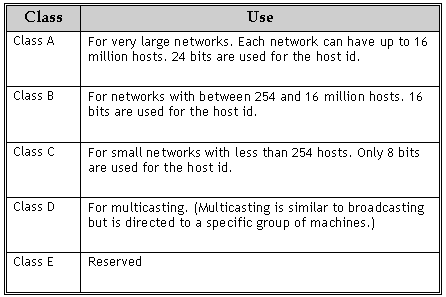
The IP address is 32 bits in length. The actual format of the address is
dependent on what class of address is used. The format of the address is
actually in three parts:
Class, NET ID and HOST ID
The class determines how many bits are used for the net id and the host id.
The valid classes are A, B, C, D and E. When applying for registered IP
addresses you must ask for the class you wish to use.
Choosing a class
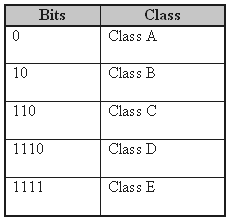
When dealing with
IP addresses it is important to recognise which class of address you are
dealing with. This is because the class of address determines the number of
bits used to represent the NET ID and the HOST ID. To determine the class of
a particular address you must work at the bit level. The first bits of an
address determine the class of address.
Dotted Decimal
Notation
Although you need to work at the bit level to find the class of address it
is not feasible to deal with bits for addresses. Because bits are not
reasonable the dotted decimal notation is used.
The 32 bit address is divided into 4 lots of 8 bits. Each number has a range
of 0 to 255. (2 to the power of 8 is 256).
Example numbers are therefore
190.23.10.1
86.1.46.101
200.100.100.254
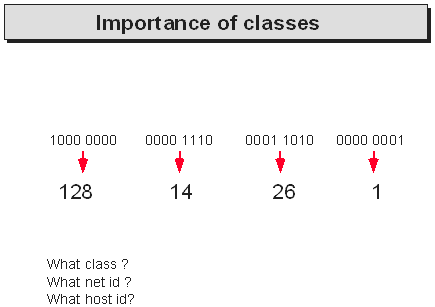
When dealing with IP addresses it is important to be able to work out the
class of an address in order to determine which network id and which host id
the address refers to. To find the class of a particular address take the
first number and write it in binary. Then compare the binary bit pattern
with the patterns overleaf to determine the class of address.
Special
addresses
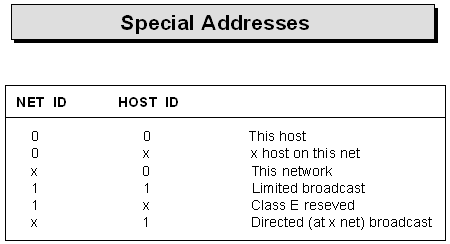
Some addresses are not allowed to be used as IP addresses for hosts. The
first is Network ID 127. This Network ID is reserved for internal loopbacks.
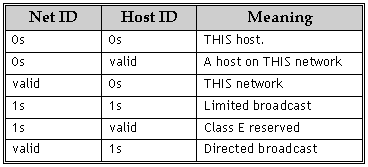
Other reserved IP addresses concern all ones or all zeros. No constituent
part (net id or host id) of the IP address for a host may be all ones or all
zeros.
The general rule is
1s mean ALL
0s mean THIS
The following is a table of special addresses and their meanings
TCP/IP Networking - Using
TCP/IP
This tutorial
goes through the process of Using TCP/IP
The
Applications Layer
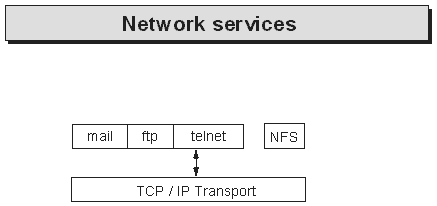
The TCP/IP applications sit on top of the transport layer.
TCP/IP provides two types of transport:
TCP Reliable
UDP Unreliable
The applications are free to choose which layer they run over.
telnet and ftp both run over TCP
SNMP and tftp run over UDP and therefore these applications must do their
own error checking.
TCP/IP Services
The services are applications, this is what the user sees of TCP/IP.
There are three main types of service
DARPA commands
Work on any operating system
Some commands are:
telnet
ftp
BSD r* services
Designed for UNIX
Some commands are:
rlogin
rsh
rcp
Third party commands
These are services that have been designed to work over the TCP/IP transport
protocols but are not typically shipped with the TCP/IP package. The most
common example would be Suns NFS.
Hostnames
All the TCP/IP services require connection to hosts. Hosts are machines
that you can communicate with. Each host has a unique IP address. IP
addresses are not user friendly. Users like to use names.
An example name is:
sales
To make the names unique there is a naming scheme which would make the above
name something like:
sales.paragon.co.uk
See the chapter on more applications for details of this naming scheme.
Although the user will use hostnames these names still have to be converted
into IP addresses. The hosts file performs this task.
In UNIX the full pathname of the hosts file is:
/etc/hosts
So to find the
hosts you can communicate with
$ cat
/etc/hosts
127.0.0.1
localhost
128.48.200.1
sales.paragon.co.uk sales
128.48.200.2
dev.paragon.co.uk dev
To find your host
name
$ hostname
Clients and
Daemons
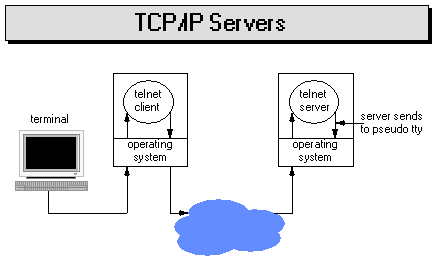
TCP/IP is client server based. The client runs the program. For the program
to work the server must be running the relevant daemon.
For example
Client Server
rlogin
<----------------------> rlogind
If the rlogind
program was not running then the user could not rlogin into the server.
There are many TCP/IP applications. It was found to be unmanageable on UNIX
systems to handle separate server processes for each service. Berkeley
therefore introduced the concept of the "super server". The "super server"
is called inetd. inetd negotiates with hosts requesting services via the
network.
Once a connection has been established inetd starts a client specific server
process. Once the specific server has been started then inetd goes back to
listening on the network.
Remote Login
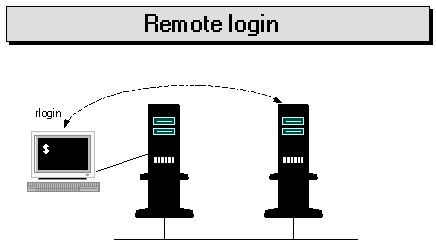
To log on another machine
rlogin host
host is the name
of the machine you wish to log on to.
If not "trusted" then you will be prompted for a password.
rlogin host -l
user
Logs onto machine
host as the user user.
When working between UNIX systems most people use rlogin. If connecting from
a PC then the DARPA command may have to be used.
telnet host
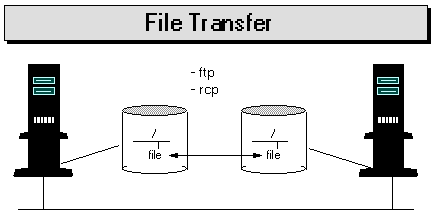
Transferring
Files
Between UNIX systems
rcp from to
from and to can
be any of
file
Implies local
machine
host:path
Remote system.
Unless specified, the path will start from your home directory. Will only
work to and from trusted systems.
From PCs ftp may have to be used. ftp is an interactive environment whereas
rcp is a batch command. This means the rcp is better suited to automatic
file transfers. ( For example in UNIX through cron).
ftp
Type ftp and get started! The following gives some guidelines. To start ftp,
type
ftp host
This will connect
you to the machine called host. You will then need to give username and
password. Once connected you can look around and manipulate the servers
directories.
ls
dir
cd
delete
With UNIX it will
be the UNIX permissions which provide security. Note that these commands are
NOT UNIX or MSDOS commands but ftp commands. The ftp commands that the user
sees are not standard and so will vary from one TCP/IP implementation to
another. The commands the user types in are converted into the standard ftp
commands which, for example, would be seen with a LAN Analyser. By default
ftp commands work on the remote system.
Commands beginning with l will generally do something on the local
system. For example
lcd
ldir
To actually
transfer files with ftp the get and put commands are used.
get
From the server
to local machine.
put
Puts a file on
the server from the local machine.
get and put can only handle one file at a time. For multiple files to be
transferred in one go the commands mget and mput can be used.
The * is the wildcard character.
Note: that ftp is quite at home in transferring files from one operating
system to another.
By default ftp will do all necessary conversions. For example
From DOS to UNIX the <CR> <LF> sequences are changed into LF for UNIX.
This is not satisfactory for executable programs. To transfer executables
the binary command should be used. Note also the binary mode of transfer
will be required in any situation where the exact original format is
required to be left intact.
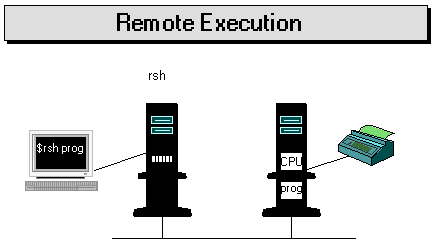
Remote
Execution
Not commonly used by users. A common application is in the setting up of
remote printers. rsh is also used extensively in X Window environments.
Interactive commands are not allowed.
The rsh command.
rsh host
command
Beware your path
setting will probably mean that you pick up the restricted shell rsh instead
of the remote shell rsh!
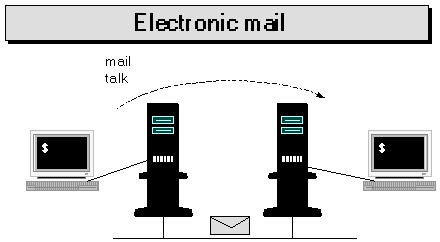
Other
Communication
For 2 way communication across the network
talk user@host
The most popular
command across networks
mail user@host
To get
information about logged in users on the network.
Finger
TCP/IP Networking - Routing and
TCP/IP
The initial
design goal of TCP/IP was to provide an internetworking architecture. With
many networks TCP/IP gateways become involved. A TCP/IP gateway is
equivalent to an OSI router and so in this handout TCP/IP gateways are
referred to as routers.
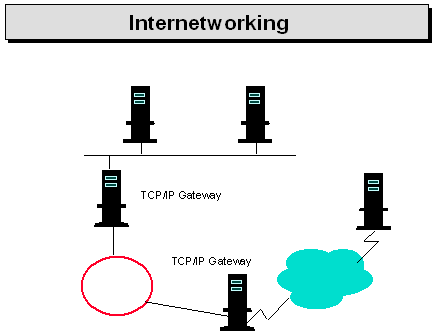
A router will
have at least two network cards and be connected to at least two networks. A
router will merely forward IP datagrams between networks. This forwarding is
known as routing.
Repeaters and Bridges
Before looking at routers it is worth reviewing other technology for
interconnecting physical networks. With thick Ethernet a length of cable ( a
segment) can be a maximum of 500m in length. To overcome this restriction
repeaters may be used. A repeater just amplifies a signal. A repeater sits
at layer 1.
Note: that repeaters are "invisible" to TCP/IP.
The TCP/IP protocols have no knowledge of the presence or otherwise of
repeaters. The problem with repeaters is that as well as increasing the
length of an Ethernet LAN they can also increase the traffic on the LAN
resulting in performance problems.
Bridges overcome the problems of repeaters. Bridges sit a layer 2 in the OSI/RM.
Bridges still connect physical LAN segments to form a single logical LAN.
Bridges therefore deal with frames rather than individual bits.
Bridges can obtain source and destination addresses from frame headers.
Using these addresses a bridge can determine where workstations are in terms
of which side of the bridge a workstation is. Once a bridge knows where a
workstation and it sees a frame is going to that workstation the bridge can
decide whether the frame needs to be passed on to the other side of the
bridge. The net result is that a bridge will filter traffic allowing
multiple traffic on a single Ethernet LAN.
Note: that bridges are not just for Ethernet.
The basic rule is that only similar networks can be bridged. For example
Ethernet can not be bridged to X.25
Note: however that a feature of IEEE 802 LANs is that they share a common
Logical Link Control Layer - IEEE 802.2
This means that bridging is possible between, say Ethernet (802.3) and Token
Ring(802.5). The presence of bridges can have a marked effect on
performance. As with repeaters bridges are invisible to TCP/IP. The bridge
creates the illusion of a single network to the higher layers.
Remote bridges
Bridges can be used to connect geographically remote LANs together. In this
case two bridges would sit connected to their respective LANs. The bridges
would be connected via a leased line or fibre optic link.
Routers and Gateways
A router is used to connect two physically separate networks. The router
will forward packets on between these networks. Routers sit at layer three
in the OSI/RM. This means that they are protocol dependent. This is because
with TCP/IP it is IP which decides the routing to be done.
There are number of IP routers on the market. One of the decisions to make
is whether to use normal hosts as your routers or to use dedicated routers.
Note that the TCP/IP documentation often refers to routers as gateways.
Gateways in OSI terminology convert protocols at layers above layer 3. A
good example would be a mail gateway, for example converting smtp mail
formats into X.400 formats.
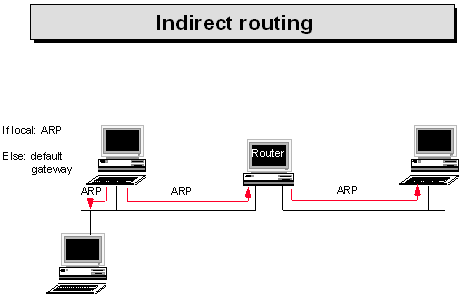
How Indirect
Routing Works
Previous to the chapter we have seen how when two hosts communicate ARP is
used to determine the physical address of the destination host. This is
sometimes referred to as direct routing.
Before a host will send an IP datagram the IP address is studied. The net id
of the destination IP address is compared to our local net id. If they are
the same then IP knows that no routing is required and that the datagram can
be sent using the direct routing method where ARP will find the physical
address of the destination host.
Routing will be used if when the destination and source addresses are
compared they are found to be different. If this is the case the routing
table of the host will be used to find the intermediate destination of this
datagram.
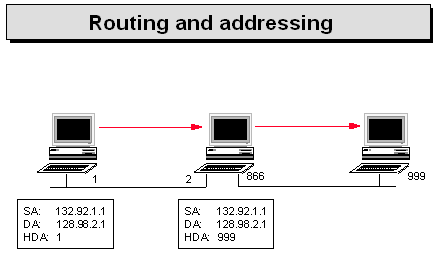
This might seem
daunting at first in terms of each host must have a routing table but in
fact in most cases the routing table will have one simple entry. The simple
entry will be that of the default gateway. The default gateway is often
specified at installation of DOS based TCP/IP implementations.
The result is that the IP datagram will hop onto a router. Note that to get
to the router direct routing (i.e. ARP) will be used. The router will then
compare the IP address and see if it is for a network to which we are
directly connected. If the IP datagram is not local then the routing tables
of the router will be used to determine the next intermediate destination of
the datagram. The datagram then hops on between routers until it reaches a
router which is directly connected to the destination host in which case the
direct routing method using ARP is used.
The TTL field is continually decremented by one and if this field reaches
zero then the datagram is thrown away and an error is returned.
Routing Tables
The routing tables are used to find out which router the datagram should be
passed on to. All hosts have routing tables but the normal hosts will have
one entry defining the default route to take. The routing tables do not
contain a list of all hosts. Instead routing tables only contain the routes
to get to a particular network. This makes the routing tables smaller and
more manageable.
Routers will have a complete routing table containing all routes in your
internet. If required host specific routing can be employed. Host specific
routing is where a hosts IP address is in the routing table. This technique
might be handy when debugging.
The question is who updates the routing tables? The routing tables can be
updated by hand but this is an unrequired extra burden placed on the
administrator. Routers routing tables are normally dynamically updated by
the use of routing protocols.
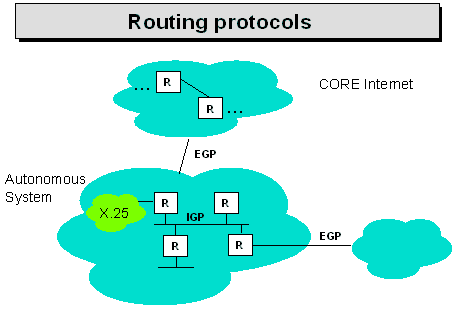
Routing
Protocols
Routing protocols are often called gateway protocols as TCP/IP calls routers
gateways. Routing protocols dynamically update routing tables. This means
that extra software will run on the routers.
If your routers are UNIX machines then this routing software often comes in
the shape of a program called routed. Another common UNIX routing protocol
program is gated.
There are two main type of routing protocol
Interior gateway protocols, Exterior gateway protocols
In an internet there will be groups of networks managed by a particular
organisation. This group of networks will be called an autonomous system.
Interior gateway protocols exchange routing information in an autonomous
system. The routers in an autonomous system know all about all routes within
the autonomous system.
There are many interior gateway protocols.
RIP - Routing Information Protocol. The most common?
OSPF - The best?
IGRP - Proprietary to Cisco routers.
HELLO - Not used much.
GGP - Used to be used within the core Internet.
Exterior gateway protocols are used for connections to outside of an
autonomous system.
RIP
RIP is an example Interior Gateway Protocol.
RIP stands for Routing Information Protocol.
RIP is only suitable for small networks.
RIP is popular only because it comes with the UNIX implementation of TCP/IP.
Routers running RIP broadcast their routing tables to neighbours once every
30 seconds. Each entry in the routing table consists of a destination
network address and the number of hops that it will take to get there.
There are a number of problems with RIP. One is that it takes routing data a
long time to work its way through the network.
OSPF
OSPF is the Open Shortest Path First protocol.
OSPF was designed to overcome the limitations of previous routing protocols.
OSPF overcomes the problems of RIP and is much more suitable for larger
networks.
|