|
|
SUMMARY
Topics covered
- CCNA 640-607 exam
- Networking
- Sample questions
- Cisco IOS commands
- Passwords
- OSI reference model and layered communication
- LAN design
- Bridging/switching
What you take away
To successfully pass the Cisco Certified Network Associate (CCNA)
certification exam 640-607, you must display knowledge of the network basics
and the Cisco IOS. In this article, Troy Thompson gives you a concise view
of some of the topics you’ll face and what you need to know to get you
started in your study regimen.
Troy begins by showing you a little bit about some of the basic questions
you’ll need to answer on the exam. Next, Troy shows you some of the basic
Cisco IOS commands you should be aware of, including their syntax and what
they’re used for. After that, Troy shows you some of the password-related
questions you’ll face in the exam. Because the OSI Model is important for
most networking concepts, Troy reminds you of the different layers of the
model and what they’re for. Finally, Troy overviews some of the LAN design
issues you’ll face and bridging/switching topics you should be aware of.
***************************************************************************************************
If you want to obtain the Cisco Certified Network
Associate (CCNA) certification, you must pass Cisco Systems certification
exam 640-607. The exam is broken into eight categories: Bridging/Switching,
OSI Reference Model and Layered Communication, Network Protocols, Routing,
WAN Protocols, Network Management, LAN Design, Cisco Basics IOS, and Network
Basics. In this article, I’ll show you the networking concepts you must know
to pass the exam.
Simulation questions
The exam will have at least two simulation questions on it. The best way to
prepare for these simulations is to get hands-on experience with a router.
If that is not possible, there are several router simulation programs that
can be purchased or downloaded. The router simulation that comes with the
Sybex book for the 640-607 exam is really good.
When you are presented with the simulation question, which may or may not be
at the end of the exam, you will have a text scenario. Be sure to read the
scenario carefully and jot down notes if needed. You will be able to toggle
between the simulation and the text. The scenario may indicate that a hacker
has broken into a router, changed information, and now other routers cannot
see it. You will be able to console into all of the routers in the
simulation, but you should focus your time on the one that is down. You will
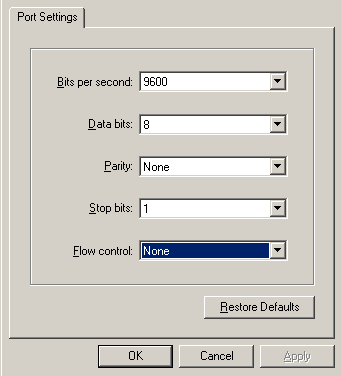
have to configure a console session to console into the router. The task to
be performed will look similar to Figure A.
|
Figure A |
|
 |
|
Setting up the console connection |
Once you have control of the router, you need to find
out what is broken. The first thing to do is to ping the other router’s IP
addresses to see if there is connectivity. Once you have established that
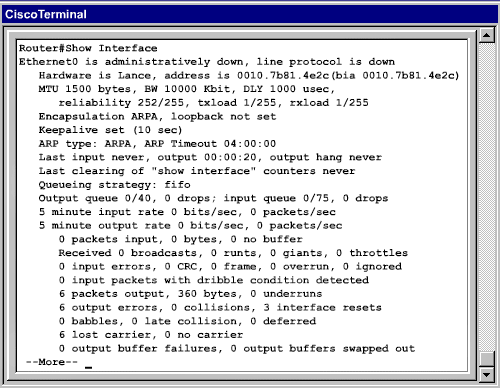
the routers cannot see each other, type Show Interface to see if
there is an interface that is down, as shown in Figure B.
|
Figure B |
|
 |
|
Here is the Show Interface command. |
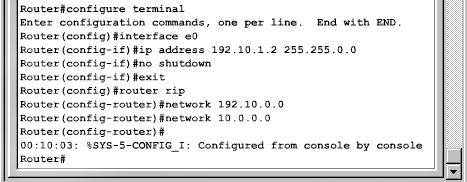
If the interface is administratively down, you can try
to perform a No Shutdown command on the interface to bring it back
up. If the protocol is down, it may be that the clock rate needs to be set.
An example of some of the commands you may have to issue can be seen in
Figure C.
|
Figure C |
|
 |
|
Here are some sample commands that you may have
to issue at this point. |
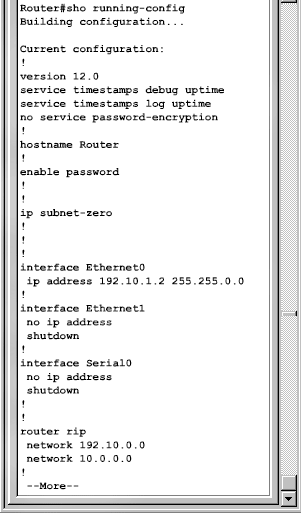
You can also type Show Running-Config to check
the configuration and to check the status of RIP Routing on the interfaces,
as shown in Figure D.
|
Figure D |
|
 |
|
Here is the Show Running-Config command. |
Don’t forget to set passwords if the simulation calls
for it.
When you have fixed all that is broken, make sure that you can ping all
other routers. You must also save the configuration by issuing the copy
running-config startup-config command. If you fail to do this, your
changes will be lost when the router is powered down. You should also log
out of the routers and leave them as you would a production router. If you
don’t log off a production router, it leaves the session open and
vulnerable.
Cisco IOS basics and network
basics
In order to pass the exam, you’ll first need to know a little about
networking and how the Cisco IOS works. You will need to know the commands
and concepts covered in this section to get you through the simulation. The
commands you should familiarize yourself with include:
- Show Interface: This command allows you to
see the status of an interface.
- Shutdown: This command manually disables the
interface. When the line protocol is down, the interface is not able to
send or receive frames on that line. This problem can be caused by a
connector, keepalive, or clock rate problem.
- No Shutdown: This command changes the status
of an interface to Up.
- Clock Rate: This command must be issued to
configure a serial interface as the DCE. An example of how to do this is:
RouterA#configure terminal
RouterA(config)#interface s0
RouterA(config-if)#clock rate 56000
RouterA(config-if)#no shutdown
Be sure not to confuse the clock rate syntax with the command to set
bandwidth on a frame relay, which is:
RouterA(config-if)#bandwidth 56
- Show Version: This command shows how long the
system has been up, the IOS version, and from where the IOS was loaded.
- Exit: This command takes you back one command
level. For instance, if you are at the RouterA(config-if) prompt and issue
the exit command, you will then be at the RouterA(config) prompt. Pressing
[Ctrl]Z takes you all the way back to the enable mode prompt.
- ?: This key is used to display syntax help,
but its use depends on where you type it. If you are looking for all
commands that begin with the letters CL, you would type CL?. If you
are looking for help on what parameters can be used with the Clock
command, you would type Clock?.
- Setup: If you issue the Setup command,
you will be in Setup Mode. From here, you can configure the router. In
Setup Mode, the default settings will appear in squared brackets [ ]. You
will enter Setup Mode automatically if no configuration file can be found.
- Show Hosts: The Show Hosts command
will display IP addresses assigned to all the hosts on your network.
If you issue a command and get a syntax error, the
caret symbol (^) will show you the point in a command where you have entered
an incorrect command, keyword, or argument.
Some of the Command Line Interface (CLI) keys that allow you to navigate
with a command line are as follows:
- [Ctrl]A: Moves the cursor to the beginning of the
current line
- [Ctrl]E: Moves the cursor to the end of the current
line
- [Ctrl]F or right arrow: Move forward one character
- [Ctrl]B or left arrow: Move back one character
- [Ctrl]P or up arrow: Recall commands in the history
buffer starting with the most recent command
- [Esc]B: Move backward one word
- [Esc]F: Move forward one word
- [Ctrl]Z: Ends Configuration Mode and returns to the
Privileged EXEC Mode.
- [Tab]: Finishes a partial command
Passwords
The exam includes several questions regarding passwords. You will probably
get a simulation question in which you must configure passwords as well.
Remember these password rules:
- All passwords can be encrypted.
- A password can be set before a user can enter the
privileged mode.
- A password can be set for individual lines.
- TACACS or Radius password authentication can be
used.
- You cannot enter all passwords using the set-up
dialog.
There are five passwords that can be set on a Cisco
router:
- Enable Secret
- Enable Password
- Virtual Terminal Password
- Auxiliary Password
- Console Password
To set a console password, do the following:
RouterA#configure terminal
RouterA(config)#line console 0
RouterA(config-line)#login
RouterA(config-line)#password password
To set a terminal console password, do the following:
RouterA#configure terminal
RouterA(config)#line vty 0 4
RouterA(config-line)#login
RouterA(config-line)#password password
To set an auxiliary password, do the following:
RouterA#configure terminal
RouterA(config)#line aux 0
RouterA(config-line)#login
RouterA(config-line)#password password
OSI reference model and layered communication
In order to pass the CCNA, you must know the OSI model inside and out. You
will likely get five to seven questions about the OSI model and how the
layers interact with each other. The different layers of the OSI model are
listed below with their corresponding stage of encapsulation.
- Application -> Data
- Presentation -> Data
- Session -> Data
- Transport -> Segments
- Network -> Packets
- Data-Link -> Frames
- Physical -> Bits
One mnemonic device that can be used to remember the OSI order is: All
People Seem To Need Data Processing.
The different layers of the OSI model include:
- Layer 7: The Application layer provides network
services to user applications. Some protocols at this level are FTP and
SMTP.
- Layer 6: The Presentation layer is responsible for
managing data conversion, compression, decompression, encryption, and
decryption. It includes the following file formats: MPEG, MIDI, PICT,
TIFF, JPEG, ASCII, and EBCDIC.
- Layer 5: The Session layer establishes, manages, and
terminates sessions between nodes. Protocols associated with this layer
include NFS, SQL, RPC, and AppleTalk.
- Layer 4: The Transport layer is responsible for
setting up and defining how two nodes will communicate. The window works
at this level to control how much information is transferred before an
acknowledgement is required. This layer deals with segments and uses both
connection-oriented (TCP) and connectionless protocols (UDP)
- Layer 3: The Network layer is responsible for path
determination and for maintaining routing tables. Routers operate at this
level.
- Layer 2: The Data Link layer is responsible for
handling error notification, network topology, and flow control. It is
broken into two different layers: Media Access Control (MAC) and Logical
Link Control (LLC). Bridges and switches operate at this layer. The Media
Access Control Sublayer builds frames from the 1’s and 0’s from the
Physical layer. The Logical Link Control sublayer acts as a managing
buffer between the upper layers and the lower layers. It is responsible
for timing and flow control.
- Layer 1: The Physical layer deals with physical
transmission of data, such as voltage, wiring, and connectors.
LAN design
When considering LAN design, you need to remember several things:
- Adding a router to your network will create
additional collision domains, broadcast domains, and logical networks.
- Adding a bridge or a switch will segment your
network. By segmenting, you increase bandwidth per user and create
additional collision domains.
- A hub cannot be used to segment a network. It only
extends a network segment and does not affect broadcast or collision
domains.
- If you implement Virtual Local Area Networks (VLANS)
on a switch, it will create additional broadcast domains.
- Hosts connected to a hub cannot use full duplex
because a hub relies on collision detection to allow access to a segment.
Full duplex has no collisions and is normally associated with switches.
- A collision occurs when multiple hosts transmit at
the same time on an Ethernet network. There are no collisions on a token
ring network because only the station with the token is allowed to
transmit. Ethernet technology is contention-based and token ring is
deterministic.
A typical question you may see on the exam will look like the following:
Which solution can reduce the number of broadcasts on your network (choose
two)?
A. A switch using VLANs
B. A router
C. A repeater
D. A bridge
E. A hub
The answer to the question above would be A and B.
When looking at a LAN technology, you can identify several items by the
name. For instance, with 100BaseFX, 100BaseT4, 100BaseTX, and 100VG-anyLAN,
the “T” stands for twisted pair, the “F” stands for fiber, the “X” stands
for fast Ethernet, and the 100 represents the speed of 100 Mbps. The term
100VG-anyLAN represents a 100 Mbps technology that is capable of connecting
to both Ethernet and token ring.
Bridging/switching
There are several items you need to know when it comes to bridging and
switching. Know that full duplex Ethernet allows simultaneous transmission
and reception of packets on two pairs of wires and uses only point-to-point
connections. There are no collisions on a full duplex Ethernet. Half duplex
only allows one station to transmit at a time.
There are three types of switching: store and forward, cut through, and
fragment free. With store and forward switching, the entire frame is copied
into the router’s buffer and checks for errors. Latency varies with frame
size. Cut through switching only copies the first six bytes into memory,
which is the destination address, before it starts forwarding the frame.
This switch type reduces latency because it begins to forward the packet as
soon as it reads the destination address and determines the outgoing
interface. Fragment free is a combination of the previous two, which starts
forwarding the packet after the first 64 bytes have been copied into memory.
It is also the default switch type for the Catalyst 1900 switch.
Switches and bridges operate at the layer 2 (Data Link) of the OSI model and
deal with frames and MAC addresses. Routers operate at layer 3 (Network) of
the OSI model and deal with packets and IP addresses. Microsegmentation with
switches will create additional collision domains and additional broadcast
domains if VLANs are created. Frame tagging assigns a user-defined ID to
each frame.
Adding additional hubs only increases the size of the existing collision
domain. As a rule of thumb, bridges and switches increase collision domain,
but do nothing for broadcast domains. Routers and VLANs, on the other hand,
deal with broadcast domains, although a router can also be used to break up
large collision domains.
Spanning Tree Protocol (STP) is used to help prevent bridging loops. It also
shuts down interfaces to prevent loops in the network, may provide redundant
paths in case of path failure, and is controlled by the root bridge.
This is a test
Be sure to give yourself plenty of study time before tackling this exam. If
you get some hands-on time with a router or router simulation, you should
have no problems with the exam simulation.
|