Setting Keyboard on a PC
to Type International Characters
Step 1
In order to type international characters in a HTML document you need first to set up your computer's keyboard to support typing of international (non-English) characters.
First step is to open the Control Panel from Start and Settings menu.
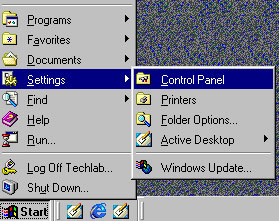
Step 2 In Control Panel window, double click on a Keyboard icon.
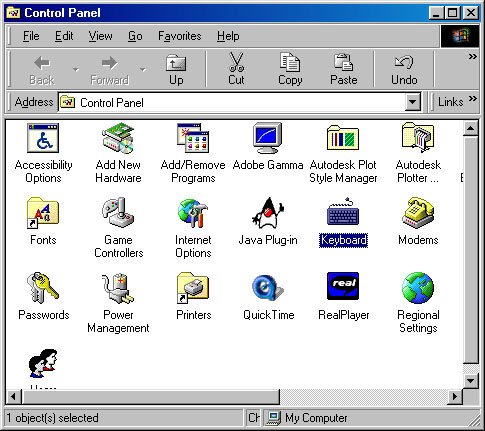
Step 3
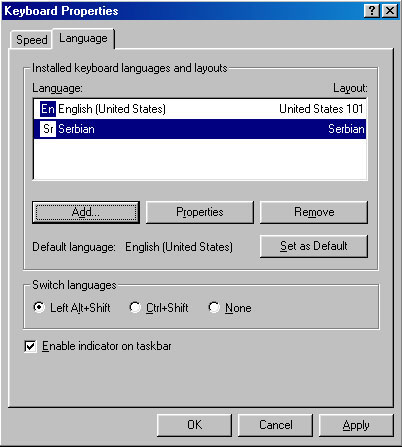
When Keyboard Properties window opens, click on a Language tab to see which keyboard languages and layouts you have active in your computer.
In this example, we see that only English language is set in a computer, so we need to click the Add button to add another keyboard language and layout.
What if Windows does not let you have any other language but English as your keyboard layout?
In that case you need to install Multilanguage Support to your Windows operating system.

Step 4
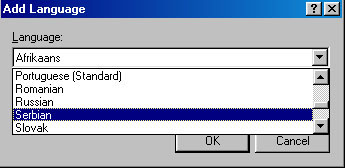
In case you have Multilanguage Support installed, Add Language window will open when you click on the Add button in Keyboard Properties - Language window. When the Add Language window opens, you need to scroll along the list of languages and select a desired language.
In our example, we are going to select one of the languages that uses the Cyrillic script, such as Serbian language.
Click OK when Serbian language is highlighted.
Step 5
Now you are back to Keyboard Properties window, where you see that besides English language you also have Serbian keyboard setting added.
Click OK to close this window.
Step 6
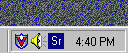
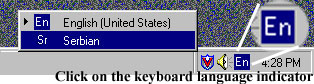
At the bottom right corner of your computer monitor you will see two white letters in a blue box showing keyboard language indicator. Click on the blue box to see all keyboard language settings activated in your computer.
Step 7
To type in the Cyrillic script, you need to select Serbian language in
the Keyboard Language Indicator. Serbian language should be active while
you are typing in a HTML generator application document that is supposed
to display the Cyrillic script.
With Sr showing on an indicator, Serbian keyboard layout is active.