Setting Macromedia Dreamweaver to Type
and Display
International Characters on a Apple Macintosh Platform
Step 1
Launch Macromedia Dreamweaver HTML generator application.
Step 2
Create a New Document or open an existing document.
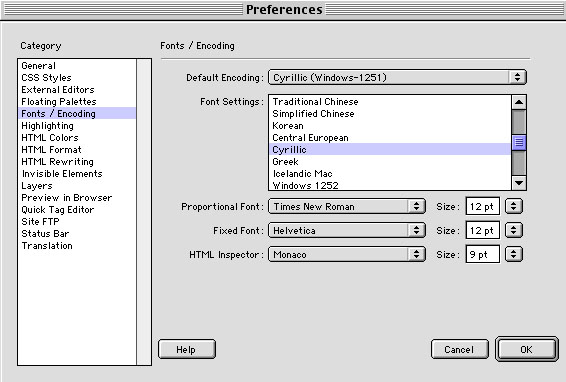
Under Edit - Preferences you will adjust Fonts/Encoding
settings that will enable you to type international characters within
a Web document.
To set your Web document to display the Cyrillic script, set your document's
Default Encoding to Cyrillic (Windows-1251). Under Font
Settings list select Cyrillic. Click OK when done.
Step 3
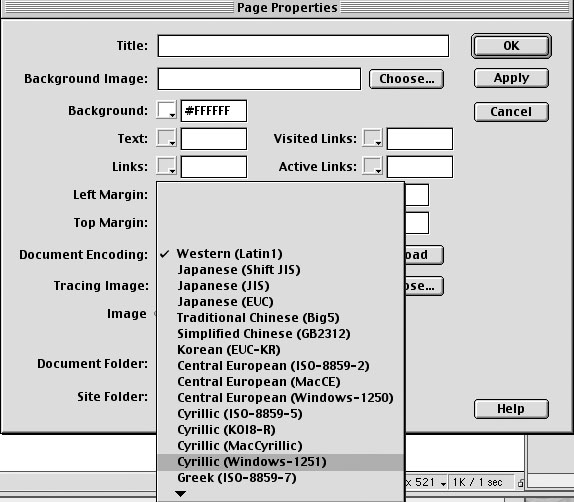
You may also double-check under Page Properties
that Cyrillic (Windows-1251) document encoding is selected for your
current document.
Windows-1251 encoding will enable your web document to display the Cyrillic
script so that it can be viewed on Windows computer platforms. Majority
of Web designers customize their Web sites so that they can be best
viewed under Windows computer platforms which are used by the vast majority
of Internet users worldwide.
Step 4
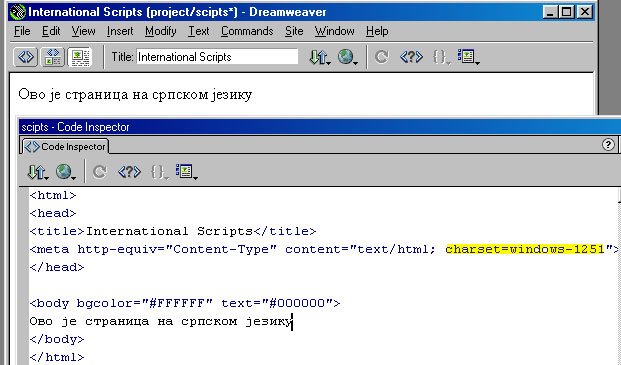
Having Cyrillic (Windows-1251) document encoding selected
for your current document will add a new charset meta tag into
HTML code of your document.
You can check it by viewing the source (HTML) view of your document (click
<>
sign at the bottom right corner of your Dreamweaver window).
Step 5
To start typing Cyrillic characters in your Dreamweaver document activate Cyrillic (Serbian) keyboard language settings by clicking the keyboard indicator icon in the upper right corner of your computer monitor (next left to Finder).
If Serbian language is not provided in the list of languages within an indicator, install it by following the procedures for keyboard language setup.