![[Maple Plot]](multivariablecalc1.gif)
Introduction to Multivariable Calculus
By: Michael Winslow
Created using Maple 6.
Graphs in 3 Dimensions:
Up to this point we have only delt with one variable at a time. We are not accustomed to drawing the graphs of multivariable functions. Here is what a few graphs look like in 3 dimensions:
>
with(plots):
implicitplot3d( x^2 + y^2 + z^2 = 1,x=-1..1,y=-1..1,
z=-1..1,title="Sphere");
plot3d(x^2-y^2,x=-2..2,y=-2..2,title="Saddle");
plot3d(x^2+y^2,x=-3..3,y=-3..3,title="Paraboloid");
implicitplot3d( x^2 + y^2 + z^3 = 9,x=-3..3,y=-3..3,z=-4..4,title="What does it look like to you?");
![[Maple Plot]](multivariablecalc2.gif)
![[Maple Plot]](multivariablecalc3.gif)
![[Maple Plot]](multivariablecalc4.gif)
Multivariable Limits:
Limits with multivariable functions are very similar to those of single variable functions. On the simple functions with no possible problems, we can simply plug in the points to evaluate the limit. However, when there are potential problems, like we will be dividing by zero, for multivariable functions, all we need to do is to find two paths that cross through the point that provide us with differerent solutions. For example if we have the point (0,0), we may use any equation that passes through that point, like x = 0, y = x, y=0 .... This changes the multivariable limit into a single variable limit. To prove that the limit does not exist you just go to the limit from different directions until you find two that produce different answers.
>
f(x,y):=x^2*y+y+2*x;
Limit(f(x,y),{x=1,y=2})=limit(f(x,y),{x=1,y=2});


Partial Derivatives:
Derivatives of multivariable functions work very similarly to those of single variable functions. To take the derivative of an (x,y,z) function with respect to x, we simply set y as a constant and then take the derivative with respect to x. You do the same if you want to take the derivative with respect to y. Notice the slightly different notation for the partial derivative as it uses the "curly d."
>
restart:
f(x,y):=x^2*y+y+2*x;
Diff(f(x,y),x)=diff(f(x,y),x);
Diff(f(x,y),y)=diff(f(x,y),y);

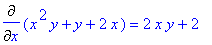
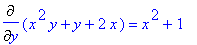
Keep in mind that all the "old rules" from your first encounter with derivatives still apply. Here is a partial derivative that requires the product rule with the derivative is taken with respect to x. We can also take second and third derivatives mixing up the variables that the derivatives that the derivative is taken respect to.
>
restart:
z(x,y):=x^2*sin(3*x+y^3);
Diff(z(x,y),x)=diff(z(x,y),x);
Diff(z(x,y),y)=diff(z(x,y),y);
Diff(Diff(z(x,y),y),y)=diff(diff(z(x,y),y),y);
Diff(Diff(z(x,y),y),x)=diff(diff(z(x,y),y),x);





Now what does this derivative give us? Well the partial derivative with respect to x simply gives us the vertical slope in the direction of the x-axis and the partial with respect to (wrt) y does the same but in the direction of the y-axis or if we want to remember vectors, the partial wrt x will put it along the vector 1 i + 0 j and y puts it in the direction of the vector 0 i + 1 j . However what if we don't want it in the direction of one of the axis? Then we do something called the directional derivative. We want the direction of the unit vector, u which has a magnitude in the x direction of u x and in the y direction of u y To find the derivative in the direction of u, then we take the partial wrt x and multiply it to u x and add it to the parial wrt y multiplied by u y .
Multiple Integrals:
Multiple integrals is the next major topic of multivariable calculus. When single integrals give us the area under a curve, a double integral provides us the volume under a region. In the double integral below, I am finding the area under the plane z = 1 in the region of a square with sides of 1. In other words I am finding the volume of a cube with sides of length 1.
> Int(Int(1,x=0..1),y=0..1)=int(int(1,x=0..1),y=0..1);
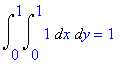
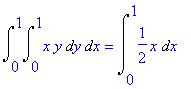
The mechanics of solving multiple integrals is very simple. We simply work our way from the inside out. So on this integral we first ignore the outside integral and the dx and we simly evaluate the inside integral. Once we have found the indefinite integral, we plug in the limits to it. We then move onto the outside integral to get the solution to the double integral.
>
Int(Int(x*y,y=0..1),x=0..1)=Int(int(x*y,y=0..1),x=0..1);
Int(int(x*y,y=0..1),x=0..1)=int(int(x*y,y=0..1),x=0..1);
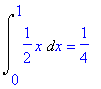
Unfortunately, we can not always have rectangular regions. Sometimes it is necessary to have regions of other shapes, like this one is a triangle. To see find the bounds, we simply plot the region on a two dimensional plot. Note that the order of the integration variables can change.
>
with(plots):
P1:=plot(x,x=0..1,color=green,legend="y=x"):
P2:=implicitplot(x=1,x=0..1.1,y=0..1,color=blue,legend="x=1"):
display({P1,P2});
Int(Int(x+y,y=0..x),x=0..1)=Int(int(x+y,y=0..x),x=0..1);
Int(int(x+y,y=0..x),x=0..1)=int(int(x+y,y=0..x),x=0..1);
![[Maple Plot]](multivariablecalc18.gif)
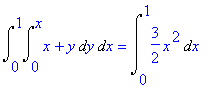
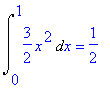
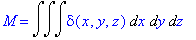
Here is a triple integral. The purpose of this integral is to multiply the density function (mass/volume) by a piece of the volume to get the volume of the entire object. We evaluate tripe integrals in the same manner as we evaluate double integrals..... Just a little more work.
> M=Int(Int(Int(delta(x,y,z),x),y),z);
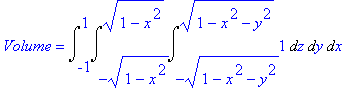
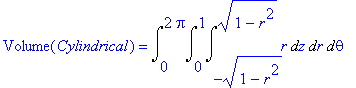
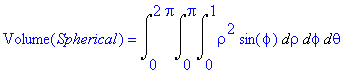
We look at the following integral to find the volume of a sphere of radius 1 and die. As there will be many trig substitutions involved in calculating the volume of this triple integral. This is why we came up with other coordinate systems, cylindrical and spherical. Different coordinate systems make it easier to do different problems.
>
Volume=Int(Int(Int(1,z=-sqrt(1-x^2-y^2)..sqrt(1-x^2-y^2)),y=-sqrt(1-x^2)..sqrt(1-x^2)),x=-1..1);
Volume(Cylindrical)=Int(Int(Int(r,z=-sqrt(1-r^2)..sqrt(1-r^2)),r=0..1),theta=0..2*Pi);
Volume(Spherical)=Int(Int(Int((rho)^2*sin(phi),rho=0..1),phi=0..Pi),theta=0..2*Pi);
Feel free to visit my website at http://www.geocities.com/mikemaple2001/calc.html as it will have this on it in color and has other stuff.