Home Gallery Tutorials Downloads Other Stuff Links About Me Email
TUTORIALS
sPatch Basics
8. In the bottom left window, press G and group all the vertexes on the left and right of the object. Press T and drag these points down about six or seven units. In the perspective view (top right window) press the red sphere so the object if given a quick render. Now press ENTER to ungroup all the vertexes. Select the vertexes second in from the left and right and drag them down about three or four units. Now in the bottom right window, select the bottom middle vertexes (the ones selected in the above picture) and drag them up one unit (remember to press T when moving points).
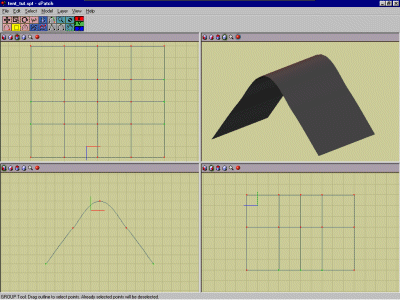
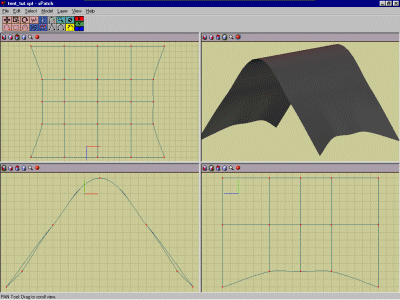
9. Now we have the basic tent shape, we'll add some pockets on each side to store the pegs or whatever. Click the view menu and then grid settings and set the grid resolution to 0.125. Now create a circle of 6 vertexes to the left of our tent in the top left window. Drag the vertexes into the positions like in the picture below (to get the two sharp top and bottom vertexes, select them and press the grey button that looks like a triangle as before). Add some points so the opposite vertexes of the new pocket are joined (except the corners).
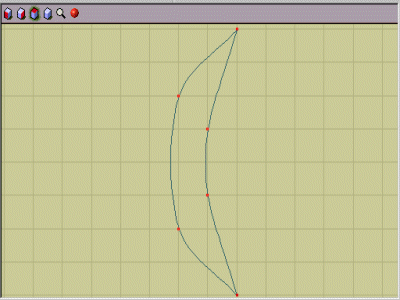
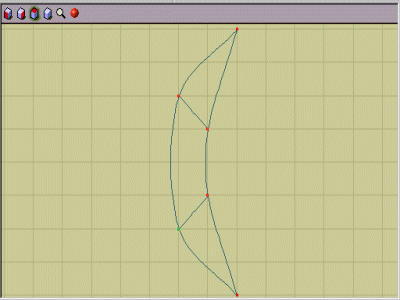
10. Group the new pocket and drag it onto the tent so it sits just to the right of the left most edge (one unit away). Now select the top corner of the pocket and join it to the vertex to the right of it. Repeat this for the bottom vertex as well. In the bottom left window drag the outer vertexes of the new pocket down so they sit flush with the tent. Now drag the inner vertexes so they sit about one unit away from the tent and three units above the outer vertexes. Sounds confusing so the diagram may help.
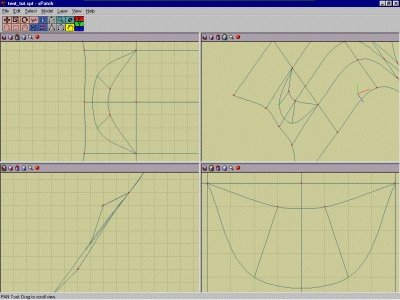
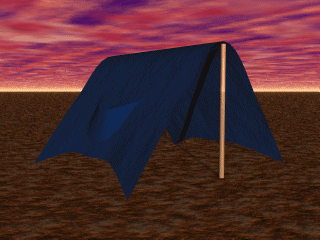
11. Add another pocket on the other side if you want to, then save the file as tent.spt. Now click file/export and choose DXF and select high (98 polys/patch) and press OK. Save it as tent.dxf. Open up Bryce, click file and then import. Find where you saved the tent.dxf file and open it. Select the tent and click E, then click smooth. Rotate it so it sits properly on the ground. Add some cylinders for the tent supports, give it a material and there you have it. SPatch is far more powerful than for making tents. The dashnog I made was all done in sPatch using the basic principle of adding and joining vertexes. If you have any questions or comments send 'em in to [email protected].
Best viewed in 1024x768 using Netscape Navigator
Copyright Michael Balzer 2000
[email protected]