Home Gallery Tutorials Downloads Other Stuff Links About Me Email
TUTORIALS
Soft Shadows
Bryce uses raytracing to render it's wonderful images. But raytracing can't produce soft shadows without a little help from the user. This process is fairly render intensive, so rendering small scenes at first is recommened until you render the final scene.
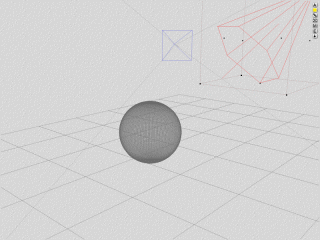
1. Open Bryce and click the on the Sky&Fog menu. Click on the little arrow next to it to select the simple black background. Now click on the arrow on the bottom right of the Sky&Fog menu, then on Edit SkyFog. Tick the disable sunlight option then exit. Go back to the Create menu and click on the sphere. Sit it on the ground by clicking the small inverted arrow underneath the M. Then create a spotlight and point it at the sphere using the rotation controls in the Edit menu. You should have a scenec that looks similar to this:
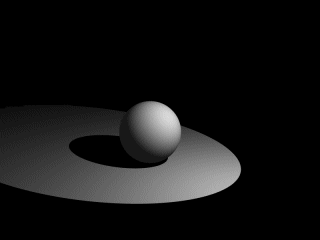
2. Note the sharp edged shadow of the sphere. Now delete your spotlight, then create another one. Select the spotlight, then click the Multi-Replicate option under the Edit option (next the File option at the very top of the screen). If any values are in the rotate or offset sections, make then 0. Now change the quantity to about 5-7. Click in the offset box of the x axis and make it 1. Now you will have eight spotlights. Select them all and go back into the Multi-Replicate option. Set any offset and rotate values back to 0. With the quantity still the same as before, put 1 into the z axis box and then click the tick to exit. you now should have 25, 36 or 49 spotlights depending on the quantity you chose. Select them all and group them.
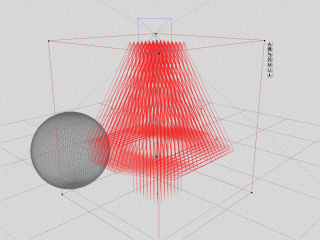
3. Rotate your spotlight group so it points at the sphere like before. A quick (sort of) render will show that where the spot is pointing is way too bright. Ungroup all spotlights, then click E. Hold down the mouse button on the top left picture and drag it left to decrease the light intensity to 1. If it is still too bright, change the colour of the light from white, to a medium/light grey. Regroup all the lights and render.
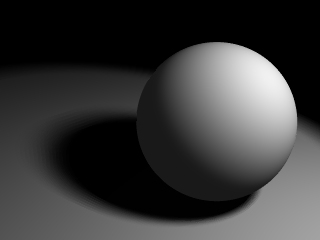
There you have it!
Although this process is very render intensive, the results look great.
If you increase the number of lights when multi-replicating, the results
look better, but you pay in rendering time. Try experimenting with different
arrangements of light to get the shadow you're after. Random delerious
ravings? Send them to me at [email protected].
Best viewed in 1024x768 using Netscape Navigator
Copyright Michael Balzer 2000
[email protected]