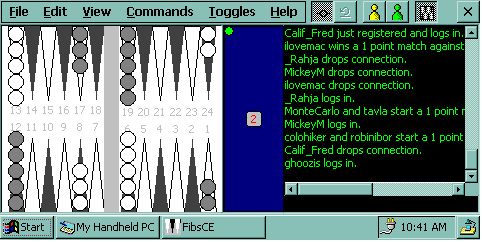
FibsCE is a client for the First International Backgammon Server (FIBS for short) for the Windows CE operating system. This means it will enable you to use your handheld computer to connect to FIBS and play backgammon against other users.
Choose the appropriate platform and don't forget to get the MFC dll if you don't have it already. Right after the download you should give a look here for installation instructions and some hints on using it.
| MIPS | SH3 | |
| Program | FibsCEMIPS.zip | FibsCESH3.zip |
| MFC DLL | Mfcce20MIPS.zip | Mfcce20SH3.zip |
A Windows CE 2.0 handheld computer. This is not a very demanding application neither in terms of RAM used nor of CPU speed, so any HPC should be adequate.
No, palm size computers are not supported yet. If you would like them to be supported in the near future please drop me a line.
FibsCE is freeware. You don't have to pay anything for it.
No fee no (guaranteed) support. You can try to contact me via e-mail.
FibsCE does not have an installation program. Just unzip the file you downloaded on your PC and copy the executable somewhere on your CE machine, on the desktop if you want to have it readily available.
The MFC DLL should be copied in the \Windows directory.
The very first thing you should do is choose Edit>Options... from the menu and set up your connection preferences. Specify your user name and password. Don't check the Use proxy checkbox unless you know what a proxy is. Please note that you should already have a valid account on FIBS. Automatic registration of new users is not supported yet. If you don't have a valid account you can telnet FIBS and create a new one.
Then connect your device to the net and choose File>Connect (or tap to the connect button). You should see FIBS' welcome screen scrolling in the terminal window (on the right).
After login is complete you can introduce usual FIBS commands in the terminal input window (low left).
If you want to invite someone choose the Commands>Who ready command. When the list is filled you can select the player you want to invite and the match length and press the Invite button
Version 1.1 - Added support for FIBS commands help