
Javascript
Some people want to know how to do animation without having to use Adobe flash or other software.This is actually really
simple to accomplish. You will need some pictures that are altered a little to show movement when a button is pushed or a page is loaded.
Below is a good example of the button with animation.
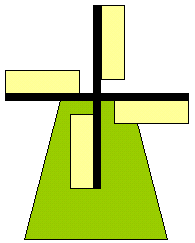
Here is the code that was used to animate the windmill
|
<html> <head> <script type = "text/javascript"> var turnWindmill; var windmill = new Array(6); var curWindmill = 0; windmill[0] = "windmill0.gif"; windmill[1] = "windmill1.gif"; windmill[2] = "windmill2.gif"; windmill[3] = "windmill3.gif"; windmill[4] = "windmill4.gif"; windmill[5] = "windmill5.gif"; function turn() { if (curWindmill == 5) curWindmill = 0; else ++curWindmill; document.images[0].src = windmill[curWindmill]; } function startTurning() { if (turnWindmill != null) clearInterval(turnWindmill); turnWindmill = setInterval("turn()", 100); } </script> </head> <body> <p>img src="windmill0.gif" height="243" width="195"/></p> <form action=""> <p>input type="button" value=" Turn " onclick="startTurning();"/> <input type="button" value=" Stop " onclick="clearInterval(turnWindmill);"/> </form> </body> </html> |
If you would like to learn more on your own, you can go to W3 Schools