Blog-it
boni and jote
welcome
ohhyeahh
and more...
modules
Introduction - Free HTML Tutorial
People often think it is extremely difficult to make a website. That is not the case! Everyone can learn how to make a website. And if you read on, you will have made one in just one hour.
Others believe - just as mistakenly - that expensive and advanced software is needed to make websites. It is true that there are lots of different programs that claim they can create a website for you. Some come closer than others. But if you want it done right, you must do it yourself. Fortunately, it is simple and free and you already have all the software you need.
The aim of this tutorial is to give you an easy, yet thorough and correct introduction to how to make websites. The tutorial starts from scratch and requires absolutely no prior knowledge of programming.
The tutorial cannot show you everything. So some engagement and a will to experiment are required. But don't worry - learning how to make websites is a lot of fun and gives a tremendous amount of satisfaction when you get it right.
How you choose to use the tutorial is up to you. But we suggest you read only two or three lessons a day and take time to experiment with the new things you learn in each lesson.
Lesson 1: Let's get started
In this first lesson, you will get a brief presentation of the tools you need to make a website.
What is needed?
Most likely you already have everything you need.
You have a "browser". A browser is the program that makes it possible to browse and open websites. Right now you are looking at this page in your browser.
It is not important which browser you use. The most common is Microsoft Internet Explorer. But there are others such as Opera and Mozilla Firefox and they can all be used.
You might have heard about, or even used, programs such as Microsoft FrontPage, Macromedia Dreamweaver or even Microsoft Word, which can - or claim that they can - create websites for you. Forget these programs for now! They are not of any help to you when learning how to code your own website.
Instead, you need a simple text editor. If you are using Windows you can use Notepad, which is usually found in the start menu under Programs in Accessories:
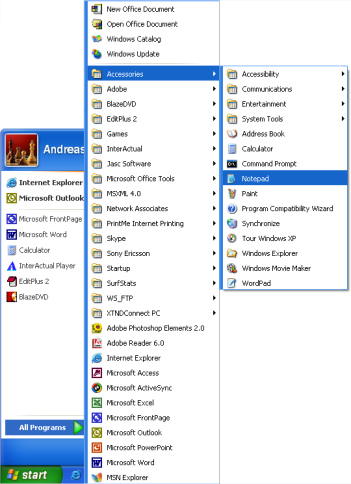
If you are not using Windows, you can use a similar simple text editor. For example, Pico (Linux) or TextEdit (Mac).
Notepad is a very basic text editing program which is excellent for coding because it does not interfere with what you are typing. It gives you complete control. The problem with many of the programs that claim they can create websites is that they have a lot of standard functions, which you can choose from. The downside is that, everything needs to fit into these standard functions. Thus, this type of programs often cannot create a website exactly as you want it. Or - even more annoyingly - they make changes to your hand-written code. With Notepad or other simple text editors, you only have yourself to thank for your successes and errors.
A browser and Notepad (or a similar simple text editor) are all you need to go through this tutorial and make your own websites.
Do I need to be online?
You do not need to be connected to the Internet - neither while reading this tutorial, nor while making your websites.
If you want to avoid being online while reading this tutorial, you can either print it out or simply disconnect from the Internet while reading on screen. You can make the website on your computer's hard disk and upload it to the Internet when it is finished.
What's next?
Go to the next lesson and read about HTML before the fun really starts in Lesson 3.
Lesson 2: What is HTML?
This lesson will give you a brief presentation of your new friend, HTML.
What is HTML?
HTML is the "mother tongue" of your browser.
To make a long story short, HTML was invented in 1990 by a scientist called Tim Berners-Lee. The purpose was to make it easier for scientists at different universities to gain access to each other's research documents. The project became a bigger success than Tim Berners-Lee had ever imagined. By inventing HTML he laid the foundation for the web as we know it today.
HTML is a language, which makes it possible to present information (e.g. scientific research) on the Internet. What you see when you view a page on the Internet is your browser's interpretation of HTML. To see the HTML code of a page on the Internet, simply click "View" in the top menu of your browser and choose "Source".
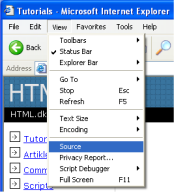
For the untrained eye, HTML code looks complicated but this tutorial will help you make sense of it all.
What can I use HTML for?
If you want to make websites, there is no way around HTML. Even if you're using a program to create websites, such as Dreamweaver, a basic knowledge of HTML can make life a lot simpler and your website a lot better. The good news is that HTML is easy to learn and use. In just two lessons from now you will have learned how to make your first website.
HTML is used to make websites. It is as simple as that!
Okay, but what does H-T-M-L stand for?
HTML is an abbreviation of "HyperText Mark-up Language" - which is already more than you need to know at this stage. However, for the sake of good order, let us explain in greater detail.
Hyper is the opposite of linear. In the good old days - when a mouse was something the cat chased - computer programs ran linearly: when the program had executed one action it went to the next line and after that, the next line and so on. But HTML is different - you can go wherever you want and whenever you want. For example, it is not necessary to visit MSN.com before you visit HTML.net.
Text is self-explanatory.
Mark-up is what you do with the text. You are marking up the text the same way you do in a text editing program with headings, bullets and bold text and so on.
Language is what HTML is. It uses many English words.
In this tutorial you will learn so-called XHTML (Extensible HyperText Mark-up Language) which, in short, is a new and more well-structured way of writing HTML.
Now you know what HTML (and XHTML) stands for let's get started with what it is all about: making websites.