|

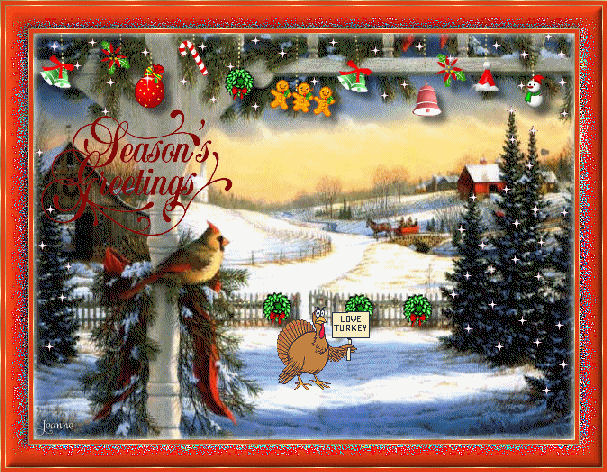
This is the
non-animated version
Jeanne's original animated Dutch
tutorial can be viewed
here
Image size is 198kb
This tutorial was done in
PSP 9
but can also be done in
other versions.
MATERIALS NEEDED:
Download the supplies
here.
(File size - 351 kb)
FILTERS NEEDED
Filter: Toadies -
Blur
THE COLOR PALETTE
Change the foreground
color to #e13d17,
background to a gold
pattern.
Open the Christmas
background image.
Copy it (Shift +D)
and close the original.
Open all the Xmas -
decoration tubes.
Copy and paste them
one-by-one onto the canvas
and decorate the top of
your image with it.
Lock the background layer
in the Layers palette.
Activate one of the other
layer and merge
the layers visible.
Apply a drop shadow:
H & V - 6
Opacity - 50
Blur - 9
Color - black.
Activate the Pen Tool with
the Linestyle on
'diamonds', width 2.
Change the foreground
color to a gold pattern.
Draw line from the top to
each decoration.
Copy the 'MD tekst'- tube.
Past onto the canvas.
Apply a drop shadow with
the color white.
Layers --> Merge --> Merge
All.
Add a new layer.
Layers --> Merge
All(again)
Selections --> Select All.
Effects --> 3D Effects -->
Cutout:
V & H - 0
Opacity - 100
Blur -15.00
Color - white.
*Image -->
Add Border --> 1 pixel
white.
Select with the Magic Wand
and fill with gold.
Selections --> Select None
( Deselect).
Image --> Add Borders -->
4 pixels in color
#e13d17.
Image --> Add Borders -->
1 pixel white.
Select with the Magic Wand
and fill with gold.
Selections --> Select
None(Deselect).*
Image --> Add Borders -->
25 pixels : red.
Select with the Magic
Wand.
Filter --> Toadies -->
Blur.
Effects --> Edge Effects
--> Enhance more.
Effects --> 3D Effects -->
Inner Bevel:
Width 13
Smoothness 16
Depth 3
Ambiance 0
Shinniness 0
Angle 315
Intensity 44
Elevation 33
Color white
Repeat from * to *
Add your name or
watermark.
Save as a *.pspimage.
Copy your image.
Open Animation Shop.
Open the turkey animation
as well as the little
star.
Click
here for the animation
tutorial.
Your tag is finished! : -)
Please take a few
minutes to write
a message in
Jeanne's Guestbook.
Thank you kindly.
Back to Index

translated on the 30th
December 2006

The graphic
design of this page is
copyrighted to
©Magstags - All Rights
Reserved.
Home |
Filter Links |
Email |
Terms Of Use |