|

*~*My
Valentine
*~*
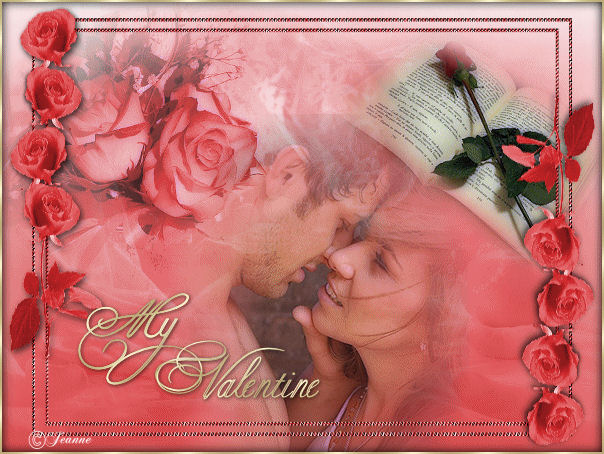
Jeanne's original
ANIMATED Dutch
tutorial can be viewed
HERE.
The tutorial was created
in PSP 9.
MATERIALS NEEDED:
Download the supplies
here.
(File size - 3,453 kb)
FILTERS NEEDED
Filter Xero -
Porcelain
THE COLOR PALETTE
Foreground color on
#d52525
Background color on white
and gradient:
Style - Linear
Angle - 0
Repeats - 0
Invert - not checked.
Open a new transparent
canvas, size 600 x 450.
Selections --> Select All.
Layers --> New raster
layer.
Copy the ' 13929' - image
and paste it into the
selection.
Change the layer' s
opacity to 32% in the
Layers palette.
Copy and paste the tube '
romance_novel' onto
the canvas.
Image --> Rotate - right
25.
Image --> Resize to 65%
Image --Resize --> to 85%
Drag it to the top right.
Copy and paste the tube '
MD_Flower050' onto
the canvas.
Resize to 65%
Layer' s opacity on 74%
Drag it to the top left.
Copy and paste the tube '
SusanT3673' onto the
canvas.
Drag it to the bottom.
Activate the Eraser tool,
highlight the flower layer
in the Layers palette,
and clean the man up.
Change the layer's opacity
to 82%.
Layers --> Merge --> Merge
All
Apply the Filter Xero -
Porcelain - standard
effect.
Selections --> Select All.
Copy the 'jeanne_lijst'
and paste it into the
selection.
Selections --> Select
None.
Copy and paste the text
onto the canvas.
Choose a nice font and add
your text onto the canvas.
Layers --> Merge --> Merge
All.
Selections --> Select All.
Effects --> 3D Effects -->
Cutout:
H & V = 0
Opacity = 50
Blur = 15
Color = black
Selections --> Select
None.
Add a 2 pixel white
border.
Select with the Magic Wand
and fill with the gold
pattern.
Selections --> Select
None.
Add your watermark or
name.
Merge all layers.
Click
here if you want
to animate the image :-)
And you're finished.
Please take a few
minutes to write
a message in
Jeanne's Guestbook.
Thank you kindly.
Back to Index

translated on the 30th
December 2006

The graphic
design of this page is
copyrighted to
©Magstags - All Rights
Reserved.
Home |
Filter Links |
Email |
Terms Of Use |