|

*~*
Happy New Year 3
*~*
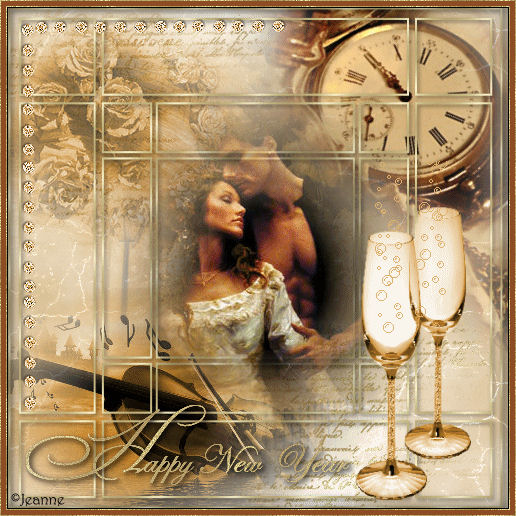
This is the non-animated
version
Jeanne's orginal animated Dutch
tutorial can be viewed
here.
Image size 264kb
This tutorial was written
for PSP 9
MATERIALS NEEDED:
Download the supplies in
two parts:
Part 1 file size -
1,431 kb
Part 2 file size -
1,655 kb
Filters needed:
Filters Unlimited
Photo Aging Kit
Change the foreground
color to #d3b27d
background color on white.
Change the background to a
gold pattern.
Open a new transparent
canvas, 500 x 500
pixels.
Fill with the foreground
color.
Filters Unlimited - Render
- Clouds fore/background
color)
Reduce the layer opacity
to 70% in the Layers
palette.
Filter Effect --> Photo
Aging Kit - Cracked paper
Click on the snowpark
tube.
Adjust --> Hue and
Saturation --> Colorize:
hue 26 Saturation 163.
Copy and paste this image
onto your canvas.
Reduce the layer's opacity
to 52%
in the Layers palette.
Add a new layer.
Click on the Brush
File --> Export --> Brush
Give it a name and click
on 'ok'.
Activate the Brush Tool
now and find
this brush.
Apply it 1x or 2x by
right-clicking with your
mouse
to the top left corner.
Apply it in the bttom
right corner as well.
Copy and paste the tube
'jeanne_roosjes_oud'- tube
onto the canvas.
Move it to the top left
corner.
Reduce the layer's opacity
to 74%
in the Layers palette.
Copy and paste the
tube 'in_the_ attick'
onto the canvas.
Image -->Rotate--> Free
Rotate: 45 to the right.
Move it to the top right.
Copy and paste the tube
tube 'fantasie'
onto the canvas.
Image --> Mirror.
Image --> resize 80%.
Position it in the bottom
left corner.
Copy and paste the
'jeanne_raster'- tube
onto the canvas.
Layers --> Merge --> Merge
All.
Copy and paste the tube
'jeanne_koppel1'
onto the canvas.
Position it nicely in the
center.
Copy and paste the tube
'MD_Moni_glaasjes'
onto the canvas.
Image --> Resize 85%.
Position it in the bottom
right corner (see example)
Copy and paste the text
tube onto the canvas.
Drag it to the bottom
left.
Copy and pasye the 'LD
dreamsdiamand'- tube
onto the canvas.
Image --> Rotate --> Free
Rotate: left 90 degrees.
Layers --> Merge --> Merge
All Layers.
Selections --> Select All.
Effects --> 3D Effects -->
Cutout: V & H 0
Opacity - 50
Blur - 25
Color - black.
Selections --> Select
None.
Change the foreground
color to #8e4d24.
Image --> Add Border: 1
pixel black.
*Image --> Add Border: 1
px white.
Select with your Magic
Wand andfill with the gold
pattern.
Selections --> Select
None.
Add 5 pixels
foreground color.
Image --> Add Border: 1 px
white.
Select with the Magic Wand
and fill with the gold
pattern.
Selections --> Select
None.
Add your watermark and
name and
the tutorial is in the can
!! :-)
Click
here for the animation
Please take a few
minutes to write
a message in
Jeanne's Guestbook.
Thank you kindly.
Back to Index

translated on the 30th
December 2006

The graphic
design of this page is
copyrighted to
©Magstags - All Rights
Reserved.
Home |
Filter Links |
Email |
Terms Of Use
|