Inside the High Performance File System
Part 3: Fragmentation, Diskspace Bitmaps and Code Pages
Written by Dan
Bridges
Introduction
This article originally appeared in the May 1996 issue of Significant Bits,
the monthly magazine of the Brisbug PC User Group Inc.
This month we look at how HPFS knows which sectors are occupied and which
ones are free. We examine the amount of file fragmentation on five HPFS volumes
and also check out the fragmentation of free space. A program will be presented
to show free runs and some other details. Finally, we'll briefly discuss Code
Pages and look at a program to display their contents.
How Sectors are Mapped on a HPFS Volume
The sector usage on a HPFS partition is mapped in data band bitmap blocks.
These blocks are 2 KB in size (four sectors) and are usually situated at either
the beginning or end of a data band. A data band is almost 8 MB. (Actually 8,190
KB since 2 KB is needed for its bitmap.) See Figure 1. The state of each bit in
the block indicates whether or not a sector (HPFS' allocation unit) is occupied.
If a bit is set (1) then its corresponding sector is free. If the bit is not set
(0) than the sector is occupied. Structures situated within the confines of a
data band such as Code Page Info & Data sectors, Hotfix sectors, the Root
Directory DirBlk etc. are all marked as fully occupied within that band's usage
bitmap.
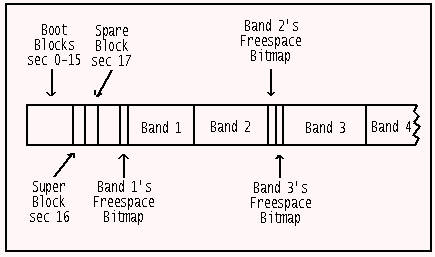
Figure 1: The basic data layout of a HPFS volume.
Since each bit maps a sector, a byte maps eight sectors and the complete 2 KB
block maps the 16,384 sectors (including the bitmap block itself) in a 8 MB
band. And since two blocks can face each other, we arrive at the maximum
possible extent (fragment) size of 16,380 KB. Examine Figure 2 now to see
examples of file and freespace mapping.
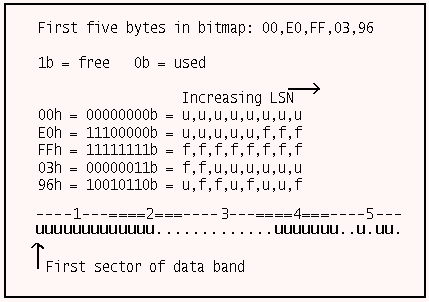
Figure 2: The correspondence of the first five bytes in a data
band's usage bitmap to the first 40 sectors in the band.
In this example we see 23 occupied sectors ("u") and 4 unoccupied areas (".")
which we will refer to as "freeruns" [of sectors]. At one extreme, the 23
sectors might belong to one file (here in four extents) while at the other
extreme we might have the FNODEs of 23 "zero-length" files. (Every file and
directory entry on a HPFS volume must have an FNODE sector.)
The advantages of the bitmap approach are twofold. First, the small
allocation unit size on a HPFS volume means greatly reduced allocation unit
wastage compared to large FAT partitions. Second, the compact mapping structure
makes it feasible for HPFS to quickly search a data band for enough free space
to slot in a file of known size, in one piece if possible. For example, as just
mentioned HPFS can map 32,760 allocation units with just 4 KB of bitmaps whereas
a 16-bit FAT structure requires 64 KB (per FAT copy) to map 32,768 allocation
units.
A Fragmentation Analysis
In this section we'll examine the level of fragmentation on the five HPFS
partitions of my first HD. Look at Figure 3. Notes:
1. A time-since-last-defrag figure of "Never" means that I've never run a
defragger across this partition since upgrading to OS/2 Warp 118 days ago. This
value is stored in the SuperBlock (LSN 16) and was determined by using the
ShowSuperSpare REXX program featured in Part 2.
2. The fragmentation levels were reported by the wondrous FST (freeware) with
"FST -n check -f C:" while the names of the fragmented files and their sizes
came from the GammaTech Utilities (commercial) "HPFSOPT C: -u -d -o1 -l
logfile". You can also use the Graham Utilities (commercial) "HPFS-EXT C: -s".
3. The high number of files with 0 data extents on C: is due to the presence
of the WPS folders on this drive. Each of these has "zero" bytes in the main
file but they usually have bytes in EAs.
4. Files with 0 or 1 extents are considered to fully contiguous, so I've
placed them in one grouping.
5. Files with 2-8 extents are considered to be "nearly" contiguous" since the
fragments will usually be placed close together on the disk and also because a
list of the location and length of up to 8 extents can be kept in a file's FNODE
sector. This list will be kept memory resident while the file is open. Note 1:
the extents themselves can not be kept memory resident since, theoretically,
they could be up to 8*16,380 KB in size. But no non-data disk reads, after the
initial read of the FNODE, would be required to work with the file. Note 2:
under some circumstances, the 8 extents, if small enough, could be kept memory
resident in the sense that they could be held in HPFS' cache. We will consider
FNODEs in detail in a later installment.
6. Files with more than 8 extents have too many fragments to be listed in
their FNODEs. Instead an B+tree allocation sector structure (an ALSEC) is used
to map the extents. The sector mappings are small enough to keep memory resident
while the file is open. ALSECs will be covered in a latter installment.
7. EAs are usually not fragmented since, in the current implementation of
OS/2, the total EA size associated with any one file is only 64 KB. If a file
has EAs in 0 extents then the EA information is stored completely within the
FNODE sector. (There is space in the FNODE for up to 145 bytes of "internal"
EAs.) In all other cases on my system they currently stored in single, external
runs of sectors. EAs will be covered in later installments.
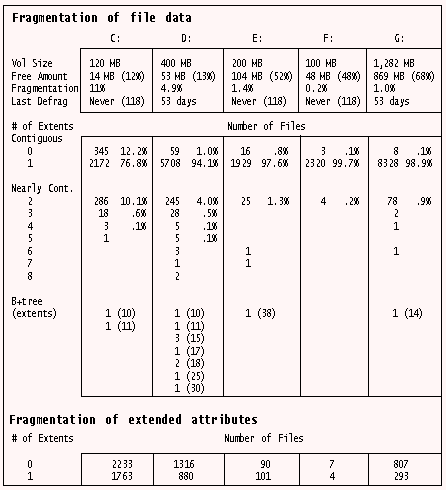
Figure 3: Fragmentation analysis of five HPFS partitions.
We now turn to the topic of what circumstances are leading to file
fragmentation on these partitions.
C: _ The OS/2 system partition. I've run out of space on this drive on
occasions. Activity here occurs though the running of Fixpacks (FP 16 and then
FP 17 were run), INI maintenance utilities and driver upgrades. There is really
nothing of concern here. Most HPFS defraggers suggest not trying to defrag files
that have less than 2 or 3 extents since you run the risk of fragmenting the
free space. We will return to this topic shortly.
D: _ My main work area and the location of communications files. I use the
DOS comms package TELEMATE because I've always liked its features (although OS/2
has to work hard to handle its modem access during a file transfer - OS/2 comms
programs, in general, are much less demanding of the CPU's attention). The other
major comms package I use is OS/2 BinkleyTerm v2.60 feeding OS/2 Squish message
databases. The fragmented files consist mainly of files downloaded by TELEMATE
(DOS comms programs do not inform HPFS, ahead of time, of how much space the
downloaded file will occupy) and Squish databases (*.SQD). The drive was
defragged 53 days ago at which time no special effort was made to reduce file
fragmentation below 2-3 extents, accounting for the presence of 245 files with
two extents. This really is an insignificant amount regardless of what the 4%
figure may lead you to believe.
The most fragmented file on this partition is a 150 KB BinkleyTerm logfile
with 30 extents. The main reason I can see for fragmentation in this case is
that the file is frequently being updated with information while file transfers
are in progress. The Squish databases are also prone to fragmentation. Out of a
total of 25 database files there were 8, averaging 500 KB each, with a average
of 15 extents.
E: _ The fragmentation here was insignificant apart from a single 2.8 MB
executable Windows program that has had a DOS patch program run over it,
resulting in 38 fragments. The 2-extent files were mainly data files that are
produced by this same Windows package (being run under WIN-OS2).
F: _ Almost no fragmentation since this partition is reserved for DOS
programs and I don't use them much.
G: _ My second major work partition. Fragmentation is low and unlikely to go
much lower since 2 extents is considered below the point of defragger
involvement.
The conclusions to be drawn from the above is that, if you don't get too hot
under the collar about some files having 2 or 3 extents then there will
generally be little need to worry about fragmentation under HPFS. Only certain
types of files (some comms/DOS/Windows) will be candidates. And keeping
partitions less than 80% full should help reduce general fragmentation as well.
Defragmenting Files
Since fragmentation is a relatively minor concern under HPFS there is not
much of an argument for purchasing OS/2 utilities based mainly on their ability
to defragment HPFS drives, especially since it's not hard to defragment files
yourself. You see, providing there is enough contiguous freespace on a volume,
the mere act of copying the files to a temporary directory, deleting the
original and then moving the files back will usually eliminate, or at least
reduce fragmentation since HPFS, knowing the original filesize, will look for a
suitably sized freespace. The success of this technique is demonstrated in
Figure 4 where 25 Squish database files (*.SQD) totalling 5.7 MB where shuffled
about on D:. Note: don't use the MOVE command to initially transfer the files to
the temp directory since this will just alter the directory entry rather than
actually rewriting the files.
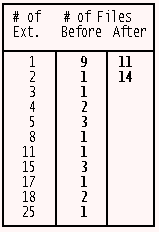
Figure 4: Number of extents in 25 SQD files before and after the
defrag process described in the text.
I've used the GU's HPFS-EXT to report these figures. This is freely available
in the GULITE demo package. Note: the fully functional HPFSDFRG is also in this
package but I wanted to show that it's not that hard to do this by hand.
HPFSDFRG does much the same as I did except that you can specify the
optimisation threshold (minimum number of extents before a file becomes a
candidate) and it will retry the copying operation up to ten times if there are
more extents after the operation than before it (due to heavily fragmented
freespace).
The Fragmentation of Freespace
Another significant aspect of HPFS' fragmentation resistance is how well the
FS keeps disk freespace in big, contiguous chunks. If the current files on a
partition are relatively fragmentation free but the remaining freespace is
arranged in lots of small chunks then there is a good change that new files will
be fragmented. You can check this with "FST -n info -f C:". This produces a
table that counts the number of freespace extents that are 1, 2-3, 4-7, 8-15,
... 16384-32767 sectors long. In my opinion though it is more important to
consider the product of the actual extent size by their frequency since the
presence of numerous 1-extent spaces are not important if there are still a
number of large spaces available.
Figure 5 shows the output of the REXX program ShowFreeruns.cmd. The partition
of 100 MB is almost empty. The display shows the location of the 2 KB block that
holds the list of the starting LSNs of each bitmap block (this figure comes from
the dword at offset 18h in the SuperBlock), the location of each bitmap block on
the left and the sector size and location of freespace on the right. As you see,
this partition has 13 data bands, 6 of which face each other. A version of
ShowFreeruns.cmd that only outputs the run size was used to generate a list of
figures. This list was loaded into a spreadsheet, sorted and a frequency
distribution performed. See Figure 6. You can see that C: has no large areas
remaining, D: has the majority of its freespace in the 4 MB < 8 MB range and
that E:, F: and G: have kept large majorities of their freespace in very big
runs. Overall, this is quite good performance.
Inspecting drive O:

 List of Bmp Sectors: 0x00018FF0 (102384)

Space-Usage Bitmap Blocks:
                                      Freespace Runs:

  0x00000014-00000017 (20-23)
  0x00007FFC-00007FFF (32764-32767)
                                      130-32763     (#1:32634)

  0x00008000-00008003 (32768-32771)
  0x0000FFFC-0000FFFF (65532-65535)
                                      32772-65531   (#2:32760)

  0x00010000-00010003 (65536-65539)
  0x00017FFC-00017FFF (98300-98303)
                                      65540-81919   (#3:16380)
                                      81926-98291   (#4:16366)

  0x00018000-00018003 (98304-98307)
  0x0001FFFC-0001FFFF (131068-131071)
                                      100369-102383 (#5:2015)
                                      102400-131067 (#6:28668)

  0x00020000-00020003 (131072-131075)
  0x00027FFC-00027FFF (163836-163839)
                                      131076-163835 (#7:32760)

  0x00028000-00028003 (163840-163843)
  0x0002FFFC-0002FFFF (196604-196607)
                                      163844-196603 (#8:32760)

  0x00030000-00030003 (196608-196611)
                                      196612-204767 (#9:8156)
Figure 5: Output from the ShowFreeruns.cmd REXX program.
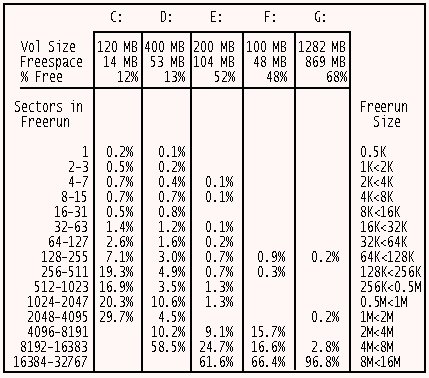
Figure 6: Freespace analysis on five HPFS partitions.
The ShowFreeruns Program
Like other programs in this series, ShowFreeruns.cmd (see Figure 7) uses
SECTOR.DLL to read a sector off a logical drive. I was motivated to design this
program after seeing the output of the GU's "HPFSINFO C: -F". On a one-third
full 1.2 GB partition, the program presented here takes 17 secs compared to
HPFSINFO's time of 26 secs. HPFSINFO also shows the CHS (Cyl/Hd/Sec) coordinates
of each run. I was not interested in these but instead display the freerun's
size. HPFSINFO also displays the meaning of what's in the SuperBlock and the
SpareBlock. If you want to do this, you can include the code from
ShowSuperSpare.cmd from Part 2 and it will only add an extra 0.5 secs to the
time. The performance then, for a interpreted program (REXX), is quite good and
was achieved primarily through a speed-up technique to be discussed shortly.
Moreover, HPFSINFO consistently overstates the end of each freerun by 1 and it
sometimes does not show the last run (e.g. on C: it states that there are 366
freeruns but only shows 365 of them). This last bug appears to be caused by the
last freerun continuing to the end of the partition. My design accounts for this
situation.
/* Shows bitmap locations and free space runs */
ARG drive .  /* First parm should always be drive */

IF drive = '' THEN CALL HELP
parmList = "? /? /H HELP A: B:"
IF WordPos(drive, parmList) \= 0 THEN CALL Help

/* Register external DLL functions */
CALL RxFuncAdd 'ReadSect','Sector','ReadSect'
CALL RxFuncAdd 'RxDate','RexxDate','RxDate'

/* Initialise Lookup Table*/
DO exponent = 0 TO 7
   bitValue.exponent = D2C(2**exponent)
END exponent

secString = ReadSect(drive, 16)   /*Read Superblk sec*/
freespaceBmpList = C2D(Reverse(Substr(secString,25,4)))
totalsecs = C2D(Reverse(Substr(secString,17,4)))

'@cls'
SAY
SAY "Inspecting drive" drive
SAY
/* LSN 25 = list of bitmap blocks */
CALL ShowDword " List of Bitmap secs",25

startOfListBlk = 0
    startOfBlk = 0
    bmpListBlk = ""
        bmpBlk = ""
getFacingBands = 0
     runNumber = 0
    byteOffset = 0
     runNumber = 0
/* Read in 4 secs of the list of sec-usage bmp blks */
DO secWithinBlk = freespaceBmpList TO freespaceBmpList+3
   temp = StartOfListBlk + secWithinBlk
   bmpListBlk = bmpListBlk||ReadSect(drive, temp)
END secWithinBlk

SAY
SAY "Space-Usage Bitmap Blocks:"
SAY "                                  Freespace Runs:"

/* Use dword pointers to bmps to read in 2KB bmp blks */
DO listOffset = 1 TO 2048 BY 4
   startDecStr = C2D(Reverse(Substr(bmpListBlk,ListOffset,4)))
   IF startDecStr = 0 THEN    /* No more bmps listed */
      DO
      IF getFacingBands = 1 THEN
         DO    /* Last data band had no facing data band */
         bmpSize = 2048
         CALL DetermineFreeruns
         LEAVE
         END

      LEAVE
      END

   /*Display a blank line when a new facing band occurs*/
   IF (ListOffset+7//8 = 0 THEN SAY

   CALL ShowBmpBlk listOffset
   DO secWithinBlk = 0 TO 3
      temp = StartOfBlk + secWithinBlk
      bmpBlk = bmpBlk||ReadSect(drive, temp)
   END secWithinBlk

   getFacingBands = getFacingBands + 1
   IF getFacingBands = 2 THEN /* Wait until you get both */
      DO                    /* bmps for the facing data*/
      bmpSize = 4096       /* bands since maximum extent*/
      CALL DetermineFreeruns    /* length is 16,380 KB */
      byteOffset = byteOffset+4096
      getFacingBands = 0
      bmpBlk = ""
      END
END listOffset

EXIT  /**************EXECUTION ENDS HERE**************/


FourBytes2Hex:  /* Given offset, return dword */
ARG  startPos
rearranged = Reverse(Substr(secString,startPos,4))
RETURN C2X(rearranged)


ShowDword:     /* Display dword and dec equivalent */
PARSE ARG label, offset
hexStr = FourBytes2Hex(offset)
SAY label": 0x"hexStr "("X2D(hexStr)")"
RETURN


ShowBmpBlk:
/* Show start-end of freespace runs in hex & dec */
PARSE ARG  offset
endDecStr = C2D(Reverse(Substr(bmpListBlk,offset,4)))+3
SAY "   0x"D2X(startDecStr,8)"-"D2X(endDecStr,8)
                          " ("startDecStr"-"endDecStr")"
startOfBlk = startDecStr
RETURN


DetermineFreeruns:
runStatus = 0
oldchar = ''
/* Check 128 secs at a time to speed up operation */
DO para = 1 to bmpSize BY 16
   /* 16 bytes*8 secs/byte = 128 secs per para scanned */
   char = Substr(bmpBlk,para,16)
   IF char = 'FFFFFFFFFFFFFFFFFFFFFFFFFFFFFFFF'x &,
              runstatus = 1 THEN ITERATE para
   IF char = '00000000000000000000000000000000'x &,
              runstatus = 0 THEN ITERATE para
   /* Part of paragraph has run start/end
      so check a byte (8 secs) at a time. */
   DO byte = para TO para + 15
      char = Substr(bmpBlk,byte,1)
      IF char > '0'x THEN        /* 1 or more free secs */
         DO
         IF char = 'FF'x THEN       /* 8 unoccupied secs */
            IF runStatus = 1 THEN  /* Run is in progress */
               NOP
            ELSE         /* Run starts on 8 sec boundary */
               DO
               startByte = byte + byteOffset
               startBitPos = 0
               runStatus = 1   /* Start run determination */
               END
         ELSE
            CALL DetermineBit /* Partial usage of 8 secs */
         END
      ELSE
         DO                    /* All 8 secs are used */
         IF runStatus = 1 THEN
            DO
            endByte = byte + byteOffset
            endBitPos = -1   /* Run ends with prior sec */
            CALL ShowRun
            END
         END
   END byte
END para

IF runStatus = 1 THEN   /* Freespace at end of part. */
   DO
   endByte = 9999999999   /* Larger than # of secs in   */
   endBitPos = 0          /* max. possible part.(512GB) */
   CALL ShowRun           /* so ShowRun will set runEnd */
                       /* to last LSN in this part.  */
   END
RETURN


DetermineBit:  /* Free/occupied usage within 8 sec blk */
DO bitPos = 0 TO 7
   IF runStatus = 0 THEN
      DO                /* No run currently in progress */
      IF BitAnd(char, bitValue.bitPos) > '0'x THEN
         DO              /* sec is free */
         startByte = byte + byteOffset
         startBitPos = bitPos
         runStatus = 1
         END
      END
   ELSE
      DO
      IF BitAnd(char, bitValue.bitPos) = '0'x THEN
         DO              /* sec is used */
         endByte = byte + byteOffset
         /* When a run ends, the sec before the first
            used one is the last sec in the freerun. */
         endBitPos = bitPos - 1
         CALL ShowRun
         END
      END
END bitPos
RETURN


ShowRun:
/* Display freerun start-end secs & reset run status */
runNumber = runNumber + 1
runStart = (startByte - 1) * 8 + startBitPos
runEnd = (endByte - 1) * 8 + endBitPos

IF runEnd > totalSecs THEN runEnd = TotalSecs - 1
IF runStart \= runEnd THEN  /* More than 1 sec is free */
   DO
   run = runStart"-"runEnd
   run = Left(run||Copies(" ",14),15)
   SAY Copies(" ",40) run "(#"runNumber":"runEnd-RunStart+1")"
   END
ELSE
   DO
   run = Left(runStart||Copies(" ",14),15)
   SAY Copies(" ",40) run "(#"runNumber":1)"
   END

runStatus = 0
RETURN


Help:
SAY
SAY "Purpose:"
SAY "  ShowFreeruns displays the location of the
       sec-usage bitmap blocks"  /* Wrapped long line */
SAY "   and the location and extent of free space runs."
SAY
SAY "Example:"
SAY "  ShowFreeruns C:"
SAY
EXIT
Figure 7: The ShowFreeruns.cmd REXX program. Requires
SECTOR.DLL. Note that the long SAY line (line 40) should include the next line
as well. (SAY clauses can't be continued on to the next line with a comma.)
Since a sector is mapped by a bit, the program often needs to check the
status of a bit within a bitmap's byte. This is done using the BITAND(string1,
string2) inbuilt function. In this design string 1 holds the byte to be examined
and string 2 holds a character that only has the corresponding bit set. Rather
than having to work out the character for string 2 each time BITAND() is used,
we instead precalculate the eight characters and then store them in the
BitValue. compound variable for later use.
The next step is to read in the SuperBlock and from it get the location of
the list of bitmap sectors and the total number of sectors. The later value is
required so we know when we've reached the end of the partition.
We then read in the four sectors of the block holding the list of bitmaps.
The list consists of dwords that store the starting LSN of each bitmap block.
128 dwords can fit in each sector of the list so the four sectors of the list
can hold 512 bitmap block LSNs. Now a bitmap block maps 8 MB of diskspace so
this 'lite' version is only good when dealing with a partition of less than 4
GB. (Earlier works refer to the maximum partition size as 512 GB but in the
recent "Just Add OS/2 Warp" package, in its technical section, it is stated that
the maximum partition size is 64 GB.) I won't be able to check this aspect of
the design until I get a HD bigger than 4 GB and succumb to the mad urge to
partition it as one volume.
The end of the list is indicated by the first occurrence of 0000h. The list
of the 100 MB partition shown in Figure 5 contains only 13 dwords since it has
13 data bands so, in a typical case, you should not expect to find much data
stored in this block.
A freerun can be bigger than a data band since pairs of bands face each
other, so we consider two bands at a time, unless we reach the end of the
partition without a facing band. Once we have a data region we call the
DetermineFreeruns procedure. Here we examine the two, combined data bitmaps
(unless it's a solo band at the end). In the initial design I looked at each
byte in the 4 KB bitmap combination to see it if it was either 00h (all eight
sectors used) or FFh (all eight sectors free). Typically, you will find lots of
occupied or free sectors together, so checking eight at a time speeds up the
search. Only when the byte was neither of these is a bit-level search required.
However, the speed of this version was poor, with the search though each byte
of the 322 KB of bitmaps for the 161 databands in the 1.2 GB partition taking a
total of 104 secs. The obvious solution was to extend the optimisation method to
a second, higher level by checking more bytes first to see if they were all set
or clear. I settled on 16 bytes which covers 128 sectors (64 KB) of diskspace at
a time and this resulted in the final time of 17 secs. Further experiments with
larger (64 byte) groups and also with third-level optimisation did not show much
improvement with my mix of partitions but your situation may warrant further
experimentation.
Code Pages
Different languages have different character sets. Code Pages (CPs) are used
to map an ASCII character to the actual character. CP tables reside in
COUNTRY.SYS. They are also present on a HPFS volume and every directory entry
(DIRENT) includes a CP index value.
CPs are used to map character case (i.e. in a foreign character set the
relationship between lower and upper-case characters) and for collating
sequences used when sorting. As mentioned in Part 1, HPFS directories use a
B-tree structure which, as part of its operation, always store file/directory
names in sorted order. Remember that HPFS is not case-sensitive (including when
sorting) but it preserves case.
The European-style language (including English) have relatively
straightforward Single-Byte Character Sets (SBCS) i.e. one character is
represented by one byte. Asian character sets typically have many characters so
they require two bytes per character (DBCS).
The first 128 characters in all ASCII CPs are the same so the CP tables on
the disk only map ASCII 128-255.
The SpareBlock holds the LSN of the first CP Info sector. There is a header
followed by up to 31 16-byte CP Info Entries. There is provision for more than
one CP Info sector which could hold CP Info Entries 31-61 (counting from 0). Why
so many different CPs are catered for I have no idea since I've been unable to
have more than two loaded at a time. In Australia we typically use CP437
(standard PC) - Country 061 and CP850 (multilingual Latin-1) - Country 000. The
layout of a CP Info sector is shown in Figure 8.
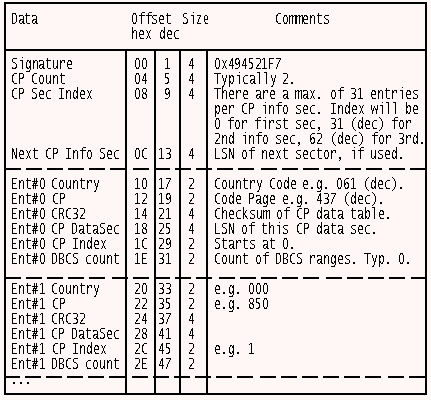
Figure 8: The layout of a Code Page Infomation Sector.
The CP Info Entry contains the LSN where this entry's CP mapping table is
stored. This sector is a CP Data Sector. As well as a header there is enough
space for up to three 128-byte CP maps per sector. Figure 9 shows the layout of
a CP Data Sector.
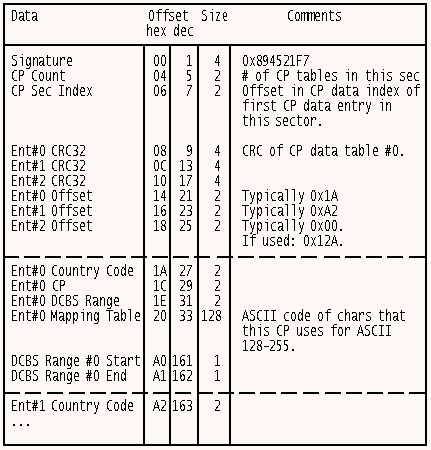
Figure 9: The layout of a Code Page Data Sector.
The CP.cmd Program
Figure 10 shows the display produced by the REXX CP.cmd program (Figure 11).
I've stopped it before it reached ASCII 255. Normally, the output will scroll
off the screen, so either pause it or send it to the printer. If the mapped
character has the same value as its ASCII value the word "same" is displayed
instead to reduce clutter.
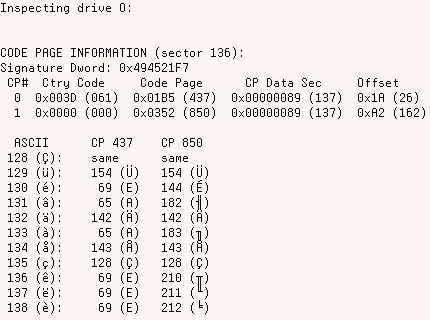
Figure 10: Partial output from the CP.cmd program. List
continues on to ASCII 255.
/* Decodes CP info & CP data sectors on a HPFS volume */
ARG drive .       /* First parm should always be drive */
IF drive = '' | drive = "?" | drive = "HELP",
              | drive = "A:" | drive = "B:" THEN CALL Help

CALL RxFuncAdd 'ReadSect','Sector','ReadSect' /* In SECTOR.DLL */
secString = ReadSect(drive,17)     /* SpareBlock is LSN 17 */
'@cls'
SAY
SAY "Inspecting drive" drive
SAY

/* Offset 33 in Spareblock contains dword of CP info LSN */
cpInfoSec = C2D(Reverse(Substr(secString,33,2)))
secString = ReadSect(drive,cpInfoSec)   /* Load CP info sec */
numOfCodePages = C2D(Reverse(Substr(secString,5,2)))
prevDataSec = ''

SAY "CODE PAGE INFORMATION (sector" cpInfoSec"):"
SAY "Signature Dword: 0x"FourChars2Hex(1)
SAY " CP#  Ctry Code     Code Page      CP Data Sec     Offset"

DO x = 0 TO numOfCodePages-1
   hexCountry = TwoChars2Hex((16*x)+17)
   decCountry = Right('00'X2D(hexCountry),3)
   cp = TwoChars2Hex((16*x)+19)
   country.x = X2D(cp)
   hexSec = FourChars2Hex((16*x)+25)
   decSec = X2D(hexSec)
   cpDataSec = decSec
   /* Since up to 3 CP tables can fit in 1 CP data sec,
      only read in a new data sec when the need arises. */
   IF cpDataSec \= prevDataSec THEN
      DO
      dataSecString = ReadSect(drive,cpDataSec)
      prevDataSec = cpDataSec
      END

   offset = C2D(Reverse(Substr(dataSecString,(2*x)+21,2)))
   start = offset + 1
   SAY " " x " 0x"hexCountry "("decCountry")  0x"cp "("X2D(cp)")  0x"
                      hexSec "("decSec")  0x"D2X(offset) "("offset")"
                       /* Wrapped long line */
   /* Store table contents of each CP in an array */
   DO y = 128 TO 255
      char = Substr(dataSecString,start+6+y-18,1)
      IF C2D(char) \= y THEN
         array.x.y = Format(C2D(char),4) "("char")"
      ELSE
         array.x.y = " same   "
   END y
END x

/* Work out title line based on number of CPs */
titleLine = "  ASCII  "
DO x = 0 TO numOfCodePages-1
   titleLine = titleLine "   CP" country.x
END x
SAY
SAY titleLine

/* Display each table entry based on number of CPs */
DO y = 128 TO 255
   dispLine = ''
   DO x = 0 TO numOfCodePages-1
      dispLine = dispLine"  "array.x.y
   END x
   SAY "" y "("D2C(y)"):" dispLine
END y

EXIT  /****************EXECUTION ENDS HERE****************/


FourChars2Hex:
ARG offset
RETURN C2X(Reverse(Substr(secString,offset,4)))


TwoChars2Hex:
ARG offset
RETURN C2X(Reverse(Substr(secString,offset,2)))


Help:
SAY "Purpose:"
SAY "  CP    decodes the CodePage Directory sector &"
SAY "                the CodePage sector on a HPFS volume"
SAY
SAY "Example:"
SAY "  CP C:"
EXIT
Figure 11: The CP.cmd REXX program. Requires SECTOR.DLL.
While REXX does not support arrays it does have compound variables and I've
used a CV called "array" to store the contents of each CP's mapping table. The
design only deals with the first 31 CP Info entries (that should be more than
enough anyway) and accommodates additional CPs by adding new columns to the
display.
Armed with this printout you can experiment with different collating
sequences when switching CPs. You can check out your current CP by typing "CHCP"
and then switch to a different CP by issuing, say, "CHCP 850". I used "REM >
File[Alt-nnn]" to create zero-length files, with one or more high-order ASCII
characters in their filenames, as test fodder.
Conclusion
In this installment you've learned how to decode the data band usage bitmaps
contents and how to display the contents of the Code Page mapping tables. Next
time we'll examine B-trees, DIRBLKs and DIRENTs.