Helping Children with
Autism
Several websites with information
about assistive technolgies for children with autism
1. Assistive
Technology for Children with Autism
This
article was written by Susan
Stokes, an
autism consultant, under a contract with CESA 7 and funded by a
discretionary
grant from the Wisconsin Department of Public Instruction.
The article discusses various modes of
technology from low (visual support strategies that do not involve
electronics), to mid (battery operated technologies or simple
electronic
devices), and high (complex technology usually at a high cost). Characteristics of autistic children are
described and technologies are given as to how to assist the child in
learning. Descriptions are given about
all of the various technologies and what research has to say about each. The author stresses that not all strategies
will work the same and that each strategy should fit the needs of the
child. A lot of the strategies suggested
are low technology which means less cost.
This site could be beneficial for parents, teachers, and
counselors who
are working with autistic children.
http://www.specialed.us/autism/assist/asst10.htm
2.
 How
to Help Children with
Autism
How
to Help Children with
Autism
This article by by Fredda Brown, Ph.D., and Sima Gerber,
Ph.D. was
written to help parents understand what autism is.
This site describes characteristics of
children with autism so parents can see if their child may be autistic. The next step is to help parents if they
think their child may be autistic. The
article gives steps for parents to take.
If your child is in fact autistic there are several approaches
to
take. The article gives real life
situations for parents to read to see if that approach would work best
for
their child. To ensure that your child
is getting the best education take into consideration some of the items
listed. It is important for parents to
be involved at home also the site offers some possible suggestions to
stay
involved. Another great thing about this
site is that it can be translated into Spanish for those parents
needing the
assistance. Additional resources are
also given.
http://www.pbs.org/parents/inclusivecommunities/autism.html
3. AT
Basics 
This site provides information on a variety of assistive technologies for students with disabilities in elementary school. The site includes foundations which give you the basics on laws and school policies. There is a section for curriculum which gives suggestions for assistive technologies in the areas of math, reading, and writing. Software is described and price is given. The next section is good for teachers on how to incorporate assistive technologies in the classroom. Several examples are given as to how to better help children. Makers of all products are given to find more information. The final section is about technology for special populations. There is a section for communication needs which would benefit autistic children. Here they give products and costs that could be helpful.
http://atto.buffalo.edu/registered/ATBasics.php
This is your one stop shop for any piece of technology you are looking for. This would be a great site to look for technology for your child or student. This site would be great for all involved with helping autistic children. There are different categories for all of the assistive technology pieces such as vision, communication, switches, keyboards, etc. Here you will be able to get a description of the technology and also get a price. Prices range from very minimal to very expensive. The minimal priced technology is usually a way to adapt equipment you already have while the higher priced technology is actually a new piece of equipment your child could use.
5.
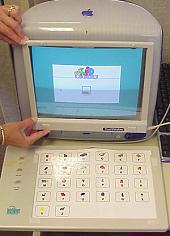
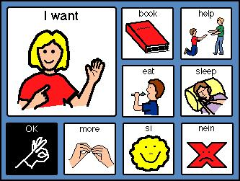
This article targets autism and autistic spectrum disorders. This site would be perfect for teachers who are teaching children with autism. The site offers several pieces of software (to address all of the students needs) and hardware such as digital cameras, scanners, etc. that can be helpful for autistic students. They identify two types of commonly used assistive technologies. The first augmentative communication devices which help store, create, and voice messages and the second touch screens which provide students to interact directly with the monitor. Classroom management issues are also discussed to help teachers understand what could happen and how to prevent situations. The last item given is a bunch of case studies of children with autism who have used assistive technologies to help in the classroom.
http://www.ncte.ie/SpecialNeedsICT/ResourcesAdvice/AdviceSheets/AutismAutisticSpectrumDisorders/
6. Family
Guide to
Assistive
Technology 
This is a site published by PLUK, Parents, Let’s Unite for Kids. The article starts by talking about what assistive technology is and gives a formal definition. Next the difference between accommodation and adaptation are discussed. Several examples of assistive technology are given for parents to use. They stress that computers are not the only forms of assistive technology. Questions are answered that parents might have such as When is using assistive technology appropriate? and Isn’t assistive technology just a crutch? These questions and several others are answered. Hints for parents are given as to when assistive technology is needed. Last, case studies are given and possible solution as to how to use assistive technology. Great site for parents and families!
7. CompuThera
– Seven
Steps to
This is a program that is an alternative way to teach reading and language. The program is aimed for visual learners which is perfect for autistic children. The program is interactive software that works on your computer. It targets both receptive and cognitive skills. Research suggests that children who use the program or more attentative and motivated to learn. This would be a great program for parents to have at home or for a school with students with autism. The program is a little expensive, costing about $130. It’s not bad compared to other products out there.
http://www.computhera.com/index.html
This site
was designed by the
http://letsplay.buffalo.edu/index.html