SHM_demo_sincos.mws
Simple Harmonic Motion
An animated demonstration
G. Fleischer for MAT-NYA (Calculus I), A2005
Instructions
To run this demonstration in Maple (9.5 or 10):
1. Go to the Edit menu and select Execute|Worksheet. This will expand both sections below.
2. Collapse Section 1 (entitled "Code for Harmonic Motion Demo Program"), by clicking on the minus sign [-], to unclutter the screen.
3. At this point only Section 2 should be open (expanded). If necessary scroll down to the animation graphic. Click on the graphic once, then
run the animation with the DVD-like buttons on the top menu bar.
4. The graph preceding the animation is a static image of the curve
y = x(t).
5. Experiment with your choices of the parameters
a, b,
 as described in Section 2. below.
6.
Enjoy!
1. Code for Harmonic Motion Demo Program
- Available upon request. It is part of the Maple worksheet.
2. Demonstration of Harmonic Motion
 =
=

The "arguments" in the first red line below correspond to the parameters
a, b,
 .
.
a
=
initial position
of the object.
b
=
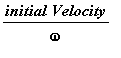 .
.
Experiment with various values of
a, b,
 , including negative or zero values of
a,b
(Not both zero!)
, including negative or zero values of
a,b
(Not both zero!)
Keep
 < 6 for best graphic effect.
To run your demonstrations, simply overtype the three numbers with values of your choice, separated by commas.
| > |
show_curve(arguments); HarMotion(arguments);
|
The first graph shows how the acceleration (
thin
red
curve) is opposite and proportional to the position (displacement) of the moving object
(
thick
red
curve)
 =
=

The second, animated graph simulates the motion of the object on the x-axis.
A small blue box on the y-axis describes the complementary harmonic motion.
Their composite motion is shown by the little red circle on the blue circular path.
![[Maple Plot]](images/SHM_demo_sincos10.gif)
![[Maple Plot]](images/SHM_demo_sincos11.gif)