
The Telnet Protocol
What is TELNET ?
Telnet, which stands for Telecommunications Network, is a protocol that provides a way for users (or clients) to connect to multiuser computers (or servers) on the Internet, whether in the next building or across the other side of the world. In most cases, users use Telnet to communicate with a remote login service.
Telnet is based on three main principles:
The concept of the Network Virtual Terminal (NVT).
Telnet over TCP/IP
On the Internet, the ability to connect with another machine is made possible by the Transmission Control Protocol (TCP), which enables two machines to transmit data back and forth in a manner coherent to the operating systems of each device, and the Internet Protocol (IP), which provides a unique, 32-bit address for each machine connected to the network. The telecommunications application built over these capabilities provides the local terminal with the means to emulate a terminal compatible with the remote computer.
Connection Establishment :
The Telnet TCP connection is established between the user’s port U and the server’s port L. The server listens on it’s well-known port L for such connections. Since a TCP connection is full-duplex and indentified by the pair of ports, the server can engage in many simultaneous connections involving it’s port L and different user ports U. Port Assignment - When used for remote user access to service hosts, this protocol is assigned server port 23, that is L = 23.
You can read more about the TCP / IP protocol suite at Computer_and_Internet:Protocols:TCP/IP
The telnet protocol gives you the ability to connect to a machine, by giving commands and instructions interactively to that machine, thus creating an interactive connection. In such a case, the local system becomes transparent to the user, who gets the feeling that he is connected directly to the remote computer. The commands typed by the user are transmitted directly to the remote machine and the response from the remote machine is displayed on the user’s monitor screen. An interactive connection is also know as remote login.
In order to remote login the user’s computer must have the ability to
establish a connection to another machine,
emulate a terminal compatible with the remote machine,
regulate the flow of data from the user’s terminal to remote machine, and vice versa.
How application programs implement a TELNET client and server
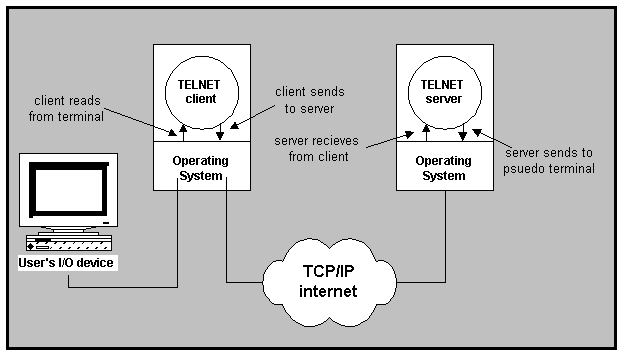
The figure below describes the path of data in a Telnet remote terminal session as it travels from the user's keyboard to the remote operating system. Adding a Telnet server to a timesharing system usually requires modifying the operating system.
The Network Virtual Terminal is a device used by Telnet to enable a local computer to communicate with a remote machine.To make Telnet interoperate between as many systems as possible, it must accommodate the details of heterogeneous computers aand operating systems. To accommodate heterogeneity, Telnet defines how data and command sequences are sent across the Internet. The definition is known as the Network Virtual Terminal (NVT). The NVT defines how data and commands are sent across the internet. The NVT is a bi-directional character device that has a printer and a keyboard. The printer responds to incoming data and the keyboard produces outgoing data which is sent over the Telnet connection. The NVT is viewed as a half-duplex device.
The Network Virtual Terminal implements a client-server architecture. A Telnet client transfers characters between the user’s terminal and a remote service. On one side, it uses the local operating system functions when it interacts with the user’s terminal. On the other side, it uses a TCP connection when it communicates with the remote service.
Use of the Network Virtual Terminal (NVT) format by TELNET
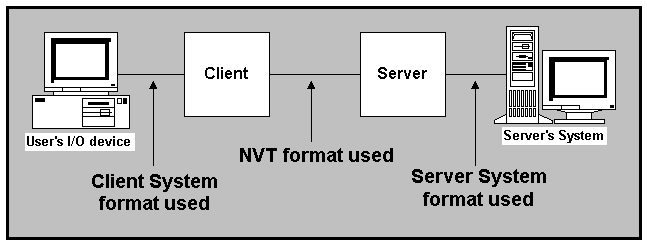
The Telnet protocol defines the character set for the virtual terminal. Several of the keys correspond to conceptual operations instead of data values. For example, one key causes an Interrupt or Abort.
The definition of NVT format is fairly straightforward. All communication involves 8-bit bytes. At startup, NVT uses the standard 7-bit USASCII representation for data and reserves bytes with the high order bit set for command sequences. The USASCII character set includes 95 characters that have "printable" graphics (letters, digits and punctuation marks) as well as 33 "control" codes. All printable characters are assigned the same meaning as in the standard USASCII character set. The NVT standard defines interpretations for control characters as shown in the table below.
|
ASCII Control Code |
Decimal Value |
Assigned Meaning |
|
NUL |
0 |
No operation (has no effect on output) |
|
BEL |
7 |
Sound audible/visible signal (no motion) |
|
BS |
8 |
Move left one character position |
|
HT |
9 |
Move right to the next horizontal tab stop |
|
LF |
10 |
Move down (vertically) to the next line |
|
VT |
11 |
Move down to the next vertical tab stop |
|
FF |
12 |
Move to the top of the next page |
|
CR |
13 |
Move to the left margin on the current line |
|
other control |
-- |
No operation (has no effect on output) |
To provide a full-duplex connection between the user’s terminal and a remote service, a Telnet client performs two tasks simultaneously :
The client must read characters that the user types on the keyboard and send them across a TCP connection to the remote service.
The client must read characters that arrive from the TCP connection and display them on the user’s terminal screen.
Because the remote service can emit output at any time or the user can type at any time, a client cannot know which source of data will become available first. Thus, it cannot block indefinitely waiting for input from one of the two sources without also checking for input from the other. In short, the client must transfer data in both directions concurrently.
The cheif advantage of using a Network Vitrual Terminal is that it permits clients from a variety of computers to connect to a service.
All Telnet commands consist of at least a two byte sequence: the "Interpret as Command" (IAC) escape character followed by the code for the command. The commands dealing with option negotiation are three byte sequences, the third byte being the code for the option referenced (see RFC 855). This format was chosen so that as more comprehensive use of the "data space" is made -- by negotiations from the basic NVT, of course -- collisions of data bytes with reserved command values will be minimized, all such collisions requiring the inconvenience, and inefficiency, of "escaping" the data bytes into the stream. With the current set-up, only the IAC need be doubled to be sent as data, and the other 255 codes may be passed transparently.
The following are the defined Telnet commands. Note that these codes and code sequences have the indicated meaning only when immediately preceded by an IAC.
|
NAME |
CODE |
MEANING |
| SE | 240 | End of subnegotiation parameters. |
| NOP | 241 | No operation |
| Data Mark | 242 | The data stream portion of a Synch.
This should always be accompanied by a TCP Urgent notification |
| Break | 243 | NVT character BRK |
| Interrupt Process | 244 | The function IP |
| Abort output | 245 | The function AO |
| Are You There | 246 | The function AYT |
| Erase character | 247 | The function EC. |
| Erase Line | 248 | The function EL. |
| Go ahead | 249 | The GA signal |
| SB | 250 | Indicates that what follows is subnegotiation of the indicated option. |
| WILL (option code) | 251 | Indicates the desire to begin performing, or confirmation that
you are now performing, the indicated option. |
| WON'T (option code) | 252 | Indicates the refusal to perform, or continue performing, the indicated option. |
| DO (option code) | 253 | Indicates the request that the other party perform, or confirmation
that you are expecting the other party to perform, the indicated option. |
| DON'T (option code) | 254 | Indicates the demand that the other party stop performing, or
confirmation
that you are no longer expecting the other party to perform, the indicated option. |
| IAC | 255 | Data Byte 255 |
The syntax of the Telnet commands :
Basic commands use two byte sequence :
< IAC > < COMMAND >
IAC = Interpret As Command
value = 255
To transmit the data “255” use the sequence :
< IAC > < IAC >
Negotiations use three byte sequence :
< IAC > < COMMAND > <OPTION >
A Brief Summary :
The main objectives of the Network Virtual Terminal - NVT :
Enable Telnet to interoperate between heterogenous systems.
Defines how data and commands are sent across the internet.
Client and server translate data and command from operating system format to NVT format, and vice versa.
All communications involves 8-bit bytes.
In the beginning NVT uses 7-bit ASCII format for data and reserves the high bit set for commands.
The option negotiation machanism allows the user to set terminal parameters to values other than the default or to negotiate more sophisticated facilities. The Telnet protocol negotiation mechanism can be initiated by either side. Besides negotiating whether or not a particular option is to be in effect, the mechanism also allows one to specify, when appropriate, which side is to perform the function. For example, a user may negotiate the Echo option and specify whether echoing is to be done locally or remotely to the initiator of the negotiation.
Four commands support option negotiation ( DO, DON’T, WILL and WON’T).
WILL <option_name> - is sent by either party to indicate that party’s willingness to begin performing the option.
DO <option_name> and DON’T <option_name> - are the positive and negative acknowledgments. DO<option_name> is sent to request that the other party begin performing the option.
WILL <option_name> and WON’T <option_name> - are the positive and negative acknowledgments.
For example, suppose the terminal wanted to use binary transmission. It would send a DO Binary Transmission to the remote host. The host could then respond with either a WILL Binary Transmission (a positive acknowledgment) or a WON’T Binaary Transmission (a negative acknowledgment). If the terminal does not want it’s characters echoed across the Telnet connection, it would send WON’T Echo; If the remote host agrees that no characters will be echoed, it would return DON’T Echo.
will - offers to use the option do - Requests that other side start the option
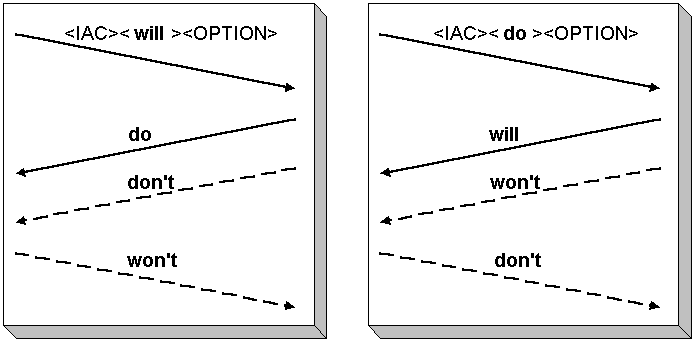
The third concept of Telnet is one of symmetry in the negotiation syntax. This symmetry allows either the client or server ends of the connection to request a particular option as required, thus optimizing the service provided by the other party. A terminal protocol should not only allow a terminal to interact with an application process on a host, but it should also allow process-process and terminal-terminal interactions. Although a majority of the connections established will be of the process-terminal form, the symmetrical forms can be very useful.
In order to initiate a Telnet session, you need to
know the address of the remote host computer.
The syntax for using Telnet
is :
telnet < address of remote host >
For example: telnet libra.math.tau.ac.il - This will initiate an interactive session with the libra server at the School of Exact Science at the Tel-Aviv University.
Every Telnet site has two addresses - one composed of words that are easier for people to remember ; The other numerical address better suited for computers.
Many remote hosts require you to have an acount to login (you must have a user-id and a password). However, there are some remote hosts that do not require users to have an acount. Users can login with the general user-id and password are usually not required (it is inserted automatically).
To see a user - friendly way to Telnet see Telnet Tutorial by Trumpet
Troubleshooting
Nothing happens when you try to connect to a Telnet site - The site could be down for maintenance or problems .
You get a "host unavailable" message - The Telnet site is down for some reason. Try again later.
You get a "how unknown" message - Check your spelling of the site name.
You type in a password on a Telnet site that requires one, and you get a "login incorrect" message - Try logging in again. If you get the message again hit your control and ' ] ' keys ( ^] ) at the same time to disengage and return to your host system.
You can't seem to disconnect from a Telnet site - Use ^] to disengage and return to your host system.
You end up with a screen full of gibberish - Chances are you have chosen an incorrect terminal emulation setting. Disconnect and try again.
REFERENCES TO TELNET SITES
Telnet Protocol Specification - RFC 854
Big Dummy's Guide to the Internet - Telnet
Introduction to Internet - Telnet
Where to Find a Telnet Application
* The Ultimate Telnet directory, search offline - update online *
Computer Networks and Internet / Douglas E. Comer
Internetworking With TCP/IP, Volume I / Douglas E. Comer
Protocols and Techniques For Data Communication Networks / Franklin F. Kuo, Editor
Troubleshooting TCP/IP, Second Edition / Mark A. Miller, P.E.
Telnet Protocol Specifications - RFC 854
This Telnet Homepage was build by four students of the School of Exact Science / Tel-Aviv University as the final
project in the course
' Protocols and Computer
Networks ' by Dr. Debby Koren from RAD .
For any questions / comments about this project , email :
Lilach Barazovich - [email protected]
Tal Lapid - [email protected]
Shira Zang - [email protected]
Hagit Ziv - [email protected]
THE END !!!