
When we go from 00:57:270 to 00:57:273 you will notice nothing happened on the screen in this step forward. As you go another step forward you will see something is missing. The top of the letter E never showed up. Our 3rd kind of mistake. Let's have a look at it and see what is wrong. Going back to 00:57:270 with F7 the back key, open up the edit window with F2.
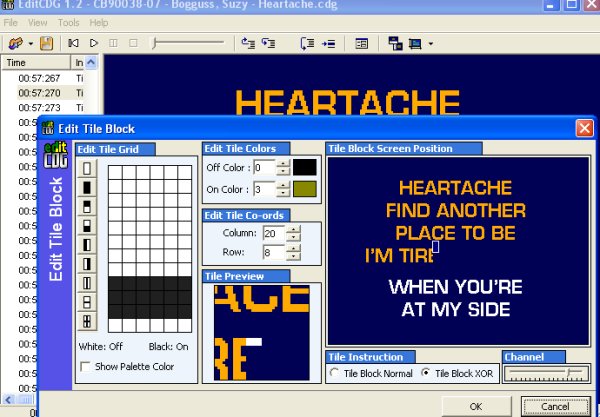
With these to things corrected, we can hit OK and this 3rd type of mistake is now corrected. All with me so far? Been fairly easy hasnt it now. On we continue, F8 to go forward some more and look for more mistakes.
At 01:13:220 you will notice that part of the M and I are missing. If you scroll slowing back and forth using F7 and F8 you will notice that each press of the key does something on the screen, yet there is something missing. This tells me that there is a Time Frame command missing. This you will learn from practice, by going slowly back and forth in this area you will see what i mean. There is NOT a time frame that does nothing.
So how do we fix this. Quite easy actually and this is our 4th type of mistake to correct, a missing Time frame. If you look at the times in this area, you will see it goes from 01:13:210 to 01:13:217. I will mention now, that these time frames always go in the same increments ... 210.. 213.. 217.. 220... 223.. 227.. 230 ... 233.. 237 .. u get the picture i'm sure... so we see one is missing... there is no 213 when we look in the Time Column.
We need to go to the top of the Edit CDG program and while sitting on the step b4 this mistake on 01:13:210 in this case and hit the TOOLS button on the top. Next we hit the RECOVER from the drop down menu. You will see a window pop open and if you scroll down just slightly in that window you will notice the Time Frame for 01:12:210 is not hightlighted like the rest of them are. To fix this, simply click on that Time Frame and hit OK to close the window. I will show you a picture of this on the next page. This will correct the missing Time frame and the mistake in this CDG. Remember... save your work as you go.


