
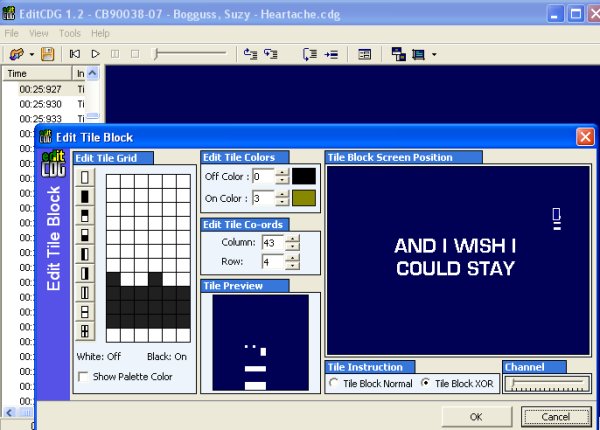
At 00:26:307 you will find a similar mistake in this file. When the S is being removed dots remain that shouldnt be there. Again hit your F7 key to back up one time frame and then hit F2 to correct this mistake just like in the other 2 examples. Watch your Tile Preview screen as you do this. One of the dots need to be turned off, while the other dot needs to be turned on but it is done just like before. Hit OK and lets continue with F8 and find the next mistake.
AT 00:26:870 you find the next one. The M has an extra dot on it and if you look at it, you will see that a few dots are missing from the M also, at the top of the first inverted V part of it... if you follow what i'm saying lol... missing dots are always caught later, so if you miss it, you can always go back and correct it. When the cdg colours over the part where a missing dot is, you will notice the colour is not the same, so you know you have to go back and fix that spot. So again, use your F7 key and lets go back one step and fix this M. The dot on the far left needs to be removed and from experience I can tell you that the missing 2 dots are in the same row at that one was, on the far right you need to click on the 2 empty squares and fill them in and this will fix our letter M. Again watch your Tile Preview while u do this. Hit OK, and lets proceed using F8 and watch for the next error.
At 00:37:663 you will see that when the letter E colours in white there is an extra dot underneath it. Again hit F7 go back one time frame and hit F2 to go to edit and remove this dot watching the Tile Preview as you do it. Hit OK, and on we go with F8 looking for the next mistake.
Ahhh, here we go a new type of mistake is found at 00:56:757. When hitting ur F8 key and moving along, its important to watch all of your screen. Sometimes bits of the CDG will appear in places they shouldnt be. After you do a few you will get the hang of what to look for. In this particular mistake you will see that part of letters appear down near the bottom right side that shouldnt be there. So we need to fix this.
Again we hit F7 to go back one step and we all should be at 00:56:753 now. Hit F2 and lets have a look at this mistake and see whats happened to it. You will notice and i havent mentioned this before, in the Tile Block Postion Screen, there is a little box that appears over the letter we are currently looking at. In this mistake, you will notice the little box there is down at the bottom and not up where it belongs on the upper part of the S which is being removed. You will see what I mean in the pictures on the next page.
This is your 2nd type of mistake, the little box is moved out of place and needs to be moved back by clicking where it belongs in that Tile Block Position Screen window. I look at editing these as a huge jigsaw puzzle, the pieces are mixed up, all we need to do is put them in order again. And yes, i'm babbliing, getting near the end of the page and need to add a picture to show you this type of mistake so just taking up space with my chatttering. lol


