|
So you want to learn to edit cdgs. It is really not all that complicated, there are actually very few things that can be wrong with them. Once you learn to recognize what is wrong with the bad bad spots it gets easier and easier. Of course there is always those cdgs that are so badly destroyed they make you want to pull your hair out before you are done editing them, but we'll save fixing those for another time. This will cover the basics, what to look for in cdgs to tell you what type of error it is, and what you need to do to fix them.
To start with, you will need to download the file in winmx in our karaoke room which Clasz put together. I will work with the cdg in that file here. The file also includes the edit cdg program. I will attempt to go through this step by step with pictures to help you along the way. The file name is (Edit CDG training.zip and it can be found in my shares, in Leo's and in Clasz shares. After you have installed the Edit CDG program, unzip the Karaoke song in it to a directory where u can find it.
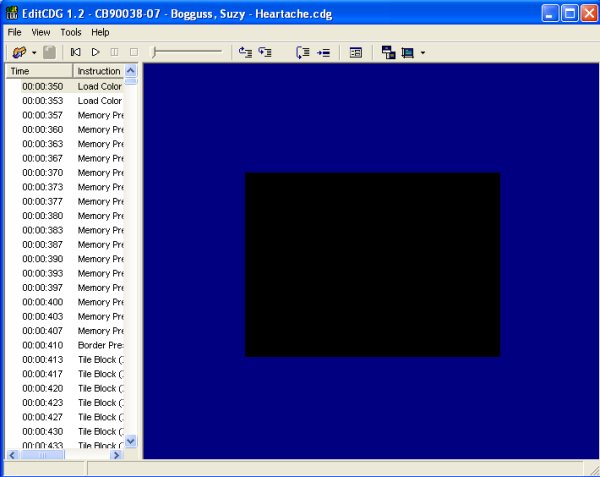
Open the Edit CDG program, and then go to file OPEN CDG. Find where you unzipped the Karaoke song in the training package and open it. |
|
|
At the top of the screen in Edit CDG you will notice that the song title you are editing appears there. On the left hand side , you can see Time and Instructions, you may have to pull the scroll bar over to see both of these. Lets talk about these two things for a moment. The time column shows you exactly the time in the song as it plays along. This is useful if you have a cdg with only a few mistakes in it, you can play the song in winamp and note the approximate time where the mistakes begins and by scrolling down in the time Column you can start there in your edit. The Instrustions Column, holds the commands that are used in the cdgs itself. You will see it first has Load Colour, Memory Presets, Border Presets and then Tile Block. It is the Tile Block we will mainly work with when we edit cdgs, although at times we might see a Load Colour thrown in and you will see the colour change where you dont want it too, but i will get into that later on.
First I will discuss the keys you will need to familarize yourself with when using this program. The ones used most frequently are the F9 key, which will take you to the time frame you have selected in the Time Column. By scrolling down and hitting any time frame, hitting F9 will take you there in the cdg itself. The F8 key, is your forward key, it steps you forward one time frame at a time. The F7 key steps you back one time frame at a time. The F2 key, is your edit key where you actually fix the mistakes in. The most important thing to remember in this program is that you have to be in the time frame before the mistake in order to correct it, so the F8 and F7 keys are very important. |
|